The first time I realized AI tools had a serious limitation, I was working with a client on their content strategy. I kept hitting the same wall: the AI agent (ChatGPT 3.5 at the time) couldn’t see their Google Drive files, couldn’t pull from their CRM, couldn’t check what was trending that morning. It was decent at writing, completely useless at looking. It’s like hiring a genius consultant and locking them in a room with no internet, no phone, and three-year-old notes.
MCP was built to fix that.
Model Context Protocol is the technology that lets AI tools break out of that isolated box and connect with the real world. Introduced by Anthropic in November 2024, it’s quickly becoming the universal standard for how AI LLMs communicate with external data, tools, and systems. OpenAI, Google DeepMind, and a growing list of developers have already adopted it.
I’ll break down what it means and how you should incorporate it into your AI LLM setup for your business. Trust me, you should have started this yesterday but it’s all good, the setup is super easy.
What Is MCP?
MCP stands for “Model Context Protocol”. If you’ve been searching for a simple MCP AI definition or wondering what MCP AI looks like in practice, here it is in plain human English: it’s an open-source standard, a shared rulebook, that defines how AI models talk to external systems.
If you’re familiar with APIs at all, this essentially connects AI LLMs like ChatGPT and Claude to the API but it grants particular permissions to the AI agent that accesses the tools.
The best analogy is USB-C. Before USB-C, every device had its own connector: phones, tablets, laptops, all different. USB-C created one universal standard that works across all of them. MCP does the same thing for AI. Instead of every AI tool needing a custom, one-off connection to every data source or app, MCP provides one universal language that everything can speak.
Through MCP, an AI can connect to three main categories:
- Data sources: files, databases, Google Drive, internal company wikis
- Tools: search engines, calculators, code execution environments, APIs
- Workflows: specialized prompts, templates, and automated sequences that guide the AI through complex tasks
MCP is the bridge between what AI knows from its training and what’s actually happening in your business right now.
The Problem MCP Solves
Large language models (AI LLMs) like Claude, ChatGPT, or Gemini are trained on a massive snapshot of information, and then that training stops. Without a live connection, they don’t know what’s in your company’s Slack, can’t see the spreadsheet you updated this morning, and can’t tell you what’s trending today.
This created what engineers call the NxM problem. If you have 10 AI tools and 10 data sources, you’d need 100 separate custom integrations (one for every combination). That’s an enormous amount of engineering work, and it scales about as well as you’d expect (it doesn’t). Every time something changes, the whole system is at risk.
The business cost is real, too. AI that can’t access current data gives outdated or hallucinated answers, which erodes trust fast.
MCP collapses that mess into a single standard. Build one MCP-compatible connector and your AI can work with any MCP-compatible tool or data source. One universal remote instead of a drawer full of 14 that all work slightly differently.
How MCP Works
How does MCP actually work? The architecture has just three components, and none of them require an engineering degree to understand.
1: The MCP Host
This is the application where the AI lives, the thing you actually open and type into. Claude Desktop is a popular example: it’s Anthropic’s desktop app that supports MCP natively, letting you connect Claude to local files, databases, and external services right out of the box. ChatGPT’s interface and AI-powered coding tools like Cursor also function as MCP hosts.
2: The MCP Client
This is the translator built inside the host. It manages communication between the AI and the outside world, working entirely behind the scenes.
3: The MCP Server
This is the external service that makes data and capabilities available to the AI. Asana has one. So do Google Drive, Gmail, Slack, GitHub, and calendar apps. Any tool that builds an MCP server becomes instantly accessible to any MCP-compatible AI host, no custom integration required.
MCP servers expose three types of things to the AI:
- Resources: data the AI can read, like files, database records, or documents
- Tools: actions the AI can take, like running a search, submitting a form, or calling an API
- Prompts: pre-built templates that guide the AI through specific tasks within that service
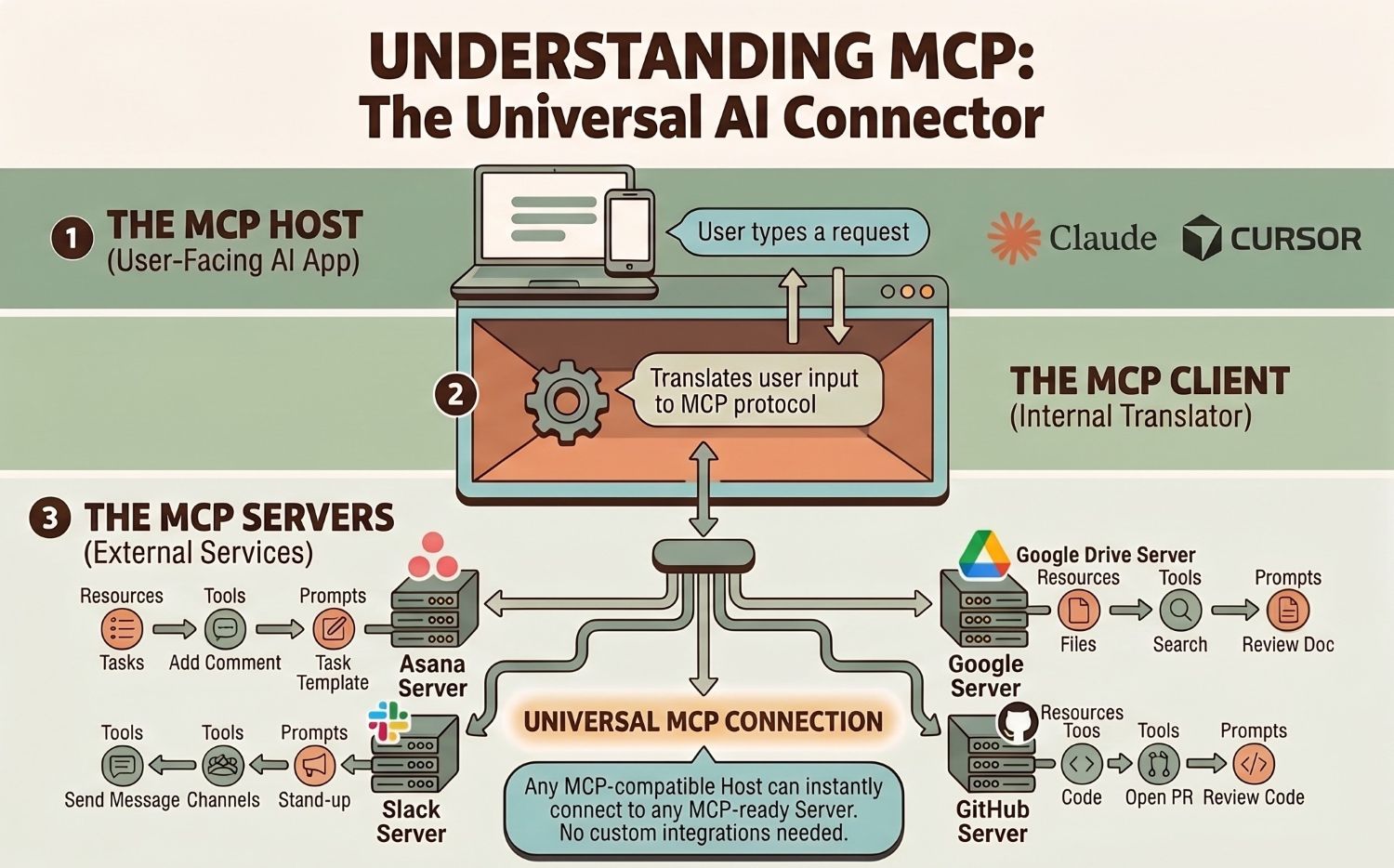
That three-part structure is what makes MCP servers so composable. A single host like Claude Desktop can connect to dozens of MCP servers simultaneously, mixing and matching resources, tools, and prompts across your entire stack.
Picture it this way: the Host is your office, the Client is your assistant, and the MCP servers are specialists in different departments. Need a file from legal? Your assistant goes to legal. Need data from finance? Finance. You never have to move, and your assistant already speaks everyone’s language.
The AI makes a request, the client routes it to the right server, the server returns what’s needed, and the result is back in your hands, often in seconds.
What Are MCP Servers, Exactly?
Since “MCP server” is the term you’ll encounter most often in the wild, it’s worth spending an extra minute on it. (It sounds more intimidating than it is, which is a proud tradition in tech naming.)
An MCP server is any service that’s been built to speak the MCP protocol. Think of it as a plugin that a tool publishes to make itself AI-accessible. When a company like Notion or Stripe builds an MCP server, they’re essentially saying: any AI that understands MCP can now talk to us.
The MCP server ecosystem is already substantial. There are MCP servers for development tools (GitHub, GitLab), productivity apps (Google Drive, Notion, Asana), databases (Postgres, SQLite), communication platforms (Slack, Gmail), and a growing list of SaaS products. Anthropic maintains a public registry, and the open-source community is building new MCP servers constantly.
For businesses, this means the question isn’t “can AI connect to our tools?”, increasingly, the answer is yes. The real question is which connections will actually move the needle for your team.
MCP vs. Other Approaches
If you’ve been following AI for a while, you might be wondering how MCP fits with things you’ve already heard of.
MCP vs. ChatGPT Plugins: Plugins were platform-locked. They only worked inside ChatGPT. MCP works across any AI tool that adopts the standard, which is a growing list.
MCP vs. Function Calling: Function calling lets AI trigger specific actions in code. MCP standardizes that capability so every developer works from the same framework, making integrations interoperable and reusable across tools.
MCP vs. Traditional APIs: APIs are powerful but rigid, they require specific technical knowledge to build and maintain. MCP is more dynamic, letting AI discover available tools and data at runtime rather than requiring everything hardcoded in advance.
MCP and OpenAI: OpenAI adopted MCP in early 2025, adding support across their platform and SDKs. That was a significant moment as it confirmed MCP as the cross-industry standard rather than an Anthropic-specific protocol. When OpenAI and Anthropic agree on something, the rest of the industry tends to follow.
MCP doesn’t compete with these approaches; rather, it organizes them under a common roof.
Real-World Use Cases
Once AI has real-world connections, a lot changes. Here are some of the coolest things you can do with MCP:
Personal AI Assistants That Actually Know Your Schedule
Ask your AI to prep you for tomorrow. With MCP connecting to Google Calendar, Notion, and your email, it pulls your actual schedule, summarizes relevant notes, and flags what needs attention, without you copying and pasting anything.
Code Generation From Design Files
Developers are connecting AI tools directly to Figma through MCP. The AI reads the design specs and generates production-ready code. Work that used to take hours of manual translation now takes minutes.
Enterprise Chatbots With Real-Time Knowledge
An MCP-powered support chatbot can query your actual product database, inventory system, and CRM in real time. Customers get accurate, current answers. Your team fields fewer escalations.
Marketing Workflows on Autopilot
At bgood media, we’ve been integrating this directly into client workflows. AI tools connected through MCP pull live campaign performance data, draft creative briefs based on what’s actually working, and surface optimization opportunities. All of these workflows are grounded in real data, not guesswork (or worse, hallucinations).
If you want context on how AI is already reshaping what’s possible on the web, our piece on AI-generated websites is worth reading alongside this one.
Benefits of MCP for Businesses
If you’re evaluating whether MCP matters for your organization, here’s the practical breakdown:
Eliminates custom connector development. Every custom AI integration your team builds is technical debt. MCP-compatible connections are reusable and far easier to maintain.
Reduces hallucinations. AI grounded in real, current data gives more accurate answers. That’s better for your clients and for your brand’s credibility.
Enables MCP AI agents. An MCP AI agent does more than answer questions; it takes multi-step actions across your tools on your behalf. It books the meeting, updates the CRM, pulls the report, and sends the summary. MCP agentic AI is what makes that kind of autonomous workflow possible, because the agent needs real connections to real systems to actually … do anything.
Scales across your stack. One standard works across multiple AI tools and data sources. As your tech stack evolves, your MCP integrations move with it.
Future-proofs your AI investments. With OpenAI, Google, Anthropic, and others aligned on MCP, this is the direction the industry is moving. Building on it now puts you ahead instead of scrambling to catch up.
Getting Started With MCP
You don’t have to build MCP from scratch. Anthropic released official SDKs in Python, TypeScript, C#, and Java. There’s also an MCP API layer that developers can build on directly, and the open-source community has already shipped pre-built servers for popular tools like Slack, GitHub, and Postgres.
For business leaders who aren’t developers, the real work is figuring out which data sources and tools would most change the game for your team, and then partnering with someone who can build or configure the right connections.
At bgood media, we’re not watching this shift from the sidelines. We’re building on it, actively integrating MCP into the marketing workflows we run for clients. If you’re curious what that looks like in practice, let’s talk.
Security Considerations
MCP was designed with security in mind. The protocol includes authentication specifications, and servers can enforce granular permissions so an AI only accesses what it’s explicitly allowed to see.
That said, a security analysis published in April 2025 highlighted that even with these protections, MCP misconfiguration can introduce vulnerabilities including prompt injection, privilege escalation, data exfiltration, and trust exploitation.
Pair that with emerging threats like AI poisoning and black hat GEO tactics, where bad actors inject misleading content into AI systems, and it’s clear that secure, well-governed AI integrations aren’t optional. MCP is only as secure as its configuration, and working with implementers who understand permissions and data governance is essential.
FAQs
What does MCP stand for?
MCP stands for Model Context Protocol. It’s an open-source standard created by Anthropic that defines how AI models connect and communicate with external data sources, tools, and systems.
Is MCP only for Claude?
No. Anthropic introduced MCP in November 2024, but the protocol is open-source and platform-agnostic. OpenAI, Google DeepMind, and a growing list of AI developers have adopted it across their tools.
Do I need to code to use MCP?
Building a new MCP server from scratch requires development work. But many pre-built MCP servers already exist for popular tools, and most businesses get started by working with a technical partner rather than building everything in-house.
Is MCP free to use?
Yes. MCP is an open-source protocol, freely available to use, build on, or contribute to. Specific MCP-enabled products or services may have their own pricing, but the protocol itself has no licensing fee.
What’s the difference between MCP and RAG?
RAG (Retrieval-Augmented Generation) is a technique where AI retrieves relevant information from a knowledge base before generating a response. MCP is the protocol that standardizes how AI connects to external systems, including the ones that power RAG. They work together: RAG is the strategy, MCP is the infrastructure underneath it.
MCP Is Changing Everything For Businesses Using AI
For years, the limiting factor in AI wasn’t intelligence. It was isolation. Models were trained on vast data and then sealed off from the world.
MCP changes that.
By standardizing how AI connects to data, tools, and workflows, MCP turns AI from a text generator into something that can actually operate inside your business, with your information, in real time. That’s not a small upgrade. The companies building on this now will have a structural advantage over the ones still treating AI as a fancy search box.
If you’re leading marketing, operations, or digital strategy, you should already be building your MCP infrastructure. And infrastructure decisions made now tend to compound, in both directions.
At bgood media, we help clients get on the right side of that line. We’re not here to explain AI from a distance, we’re in it, building with it, and making it work for real businesses. Whether you’re just getting oriented or ready to build MCP-powered workflows, we’re the team to call.
Ready to put AI to work in your business? Get in touch with us.