How to Get Your eCommerce Site Ranked in AI LLMs

For years, ecommerce SEO was all about getting your products to rank on Google, seeing them appear in the blue links next to sponsored listings (SERPs).

Now, more shoppers are asking ChatGPT, Gemini, and other AI LLMs what they should buy instead. If your product isn’t part of that answer, you don’t just lose the sale: you’re probably not even considered in the first place.  

We’ve spent the last few months reviewing hundreds of ecommerce sites and product pages to figure out how this actually works in the real world. Some people call this discipline generative engine optimization, or GEO. We call it AI Search and Agentic Commerce.

This is what we’ve found.

First, here’s a simplified look at the signals AI shopping platforms pull together before recommending a product.

Quick Highlights

No need to read the whole thing. AI is now part of the buying decision (even at times the default search experience), and this is what actually moves the needle.

  • Shopping has moved into the chat window. Buyers are asking ChatGPT, Gemini, and Copilot what to buy instead of searching for it. Adobe Analytics found shoppers referred by generative AI spend 41% more per visit than traditional channels.
  • Agentic commerce is the real shift. A chatbot that suggests products is conversational commerce. An AI that researches, compares, builds the cart, and completes the purchase is agentic commerce. Google, Shopify, and OpenAI are all building toward agentic.
  • UCP gives Shopify stores a head start. The Universal Commerce Protocol launched at the start of 2026 with 30+ companies behind it. Eligible Shopify stores are enabled by default and already syndicate to ChatGPT, Copilot, and Shop (Shop Pay). BigCommerce and WooCommerce can implement it too, as it’s an open standard, but it usually takes a developer.
  • A seat at the table isn’t a guarantee of a recommendation. You can influence what information AI systems see. You can’t control what they ultimately recommend.
  • Brand mentions now carry the weight backlinks used to. AI shopping tools pull reviews, specs, and pricing from retailer pages, review sites, and forums, and then reconcile all of it against what you say about yourself. Accurate info on your site plus messy info everywhere else is a losing combination.
  • Don’t manufacture those mentions. Reddit is catching roughly 25,000 brand-planted posts and comments a day and building detection aimed specifically at this. Earn the coverage instead.
  • Write PDPs with specifics, not adjectives. “Premium comfort” tells an AI nothing. “Merino wool blend, true to size, machine washable, rated to 20°F” gives it something to cite. A controlled study across 252,000 trials and six AI models found citations track topical relevance, list position, explicit pricing, content freshness, and completeness.
  • Your Shopify store already has an agents.md file, and it’s generic. Since May 2026 Shopify auto-generates one at yourstore.com/agents.md. The default is checkout and API boilerplate that reads identically to every other store’s. Customize it through your theme’s Liquid files or write one manually if you’re off Shopify.
  • There’s no proof yet that agents.md improves visibility. The feature is too new for credible before-and-after studies. Treat it as infrastructure worth getting right early, not a ranking hack. And keep it honest, since guardrails are likely coming.
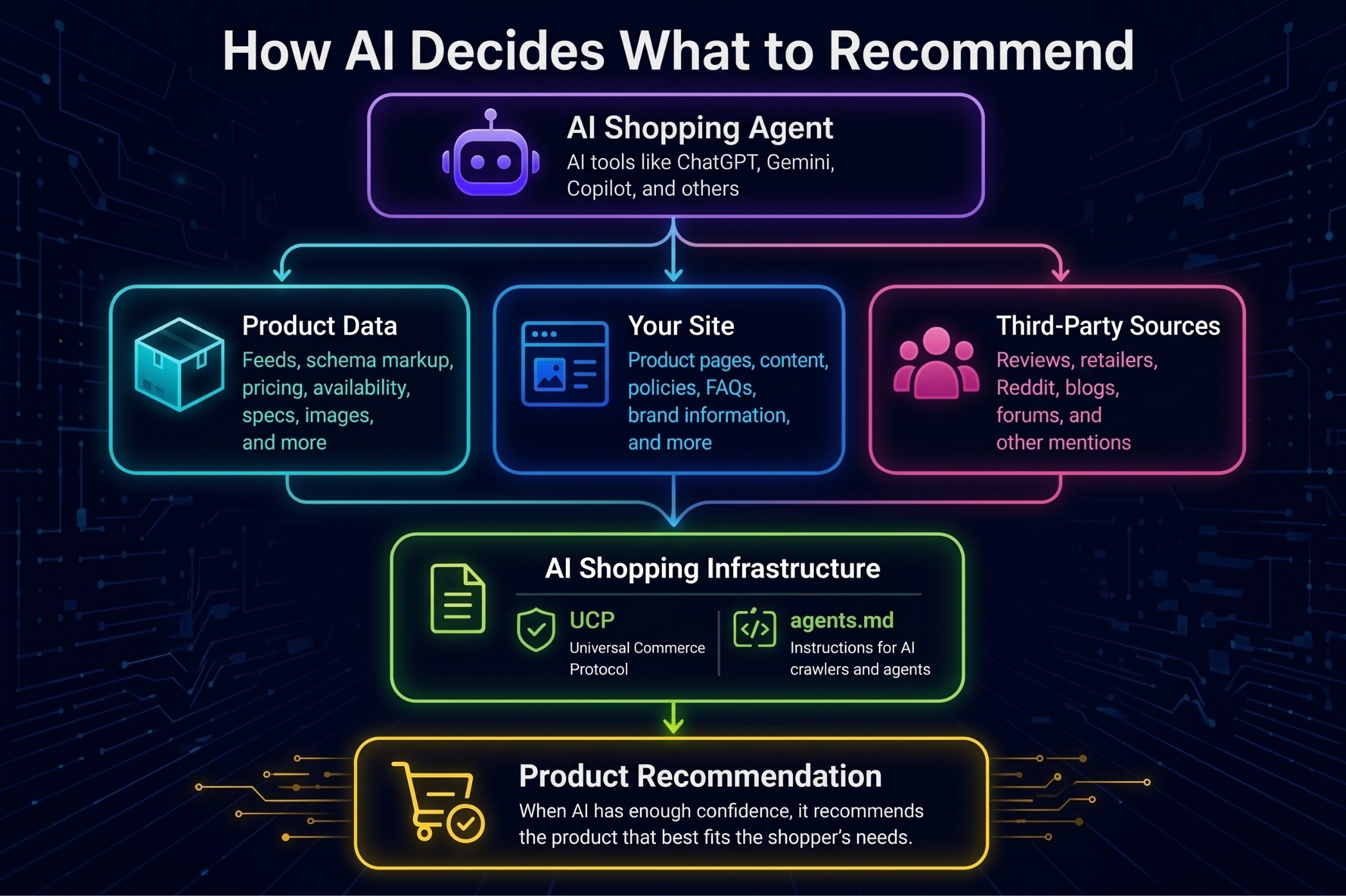
Graphic displaying how AI and LLMs determine their recommendations to users, including AI shopping agents, product data, website data, third-parties, and more.

What Is Agentic Commerce?

Agentic commerce is the term for AI systems that can browse, compare, and in some cases complete a purchase on a shopper’s behalf. Shopify draws a useful distinction: a chatbot that answers questions or suggests products is conversational commerce. An AI that researches, compares, and completes the purchase itself is agentic commerce. 

Google, Shopify, and OpenAI are all moving toward the same goal: AI that can do more than recommend products. These systems can already compare products, build shopping carts, and in some cases finish the purchase itself. That’s a very different role than simply answering a question, and it changes what ecommerce brands need to optimize for.

That’s the shift this whole piece is about: discovery and purchase decisions increasingly happening inside a chat window instead of a search results page.

The practical effect of all these changes is that your product page is no longer just talking to a human who happens to land on it. It’s also being read by a system deciding whether to recommend you at all.

If you’re wondering how AI systems actually access product catalogs, APIs, and other external data, that’s what the Model Context Protocol (MCP) was designed to help solve. We covered that in more detail in our guide to What Is Model Context Protocol?
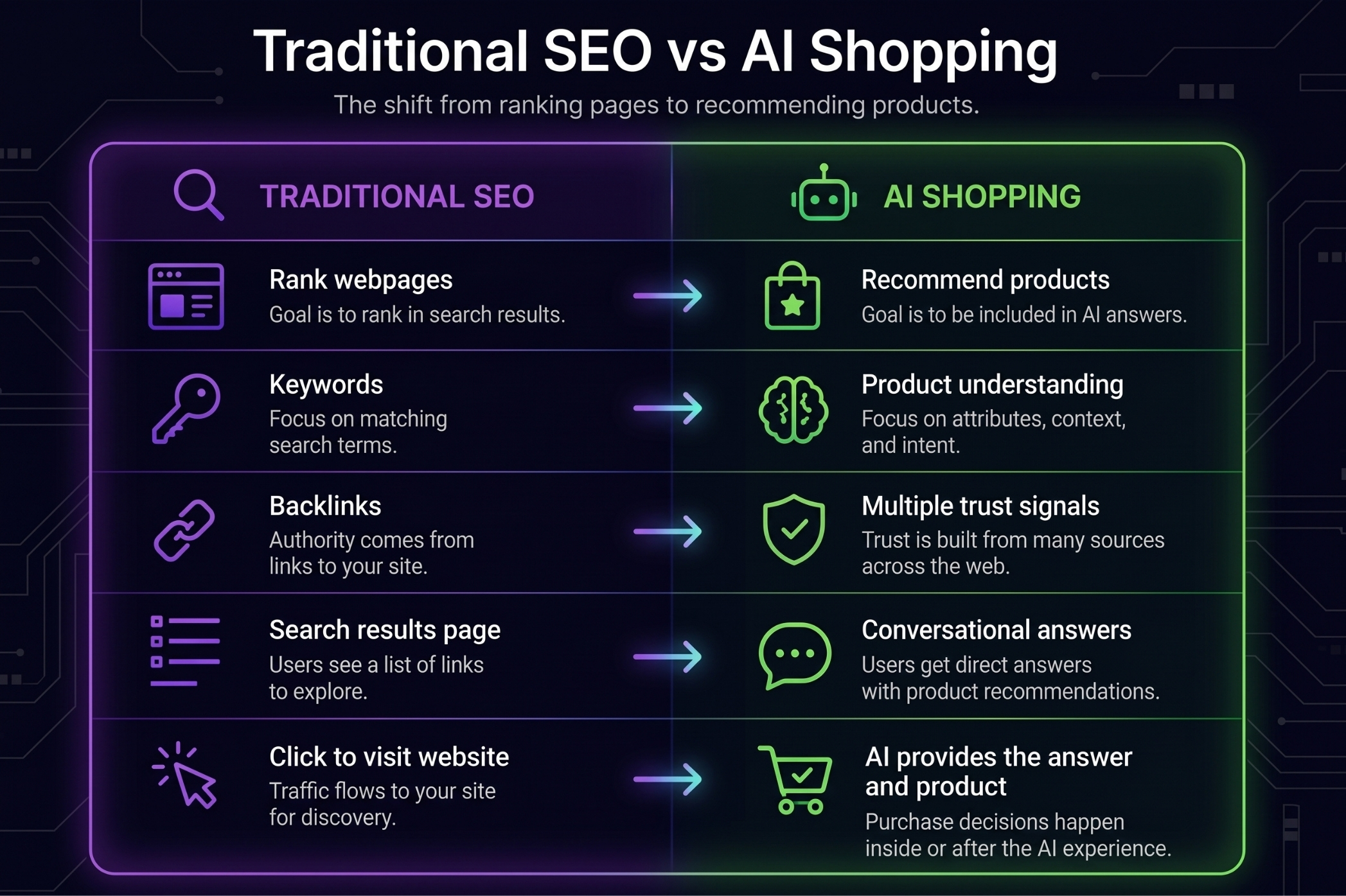
A guide highlighting all of the differences between traditional SEO and AI shopping

The Universal Commerce Protocol (UCP): Shopify’s Head Start

Shopify and Google built something called the Universal Commerce Protocol, or UCP, an open standard for how AI agents discover, evaluate, and transact with ecommerce platforms. It launched at the start of 2026 and now has more than 30 companies behind it, including some brands you’d recognize.

This is the piece that matters most for Shopify AI search visibility specifically. Eligible Shopify stores are UCP-enabled by default, and eligible products are already included in Shopify’s Catalog, which syndicates product information to ChatGPT, Copilot, Shop, and other AI surfaces. Merchants can influence what information is available, but they don’t control what an AI ultimately recommends. (Think of UCP as giving your products a seat at the table, not guaranteeing they’ll be chosen.)

If you’re not on Shopify, UCP is still an open standard, so BigCommerce and WooCommerce stores can use it too. BigCommerce’s parent company has publicly backed it, and there are already WooCommerce plugins built around it. In practice, though, getting it running usually takes a developer, since it’s not a default toggle the way it is on Shopify.

Build Brand and Product Mentions Everywhere

Most brands still aren’t thinking about brand mentions and AI search together, but that pairing is really the whole answer to how to get cited by AI in the first place. AI shopping tools do a lot more than read your website.

For example, ChatGPT’s Shopping Research explicitly pulls in reviews, specs, and pricing from other retail sources and trusted third-party sites, not just what you publish yourself.

This lines up with what we’ve seen in our own review of hundreds of product pages: brands with strong, accurate information sitting on their own site but messy or outdated information floating around elsewhere tend to underperform in AI answers compared to brands with a consistent story across the web.

If something inaccurate about your product is sitting on a retailer page, a review site, or a forum somewhere, that’s a source an AI system might reconcile against your own claims … and it might not resolve in your favor.

We wouldn’t go as far as claiming there’s a fixed sequence, like AI checks your site first, then retailers, then Reddit. Nobody’s published that as an official rule, and we haven’t seen evidence of one.

What we can say from our own testing is that AI systems tend to pull together first-party product information with third-party listings, reviews, and community discussion, and treat all of it as part of the same picture.

This is playing out publicly right now. Reuters reported this week that retailers including Walmart, Ulta Beauty, and Wayfair are actively updating their websites to rank better in chatbot results, even as they try to keep the actual transaction and customer data on their own platforms. Ulta Beauty is building shopping carts into Gemini because that’s where customers are already finding its products, while still preferring purchases happen on ulta.com. The stakes are real too: Adobe Analytics found that shoppers referred by generative AI tools spent 41% more per visit than those who arrived through traditional channels.

One caution before you go chasing every mention of your brand online: don’t try to manufacture this. Reddit in particular has become a magnet for brands seeding fake, AI-friendly posts designed to look like organic recommendations, and it’s not working out well for the brands doing it.

The Verge recently reported that Reddit’s own moderation systems are catching roughly 25,000 spammy, brand-planted posts and comments a day, and the platform is actively building detection specifically aimed at this kind of manufactured content. If you want to know more about why that approach backfires, we’ve written separately about AI poisoning and black hat GEO. The safer, more durable play is making sure what’s already being said about your brand is accurate, and earning genuine coverage and reviews rather than faking them.

Use Bullet Points on PDPs (Product Pages)

We’re calling it a “hack” because that’s how most brands will search for it, but the real move here is giving AI something specific to work with instead of marketing fluff. Product detail pages need to say something concrete, not just sound good.

Shopify’s Catalog now structures fields like materials, sizing, key features, technical specs, and value proposition specifically so agents can search and compare products more precisely. Google has rolled out something similar with what it calls “conversational attributes,” which are aimed at helping AI systems understand product nuance rather than just keywords.

In practice, this means the difference between a bullet that says “premium comfort” and one that says “merino wool blend, true to size, machine washable, rated for temperatures down to 20°F” is enormous from an AI system’s perspective. The first tells AI almost nothing. The second gives it details it can actually use.
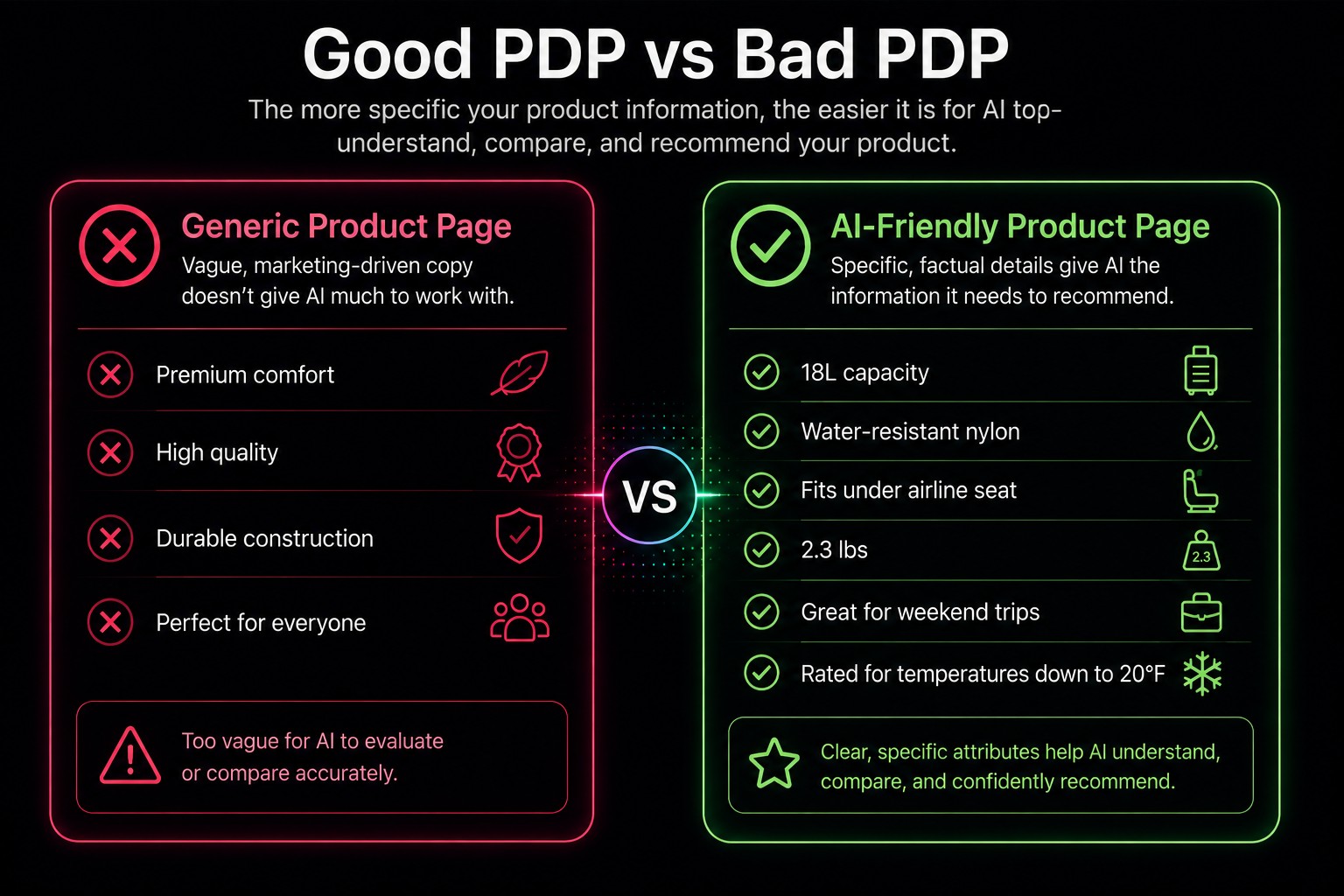
Neon pink and green graphic highlighting the differences between "good", or well performing, product pages versus "bad" PDPs for an eCommerce website.

Formatting bullets a certain way isn’t itself a magic ranking trick. A recent controlled study running 252,000 trials across six major AI models found that the strongest factors in whether a product gets cited were topical relevance, where it sits in a list, explicit price information, how fresh the content is, and completeness.

What we have found in our own testing is that bulleted, attribute-rich PDP content tends to be easier for agents to pull cleanly out of a page’s HTML than the same information buried in a paragraph.

Call that our own observation rather than an industry-proven rule, but it’s a low-effort change worth making regardless. We’ve seen it increase the accuracy of product information on AI platforms 100% of the time.

Seriously, AI takes this information into account above everything else on a given page.

Create an agents.md File: Your Brand’s AI Instruction Manual

If your store runs on Shopify, you already have one of these, whether you knew it or not. As of May 2026, Shopify automatically generates an agents.md file for every store, accessible at yourstore.com/agents.md, with /llms.txt and /llms-full.txt pointing to the same content unless you customize them.

Stores on the Agentic Storefront also expose this connection through a sitemap agentic discovery XML file, something like yourstore.com/sitemap_agentic_discovery.xml, which is what actually points agents toward the agents.md file and the rest of your agent-readable setup in the first place.

Here’s the catch, and it’s worth understanding before you get excited about it: the default file Shopify generates is mostly technical boilerplate. It tells an AI agent how to use your store’s checkout and API endpoints. It doesn’t say anything about your brand, your best sellers, or what makes you worth recommending over the store next to you. Every default Shopify agents.mdd reads almost identically to every other one. If you want an agent to actually understand what makes your brand distinct, you have to write that part yourself.

You can customize it through your theme’s Liquid template files, adding information about what you sell, what sets you apart, and which pages or collections matter most. Non-Shopify brands can and should build a version of this manually too. It’s a markdown file, nothing fancier than that.

Does agents.md Actually Improve AI Visibility?

We went looking for before-and-after case studies because we knew readers would want proof that this actually works. We didn’t find any that met that standard. That’s not especially surprising. Shopify only introduced customizable agents.md files in late May 2026, so the feature simply hasn’t been around long enough for credible longitudinal studies to emerge.

What we did find was telling in a different way. Agencies, ecommerce platforms, and AI tooling companies are already building around the standard, and Shopify has made it part of its long-term agentic commerce roadmap. That doesn’t prove a customized agents.md file will improve your visibility today, but it does suggest this is infrastructure worth putting in place before it becomes table stakes.

Our Take

Treat this as infrastructure worth getting right early, not a proven ranking hack. Keep it accurate and genuinely useful rather than treating it as another place to stuff keywords, since Shopify has signaled that rules and guardrails for these files are likely coming. Getting flagged for gaming a system before the rules even exist is a bad way to find out where the line was.

If you want a working example, we keep our own agents.md file up to date and public.

If you’d like to dig deeper, we’ve also put together a broader guide to ecommerce SEO and GEO, and a deeper look at how agentic commerce actually works if you want the bigger picture beyond the ecommerce-specific tactics here.

Where This Leaves You

If there’s one theme running through everything we’ve covered, it’s that AI doesn’t make recommendations based on a single signal. It builds confidence by comparing information from a lot of different places. That’s why product data, your own website, third-party mentions, UCP, and agents.md all matter. They’re different pieces of the same picture.

The good news is that none of this requires chasing the latest AI hack. It mostly comes down to doing the fundamentals well, presenting your products clearly, and making sure the information about your brand is accurate wherever AI is likely to find it. That’s a worthwhile investment whether you’re thinking about today’s AI shopping experiences or the ones we’ll all be using a few years from now.

If you’ve got questions about how to get your ecommerce site to rank on AI Search, reach out to us. We’d be happy to give you the blueprint on AI Search citing.

Next Steps You Should Take to Improve Your eCommerce Site’s Rankings in AI

  • Have your store connected to the UCP (Universal Context Protocol). Ensure all of your products in your catalog are available for indexing.
  • Build brand mentions and product mentions along with backlinks on authoritative 3rd party sites.
  • Create an agents.md file or markdown-formatted page on your site that describes your business, mission, team, contact information, and how an AI agent can properly crawl the site.
  • Create an llms.txt file with information regarding which pages you want the AI agent to source for information. It’s similar to a robots.txt file used in traditional SEO best practices. You’re just alert the AI agent as to where on the website you want it to go. Check out our llms.txt file here.

FAQs

What is agentic commerce? Agentic commerce refers to AI systems, like ChatGPT, Gemini, and Copilot, that can browse, compare, and in some cases complete purchases on a shopper’s behalf rather than simply answering questions about products.

Do I need Shopify to use the Universal Commerce Protocol? No. UCP is an open standard co-developed by Shopify and Google, so BigCommerce and WooCommerce stores can implement it too. It’s just not a default toggle outside Shopify, so it typically takes a developer to set up.

What is an agents.md file, and do I need one? It’s a plain markdown file that tells AI agents what your brand sells, what makes it different, and which pages matter most. Shopify generates a default one automatically for every store, but the default is generic. Every store should have a customized version, Shopify or not.

How does AI decide which products to recommend? Based on what we’ve seen across hundreds of product pages, it comes down to a mix of structured, specific product data, accurate third-party mentions and reviews, and how well a store’s technical setup lets an agent actually read and transact with the catalog. No platform has published an exact formula.

Do backlinks still matter for AI search visibility? They’re part of the picture, but they’re no longer the whole picture. AI shopping tools weigh brand and product mentions across reviews, retailer listings, and community discussion, not just links pointing back to your site.

Google PageSpeed Insights Explained: What Your Core Web Vitals Are Really Telling You

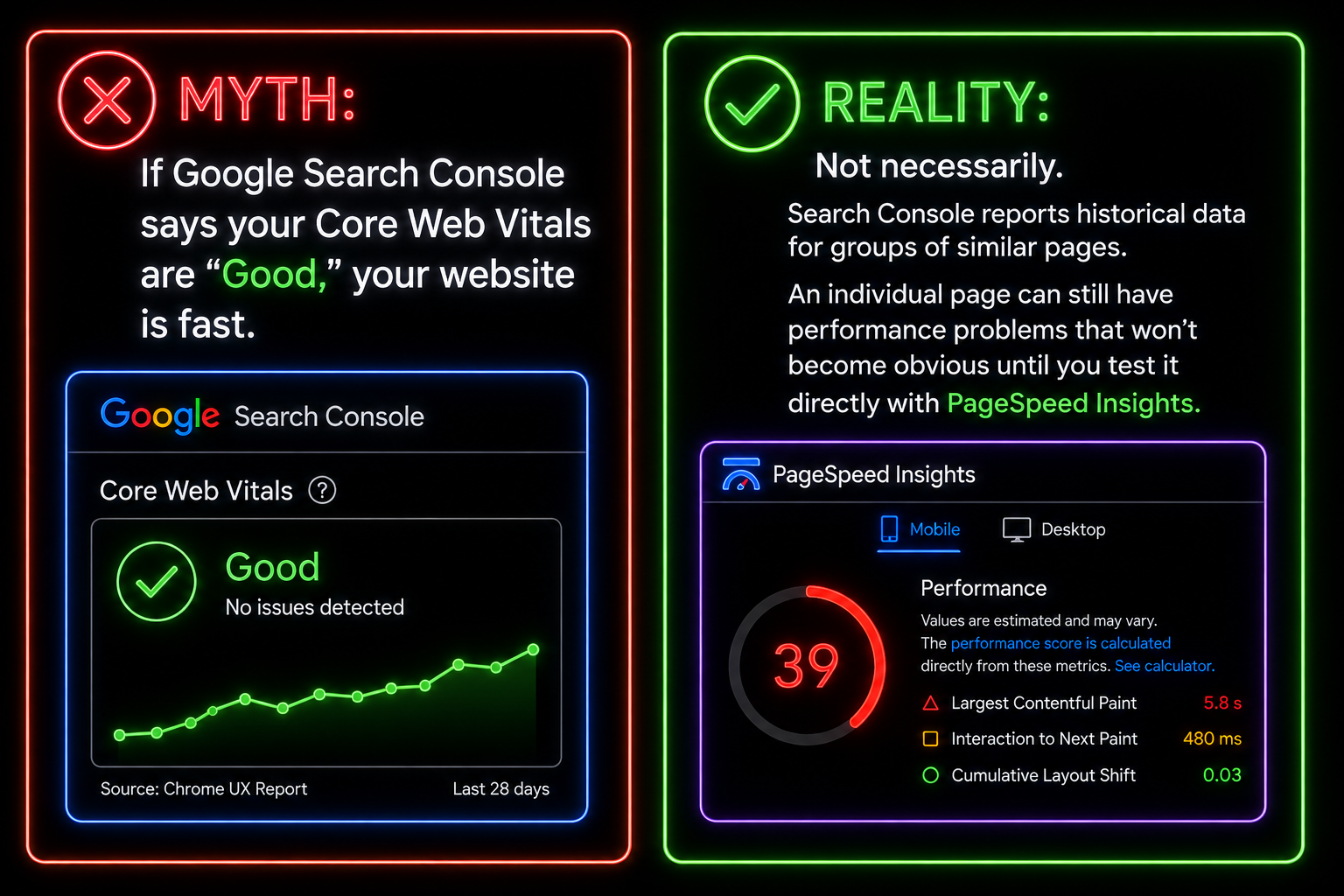
Your Google Search Console report says your Core Web Vitals are “Good.” Then you run one of those same pages through Google PageSpeed Insights and discover it takes more than 17 seconds for the largest piece of content to load on mobile.

How can both be true?

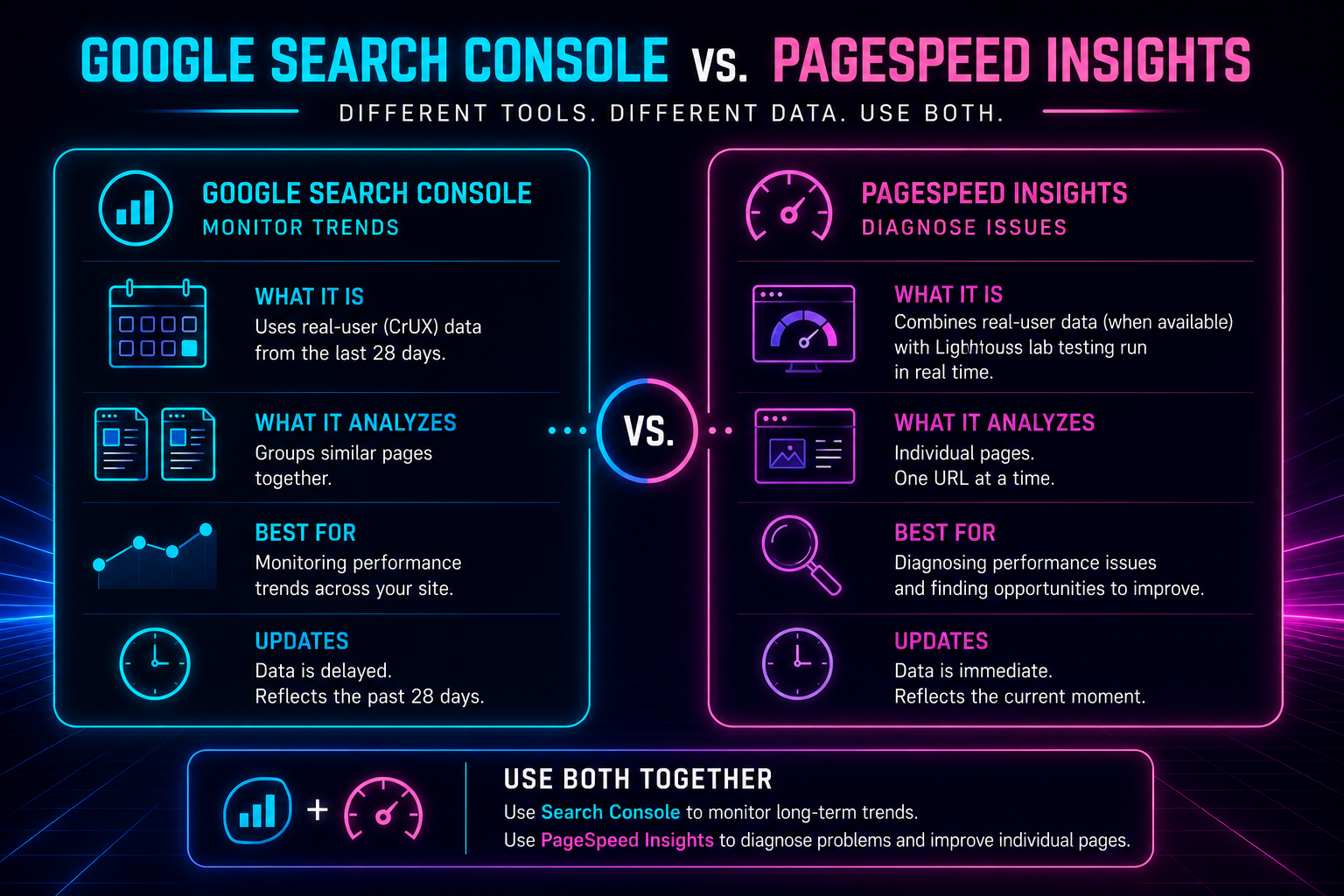
The answer is that Google Search Console and PageSpeed Insights aren’t measuring the same thing. Search Console uses real-user data collected over 28 days to monitor performance trends across groups of similar pages, while PageSpeed Insights analyzes individual pages using a combination of real-user data (when available) and a real-time Lighthouse test.

Because of that, Search Console can report that a group of pages is performing well overall even if an important landing page is loading slowly or struggling on mobile.

Because Core Web Vitals are part of Google’s page experience signals, improving them can support your broader SEO efforts alongside quality content, technical SEO, and strong backlinks.

TL;DR

No need to scroll unless you want expert advice. This is pretty much everything you need to know.

  • Google Search Console and PageSpeed Insights aren’t measuring the same thing. Search Console reports 28 days of real-user data grouped across similar pages. PageSpeed Insights analyzes one URL in real time. Both can say different things about the same page and both can be right.
  • Only three metrics feed Google’s ranking systems: LCP under 2.5 seconds, INP under 200 milliseconds, and CLS under 0.1, measured at the 75th percentile of real visits.
  • The 0 to 100 Lighthouse score is not a ranking factor. Total Blocking Time is 30% of that score and 0% of the ranking signal. It’s a diagnostic tool, not a scoreboard.
  • Core Web Vitals are pass/fail, not a curve. Fix whatever sits closest to a threshold, and stop optimizing once a metric is green and stable.
  • LCP is where most sites fail. Only 62% of mobile origins clear it, versus 77% for INP and 81% for CLS. Fix LCP first, take the cheap CLS wins, and don’t ignore INP.
  • Test mobile, not desktop. Google indexes the mobile version of your site first, regardless of where your traffic comes from.
  • Use both tools. Search Console to monitor trends across your site, PageSpeed Insights to diagnose individual pages.

What Are Core Web Vitals and Why Do They Matter for SEO?

Core Web Vitals are Google’s standardized measurements for evaluating how users experience a webpage.

Rather than focusing solely on content relevance, Google also wants to understand whether visitors can access that content quickly, interact with it smoothly, and use it without unexpected visual disruptions.

Today, Google’s three official Core Web Vitals are:

  • Largest Contentful Paint (LCP) measures loading performance.
  • Interaction to Next Paint (INP) measures responsiveness after a visitor interacts with a page.
  • Cumulative Layout Shift (CLS) measures visual stability.

These metrics are part of Google’s broader page experience signals. They’re not the most important ranking factor—high-quality, relevant content still comes first—but they can become a deciding factor when several pages provide similarly useful information.

Think of it this way: If two companies publish equally helpful articles answering the same question, Google would rather send users to the page that’s faster, more responsive, and easier to use.

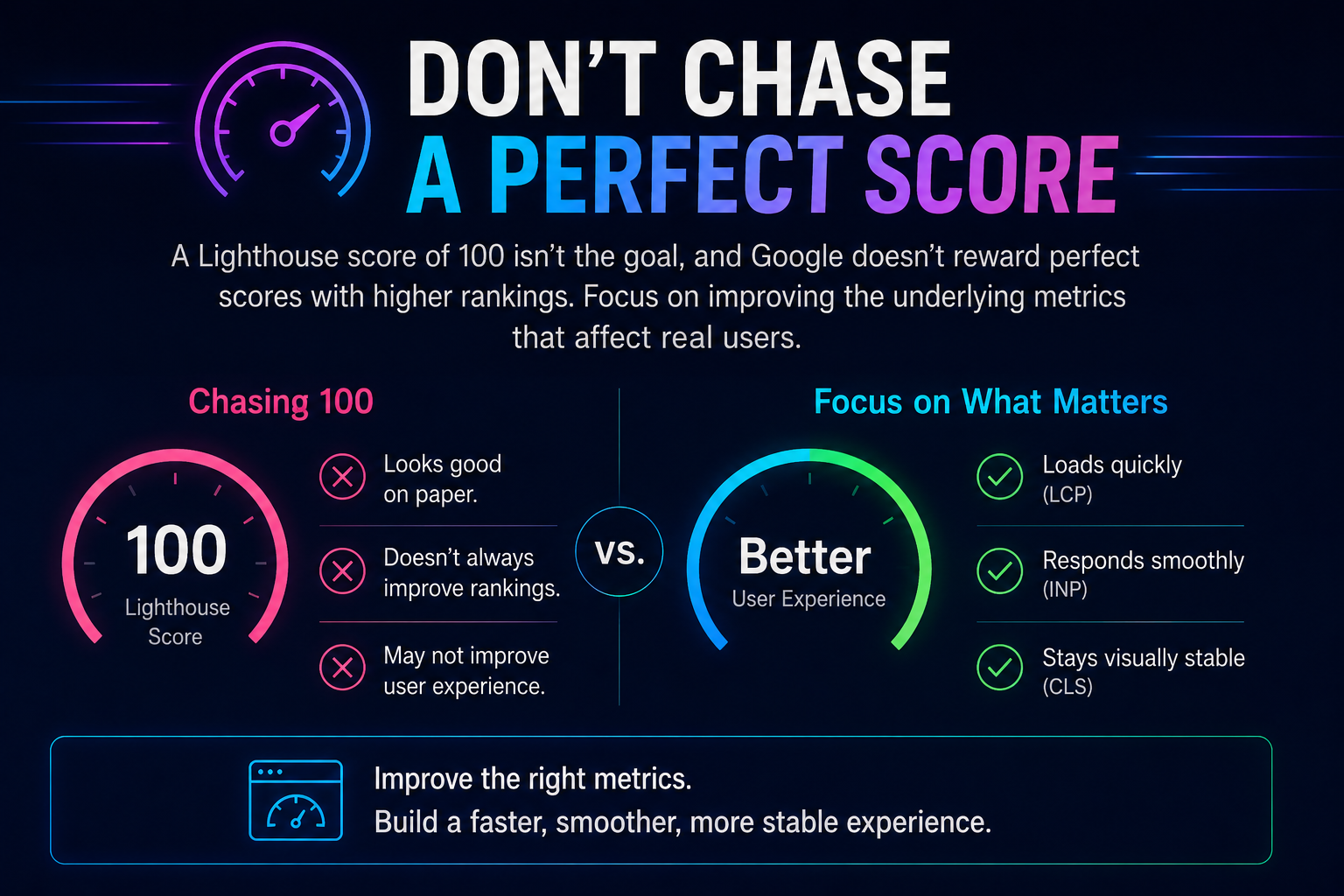
That doesn’t mean you need perfect scores. Google has repeatedly stated that there isn’t a special ranking bonus for earning a perfect 100 in Lighthouse. Instead, the goal is to provide a consistently fast, stable experience for real users.

Understanding Your Core Web Vitals & PageSpeed Insights Metrics

Core Web Vitals get most of the attention, but they’re only part of the performance report you’ll see in PageSpeed Insights. Google also includes several additional metrics that help explain why a page received its score.

Some of these metrics are official ranking signals, while others are diagnostic tools. Together, they provide a much more complete picture of how visitors experience your site.

Metric What It Measures Good Needs Improvement Poor
Largest Contentful Paint (LCP) Time until the largest visible element loads <2.5 s 2.5–4.0 s >4.0 s
First Contentful Paint (FCP) Time until the first visible content appears <1.8 s 1.8–3.0 s >3.0 s
Total Blocking Time (TBT) Time the browser can’t respond to user input <200 ms 200–600 ms >600 ms
Cumulative Layout Shift (CLS) Visual stability during page load <0.1 0.1–0.25 >0.25
Speed Index How quickly visible content appears <3.4 s 3.4–5.8 s >5.8 s


Let’s look at what each metric actually tells you.

Largest Contentful Paint (LCP)

Largest Contentful Paint measures how long it takes for the largest visible element on a page to finish loading. That’s often a hero image, large heading, or featured image near the top of the page.

LCP is one of the clearest indicators of perceived page speed. Even if smaller elements load first, visitors generally don’t feel like the page is ready until the main content appears.

A poor LCP score is often caused by:

  • Large, unoptimized images
  • Slow server response times
  • Render-blocking JavaScript or CSS
  • Too many third-party resources loading before the main content

Google considers an LCP under 2.5 seconds good. Anything over 4 seconds falls into the poor range.

First Contentful Paint (FCP)

First Contentful Paint measures how long it takes for the browser to display the first visible piece of content. That might be text, an image, or another page element.

FCP doesn’t tell you when the page is fully loaded, but it does influence how fast the site feels. A page that starts rendering quickly is usually perceived as faster than one that shows a blank screen for several seconds.

Common causes of poor FCP include slow hosting, render-blocking resources, and large CSS or JavaScript files that delay rendering.

A good FCP is under 1.8 seconds, while anything above 3 seconds is considered poor.

Total Blocking Time (TBT)

Total Blocking Time measures how long the browser is too busy to respond to user input while the page is loading.

Although TBT isn’t an official Core Web Vital, it’s an important diagnostic metric because it often points to the same issues that affect Interaction to Next Paint (INP), Google’s official responsiveness metric.

Heavy JavaScript is usually the biggest culprit. Analytics scripts, chat widgets, advertising tags, and other third-party tools can all increase blocking time if they require significant processing before the page becomes interactive.

Google recommends keeping TBT below 200 milliseconds. Scores above 600 milliseconds indicate that users may experience noticeable delays when trying to interact with the page.

Cumulative Layout Shift (CLS)

Cumulative Layout Shift measures how much a page moves around while it’s loading.

If you’ve ever tried to click a button only to have it shift just before you clicked, you’ve experienced a layout shift. It’s frustrating for users and can make a page feel unreliable even if it loads quickly.

The most common causes include:

  • Images without defined dimensions
  • Embedded videos or ads that load after the page begins rendering
  • Dynamically inserted content
  • Web fonts that cause text to reflow

A CLS score below 0.1 is considered good. Anything above 0.25 is poor.

Speed Index

Speed Index measures how quickly visible content appears throughout the loading process.

Unlike LCP or FCP, which focus on specific milestones, Speed Index looks at the overall visual progression of the page. Lower scores generally indicate that users see meaningful content sooner.

While Speed Index isn’t an official Core Web Vital, it can help explain why a page feels slow even when other metrics look reasonable.

Google considers a Speed Index below 3.4 seconds good. Scores above 5.8 seconds indicate there’s room for improvement.

How Are Each of the Web Vitals Weighted?

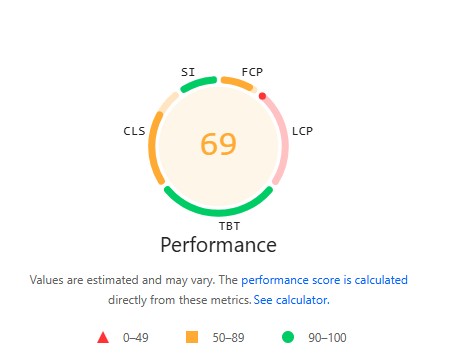
A PageSpeed Insights performance gauge showing a score of 69 out of 100, with the outer ring divided into segments for the five weighted lab metrics: SI, FCP, LCP, TBT, and CLS.

Ask which metric deserves your attention and you’ll get two different answers, because there are two different scoring systems in play. The 0 to 100 performance score in PageSpeed Insights is a weighted average of five lab metrics, here’s the exact formula:

Metric Weight in Lighthouse Score
Total Blocking Time (TBT) 30%
Largest Contentful Paint (LCP) 25%
Cumulative Layout Shift (CLS) 25%
First Contentful Paint (FCP) 10%
Speed Index (SI) 10%

This is what trips people up: that score isn’t a ranking factor. It’s a lab simulation run once from Google’s servers.

What Google actually uses in its ranking systems is field data from real Chrome users, and it looks at only three metrics: LCP at 2.5 seconds or less, INP at 200 milliseconds or less, and CLS below 0.1. There’s no weighted average involved. Each one is assessed independently, pass or fail, at the 75th percentile of real visits.

So TBT carries 30% of a score Google doesn’t rank on and 0% of the signal it does. It still matters, but only as a lab proxy for INP, which is the metric that counts.

That pass/fail structure should change how you prioritize. Moving LCP from 5.0 seconds to 3.2 seconds is a real engineering win that does nothing for your ranking signal, because you’re still failing.

Moving it from 2.7 to 2.4 is a far smaller change that flips the metric to passing. The reverse holds too: once a metric is comfortably green, further optimization buys you nothing.

Work on whatever sits closest to a threshold rather than whatever looks worst, and stop when it’s stable.

As for where the real problem usually lives, HTTP Archive’s analysis of real Chrome user data found that only 48% of mobile sites pass all three Core Web Vitals, and LCP is the metric holding that number down. Just 62% of mobile origins clear it, compared to 77% for INP and 81% for CLS.

If you fix one thing, fix LCP!

CLS is the cheapest win and usually comes down to images without dimensions, ads that inject after render, and fonts that reflow text, so take those hours regardless.

INP is the one most teams skip, and it’s the most dangerous omission. It replaced First Input Delay in March 2024 and measures responsiveness across the entire visit instead of just the first click, so plenty of sites that passed the old metric are quietly failing the new one.

And before you blame your server, check your Time to First Byte. If it’s already under 800 milliseconds, your LCP problem is in the asset pipeline, not the hosting.

Rankings aren’t even the strongest argument for doing this work. Vodafone Italy A/B tested two identical landing pages where the only difference was a 31% better LCP in the field.

The faster page produced 8% more sales, a 15% better lead-to-visit rate, and an 11% better cart-to-visit rate. No design change, no new copy, no extra traffic. Insane to think that speed is a conversion factor… huh.

Core Web Vitals are a modest tiebreaker in search, but the user behavior they measure shows up in your conversion rate whether Google cares or not.

Why Mobile Comes First (Even If Most of Your Visitors Use Desktop)

It’s easy to assume desktop performance matters most if that’s where most of your traffic comes from. In reality, Google primarily evaluates the mobile version of your site.

That’s because Google uses mobile-first indexing. When Google crawls and indexes your website, it looks at the mobile version of your pages first. If your mobile experience is slow, difficult to use, or missing content that’s available on desktop, it can affect how your pages are evaluated in search.

That doesn’t mean desktop performance is irrelevant. It still affects your visitors and conversion rates. But from an SEO perspective, mobile performance deserves your attention first.

A Real Example

To illustrate the point, we ran the bgood media homepage through PageSpeed Insights using Google’s mobile device emulation.

The results weren’t flattering, but they were a good reminder that no website is ever truly “finished.”

Metric Result
Performance Score 39
First Contentful Paint 7.9 s
Largest Contentful Paint 17.3 s
Total Blocking Time 750 ms
Cumulative Layout Shift 0
Speed Index 7.9 s


Nearly every loading metric fell into the poor range. The exception was Cumulative Layout Shift, which scored perfectly because the page remained visually stable while loading.

We chose to include these results for a reason. Website performance changes over time. New content gets published, plugins are installed, scripts are added, and design updates introduce new assets. Even websites maintained by digital marketing agencies need regular performance reviews.

If we had only looked at desktop performance, we would have missed some of the biggest issues affecting the mobile experience.

That’s why it’s a good idea to test your most important pages on mobile before and after major website updates. Small changes can have a bigger impact than you might expect.

Google Search Console vs. PageSpeed Insights

One of the biggest sources of confusion around Core Web Vitals is the difference between Google Search Console and PageSpeed Insights.

Although both tools use Google’s data, they answer different questions.

An infographic comparing Google Search Console vs. PageSpeed Insights. The left side notes that Search Console uses delayed 28-day real-user data to monitor site-wide trends, while the right side shows PageSpeed Insights uses immediate lab data to diagnose individual pages.

Google Search Console Shows Long-Term Trends

The Core Web Vitals report in Google Search Console is based on data collected from real Chrome users over the previous 28 days.

That makes it a valuable monitoring tool. If a group of pages starts performing worse over time, Search Console will usually show the trend. The tradeoff is that the data isn’t immediate.

Search Console also groups similar pages together instead of reporting on every URL individually. A problem affecting one page may not appear if the rest of the group is performing well. Likewise, a recent change won’t show up right away because the report is based on historical data.

For those reasons, Search Console is best used to monitor the overall health of your website, not to troubleshoot individual pages.

PageSpeed Insights Helps You Diagnose Problems

PageSpeed Insights takes a different approach, which gives you immediate feedback.

Instead of looking at groups of pages, it analyzes a single URL. The report combines available field data from real users with a Lighthouse test performed when you run the analysis. 

If you optimize an image, remove a script, or update your code, you can rerun the test and see how those changes affected the page. The report also highlights opportunities and diagnostics that help identify what’s slowing the page down.

For page-level analysis, it’s the more useful tool.

A myth versus reality graphic explaining that a 'Good' Core Web Vitals status in Google Search Console does not guarantee a fast website, because Search Console groups historical data, whereas PageSpeed Insights can reveal slow performance on individual pages.

The two tools work best together.

Use Google Search Console to monitor trends across your website.

Use PageSpeed Insights when you want to understand why a specific page is underperforming and what you can do to improve it.

Other Tools for Measuring Core Web Vitals

PageSpeed Insights should be your primary tool for evaluating page performance, but it isn’t the only one worth using. Depending on your role, other tools can provide additional context or make ongoing monitoring easier.

PageSpeed Insights

For most marketers and business owners, PageSpeed Insights is the best place to start. It analyzes individual pages, combines available field data with Lighthouse testing, and identifies specific opportunities to improve performance. It also lets you compare mobile and desktop results, making it easy to spot issues that might otherwise go unnoticed.

Chrome DevTools and Lighthouse

Chrome DevTools includes Lighthouse, Google’s open-source performance auditing tool. Developers often use it while building or updating websites because it allows them to test pages before changes go live.

DebugBear

DebugBear builds on Lighthouse testing by adding historical tracking and ongoing monitoring. If you’re responsible for maintaining a large website, it’s a useful way to see how performance changes over time and catch issues after deployments.

WebPageTest

WebPageTest provides more advanced performance testing, including waterfall charts that show exactly how a page loads. It’s more technical than PageSpeed Insights, but it can be invaluable when developers need to pinpoint specific bottlenecks.

CrUX Dashboard

The Chrome User Experience (CrUX) Dashboard uses Google’s real-user data to track performance trends at the domain level. It’s helpful for identifying long-term improvements or declines but isn’t designed to diagnose individual pages.

Google Search Console

Google Search Console still belongs in your toolkit. Its Core Web Vitals report is useful for spotting patterns across your website and identifying groups of pages that may need attention. Just remember that it’s a monitoring tool, not a real-time diagnostic tool.

How to Improve Your Core Web Vitals

You don’t need to rebuild your website to improve Core Web Vitals. In many cases, a handful of targeted optimizations can make a noticeable difference.

Start with the biggest opportunities.

Compress and Optimize Images

Large images are one of the most common causes of poor Largest Contentful Paint scores. Compress images before uploading them, serve appropriately sized versions, and use modern formats like WebP whenever possible.

Remove or Defer Render-Blocking JavaScript

Scripts that load before your content can delay rendering and increase both FCP and LCP. Deferring non-essential JavaScript allows the browser to display important content sooner.

Enable Lazy Loading

Images and videos below the fold don’t need to load immediately. Lazy loading reduces the amount of data downloaded during the initial page load, improving performance without affecting the user experience.

Reserve Space for Images, Ads, and Embeds

Unexpected layout shifts are usually preventable. Define image dimensions and reserve space for ads, videos, and embedded content so the page layout remains stable as resources load.

Improve Server Response Times

A slow server can affect almost every performance metric. Faster hosting, better caching, and a content delivery network (CDN) can all reduce load times, especially for visitors who are far from your server.

Review Third-Party Scripts

Analytics tools, chat widgets, advertising tags, heat maps, and other third-party scripts all add work for the browser. Audit them regularly and remove anything that’s no longer providing value.

Test Mobile Performance After Every Major Update

Don’t wait until rankings drop to check your Core Web Vitals. Make it a habit to run PageSpeed Insights on your most important pages every month (and after any major website update).

An infographic titled 'Don't Chase a Perfect Score' explaining that a 100 Lighthouse score doesn't guarantee better rankings. It contrasts chasing a 100 score with focusing on a better user experience by improving real-world metrics like LCP, INP, and CLS.

Common Questions We’re Asked

I fixed my LCP. Why does Search Console still say the page is failing?

Because Search Console runs on a 28-day rolling window of real-user data. Your fix has to age into that window before the report moves, so expect roughly four weeks before the status flips (and longer if the page gets little traffic). PageSpeed Insights will show the improvement immediately in its lab test. Use that for confirmation and stop refreshing Search Console daily.

Why does my PageSpeed score change every time I run the test?

Because the score comes from a single simulated load on Google’s hardware, and that load competes with whatever else is happening on the server at that moment. Swings of 5-10 points between runs are normal. Run it three times and take the middle result. If you are chasing a 4-point difference, you are optimizing noise.

My report says there is no field data for this page. What does that mean?

It means not enough Chrome users visited that URL for Google to build a real-user dataset, so you are seeing lab results only. Google usually falls back to origin-level data for the whole domain. That is fine for diagnosis, but remember the ranking signal comes from field data, so a page with none is being judged by the origin’s numbers.

Search Console says my Core Web Vitals assessment failed. What do I fix first?

Open the report, sort by the URL group with the most affected pages, and check which of the three metrics is failing. Fix whichever one sits closest to its threshold rather than whichever looks worst. Then confirm the fix on a single URL in PageSpeed Insights before rolling it out sitewide. Validating one page is faster than validating 50.

I am on WordPress. What usually causes bad Core Web Vitals?

Four things, in this order: a page builder loading far more CSS and JavaScript than the page uses, uncompressed hero images, too many plugins each adding their own scripts, and cheap shared hosting inflating server response time. Audit your plugins first, as it is the fastest win and it costs nothing but an afternoon.

Will a caching plugin or a CDN fix this on its own?

Partly. Caching and a CDN mainly improve server response time and Time to First Byte, which helps LCP if that is your bottleneck. Neither one shrinks an oversized hero image, defers a render-blocking script, or reserves space for an ad that shifts your layout. They are a real step, not a substitute for fixing the page itself.

Do Core Web Vitals matter for AI search and GEO?

Indirectly, and more than people assume. AI systems have to crawl and render your page before they can cite it, and a slow, script-heavy page is a page that gets crawled less thoroughly. Speed is not a GEO ranking factor, but a fast, clean, well-structured page is easier for every crawler to read, whether it is human-facing or not.

Can I fix this myself, or do I need a developer?

Image compression, lazy loading, plugin cleanup, and setting explicit image dimensions are all within reach of a non-developer. Deferring render-blocking JavaScript, cutting unused CSS, and diagnosing third-party script conflicts usually are not. Do the first list yourself, measure again, and only bring in a developer for whatever is still failing.

How do I justify this work to a boss or client who does not care about scores?

Do not lead with the score, because it is not a ranking factor and they will rightly ask why it matters. Lead with revenue. Vodafone Italy tested two identical landing pages differing only in LCP and the faster one produced 8% more sales. Frame the work as conversion optimization that happens to help SEO.

Should I test my homepage or my other pages?

Other pages. Homepages get tested constantly and fixed first, while the product and landing pages that actually convert get ignored. Pick your top five pages by revenue or leads, test each on mobile, and start there. Your homepage score is the one least likely to be costing you money.

Conclusion

Core Web Vitals are about more than improving a performance score. They’re about creating a website that’s fast, responsive, and easy to use.

They also strengthen the technical foundation that supports broader search visibility, including both traditional SEO and Generative Engine Optimization (GEO).

If you take away one thing from this article, it should be this: Google Search Console is ideal for monitoring long-term trends across your website, while PageSpeed Insights is the better choice for evaluating individual pages and identifying opportunities for improvement. Using both gives you a more complete picture of your site’s performance.

If you haven’t tested your most important pages recently, start with a mobile PageSpeed Insights report. You may find everything is performing well, or you may uncover opportunities to improve your site’s speed, usability, and search visibility.

Need help improving your Core Web Vitals? Our team can identify performance bottlenecks and help you build a faster, more search-friendly website. Reach out today!