How Do Marketing Channels Work Together? The Complete Guide to Integrated Marketing

Most businesses are not under-marketing. They are marketing in pieces.

Marketers estimate that 26% of marketing budgets go to waste, often because channels aren’t talking to each other. Your SEO team doesn’t know what paid search is bidding on. Your social media manager hasn’t seen the email calendar. Your content creator has no clue what’s actually converting in ads.

Meanwhile, your customers don’t experience your brand by channel; they experience it as a journey. They might discover you via organic search, see a paid ad a few days later, click through a blog shared on social, and finally convert after encountering your brand in an AI-generated answer. If those touchpoints aren’t connected, trust weakens … and so do results.

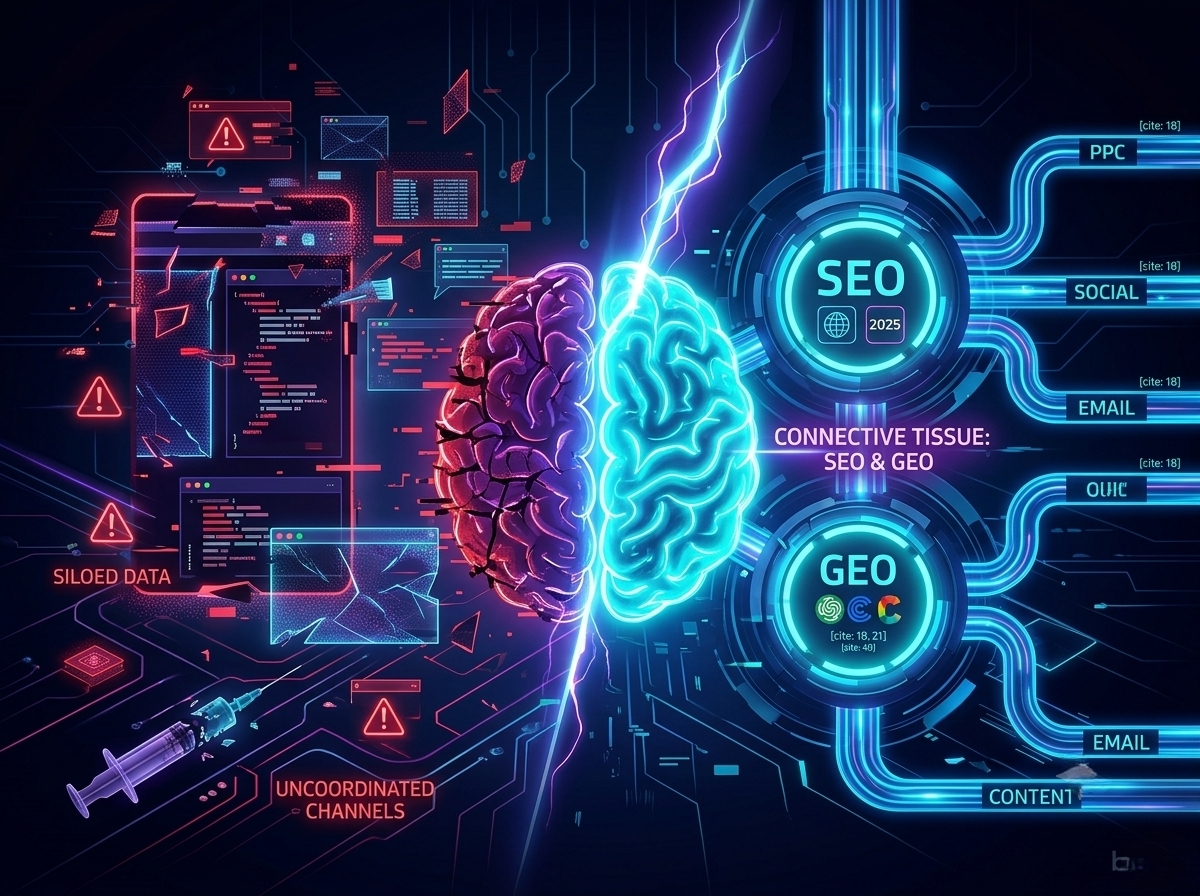
The fix isn’t throwing more money at more channels, it’s integration. At the heart of that integration are SEO and GEO (generative engine optimization), working together as the connective tissue that ties every marketing channel into a cohesive system.

In this guide, I’ll walk you through how marketing channels should work together, why integrated and omnichannel strategies outperform siloed efforts, and how to build a system where every channel strengthens the others.

What Are Marketing Channels?

A marketing channel is any medium through which your brand communicates with potential or existing customers.

That typically includes organic search (SEO), generative engine optimization (GEO), paid search (PPC), social media (organic and paid), email marketing, content marketing, public relations, affiliate marketing, and AI-powered answer engines like ChatGPT, Perplexity, and Claude.

Each channel plays a different role:

  • SEO captures demand when people actively search for solutions.
  • GEO increases visibility inside AI-generated answers.
  • Paid search provides immediate reach.
  • Social builds familiarity and trust.
  • Email nurtures direct relationships over time.

In the past, these channels operated in silos because organizations were structured that way. The SEO specialist reported to one manager, paid media to another, social to a different department. Each had separate budgets, different KPIs, and rarely communicated. Technology reinforced this fragmentation, i.e., the tools didn’t talk to each other.

This siloed approach is now genuinely harmful

Customers do not think in channels. They think in problems, questions, and solutions. They expect consistency whether they meet your brand through a Google search, an Instagram ad, an AI response, or an email in their inbox.

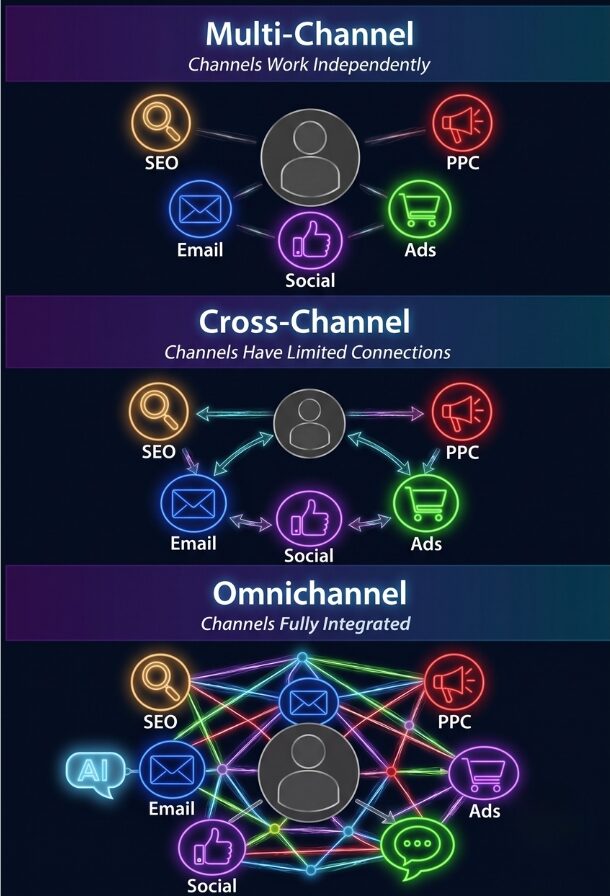
The Evolution: Multi-Channel → Cross-Channel → Omnichannel

Diagram comparing Multi-Channel, Cross-Channel, and Omnichannel marketing strategies and their level of channel integration.

Not all “multi-channel” strategies are created equal.

Multi-channel marketing means you’re present on multiple channels, but they operate independently. You have a website, social media, email program, and paid ads, but they don’t coordinate. Your Facebook content doesn’t reference your email campaigns. Your paid ads land on pages without regard to SEO strategy. Customers experience your brand differently depending on which channel they encounter.

Cross-channel marketing represents an advancement where channels acknowledge each other. Your email campaign mentions your social media. Your paid ads and organic content target complementary keywords. There’s coordination, but it’s superficial. Each channel still operates primarily for its own metrics.

Omnichannel marketing is the gold standard: a fully integrated, customer-centric approach where channels work together as a unified ecosystem. A customer who clicks an Instagram ad and doesn’t convert receives a remarketing ad referencing that specific product. When they visit organically later, they see personalized content based on previous interest. If they sign up for email, the welcome sequence acknowledges their journey.

This distinction matters. Research consistently shows that omnichannel campaigns drive significantly higher purchase rates and customer lifetime value compared to single-channel or loosely connected approaches.

Why Marketing Channels MUST Work Together

Here’s a jaw-dropper: companies with strong omnichannel strategies retain 89% of their customers, compared to just 33% for those with weak channel integration. That alone should get your attention—but the benefits don’t stop at retention.

When your channels work together, campaigns perform better and customer acquisition costs drop. Why? Because integration cuts waste. You’re not paying twice for the same message or competing with yourself across channels.

Modern customers expect seamless journeys. They want brands to “get them” no matter where they interact—Instagram, Google search, email, or even AI tools. In fact, 73% of retail shoppers use multiple channels before making a purchase.

Without integration, attribution suffers. You might spend heavily on paid search for keywords you already rank for organically, or show social ads to people who are already on your email list. That’s money literally slipping through your fingers.

But when channels share data, everything clicks. Your email platform can tell your ad platform who’s already converted, preventing wasted spend. SEO insights can guide paid campaigns toward keywords that actually convert. Social listening can feed your content calendar, ensuring your posts answer real questions your audience is asking.

In short: connected channels don’t just save money: they make every marketing dollar work harder.

SEO & GEO: The Connective Tissue of Modern Marketing

Think of SEO and GEO not as channels per se, but as the glue that connects everything in your marketing ecosystem. And for companies that previously only paid attention to SEO, incorporating GEO is game-changing. Here’s why SEO and GEO are critical to your marketing strategy:

SEO’s role extends far beyond ranking on Google.  When you do keyword research, you’re learning the exact language your customers use to describe their problems and solutions. That insight should guide your paid ads, social captions, email subject lines, video titles, and even sales presentations. In other words, SEO research is basically market research.

SEO content also feeds social and community strategies. A blog post optimized for search can become social content, spark discussions, or fuel community engagement. Videos optimized for YouTube can be shared on LinkedIn, Instagram, or TikTok. And content that performs well organically? It’s already been validated by your audience.

Paid campaigns get smarter with SEO data. See which keywords convert best organically? Prioritize them in paid campaigns. Notice which content formats resonate? Allocate ad budget accordingly. It’s a multiplier effect.

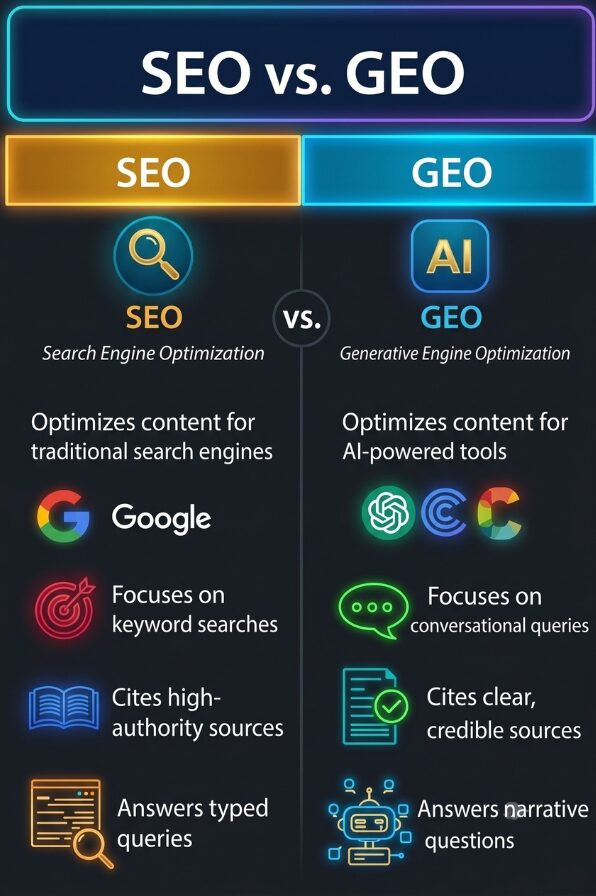
Now let’s talk GEO (Generative Engine Optimization). As AI tools like ChatGPT, Claude, Perplexity, Microsoft Copilot, and Google AI Overviews change how people find information, GEO is becoming just as important as SEO. GEO ensures your content shows up in AI-generated answers when people ask questions in your field. For instance, someone asking ChatGPT “What’s the best email marketing platform for small businesses?” could see your brand recommended—and that shapes perception and decisions.

SEO and GEO work best together. Well-structured, authoritative, and clearly cited content that performs for SEO also does well in GEO. AI tools reward content that’s expert, accurate, and comprehensive—basically the same principles that make SEO succeed.

GEO does have its own nuances, which you need to pay attention to. People ask questions differently in AI than they type into Google. GEO content should focus on conversational queries, cite authoritative sources, use structured data, and include FAQ-style content.

A high-resolution, dark-background neon-style infographic that contrasts SEO (Traditional Search Engine Optimization) with GEO (Generative Engine Optimization). The left column (SEO, gold/orange) and the right column (GEO, cyan/blue) feature clear headers and descriptive bullet points with specific, improved icons and explicit, labeled context.

How Paid and Organic Channels Amplify Each Other

I touched on this a little bit earlier, but let’s take a closer look at the relationship between paid and organic channels. When you combine the two, it creates a multiplier effect that dramatically outperforms either approach in isolation:

Using PPC data to inform SEO strategy gives immediate feedback on which keywords convert, which messaging resonates, and which landing page elements drive action. Smart marketers run PPC campaigns on keywords they’re considering for SEO investment, analyze conversion data, then double down on SEO for winners. You can test dozens of headline variations in paid ads, identify top performers, then use those headlines in your SEO title tags.

SEO rankings lower PPC costs. When you rank organically for a keyword, you might still run paid ads to dominate the search results page. However, Google’s Quality Score algorithm considers landing page relevance and user experience—factors improved when your page ranks organically. Higher Quality Scores mean lower cost-per-click and better ad positions.

Retargeting based on organic traffic behavior is extraordinarily effective because you’re targeting people who’ve already demonstrated genuine interest by finding you organically. Someone who discovers your blog post through search, reads it, but doesn’t convert shows high-intent behavior. Retargeting them with paid ads referencing the content they consumed drives conversion rates 2-3x higher than cold traffic.

Social proof from organic content boosts paid performance. When you run paid ads promoting content already performing well organically—content with thousands of shares and strong engagement—the social proof transfers to the ad.

Testing messaging in paid before committing to SEO is smart resource allocation. SEO requires significant investment in content creation. Paid ads let you test value propositions, messaging angles, and positioning strategies quickly. Run five different ad variations emphasizing different benefits. The winner becomes the messaging foundation for your SEO landing page.

Content Marketing as the Fuel

If SEO and GEO are the connective tissue, content is the fuel that feeds the whole body.

One piece of strategically developed content feeds multiple channels simultaneously. Consider a comprehensive research report. The full report lives on your website, optimized for SEO. The executive summary becomes a LinkedIn article. Key statistics become social media graphics. The methodology section becomes a YouTube video. Interesting findings become email content and ad copy. The research gets cited when AI assistants answer questions about your topic. That’s one content asset serving multiple channels.

Start with a pillar piece: a comprehensive guide, original research, detailed case study, or in-depth tutorial optimized for both SEO and GEO. Then atomize it into channel-specific formats. A 3,000-word guide becomes 15 social posts highlighting key takeaways, a video teaser, five email segments, three podcast topics, ten paid ad variations, and five guest article pitches.

The strategic advantage is efficiency and consistency. You’re not creating entirely different content for each channel—you’re creating strategically important content once and distributing it intelligently everywhere. This reduces production costs while increasing output and ensuring messaging consistency.

Email, Social, and Community: The Engagement Triangle

Now let’s take a look at how to use your channels to drive engagement. Email marketing, social media, and community building form an engagement triangle, where each channel feeds and strengthens the others. 

Creating new content all the time is a ton of work, but with a good engagement triangle, cross-promotion and audience participation help sustain momentum without constant new production.

Here’s how:

Growing email lists from social following: Sticky social media content attracts followers. Those followers see posts consistently, building trust. You create content designed to convert social followers to email subscribers (lead magnets, free resources, templates, etc.). A compelling Instagram post might promote a free template. A LinkedIn post might promote gated research.

Amplifying email content on social: Your email newsletter contains valuable insights that become social content. You can share snippets from your newsletter with a call-to-action to subscribe. If an email topic drove high engagement, that signals strong interest for more social content on that theme.

Building community through both channels: A LinkedIn community discussing industry topics becomes a source of email content—questions asked become newsletter topics. Email subscribers become community advocates. Active community members receive special recognition in emails, strengthening loyalty.

Essentially, a good synergy between email marketing and social creates a user-generated content loop to promote your brand organically.

Data Integration: The Technology Behind Channel Synchronization

The back-end of your marketing channels (data) is just as important as the front-end that customers see (content). True omnichannel marketing requires that all your data systems talk to each other:

Customer relationship management (CRM) systems are the backbone of everything. Your CRM should act as a single source of truth, capturing every interaction a customer or prospect has with your brand—site visits, email clicks, social engagement, chats, and purchase history. When all that data lives in one place, it’s much easier to personalize messaging and keep marketing and sales aligned. Tools like Salesforce, HubSpot, and Microsoft Dynamics can do this well when they’re set up thoughtfully.

Marketing automation tools build on that foundation by responding to behavior in real time. For example, when someone downloads an ebook, they can automatically enter an email nurture flow, start seeing relevant ads, and trigger a heads-up to sales if they show strong buying signals. The goal isn’t more automation—it’s more relevant, timely touchpoints.

Attribution modeling helps you understand how all those channels actually work together. Relying on last-click attribution gives all the credit to the final step and ignores the earlier content, SEO, or ads that warmed someone up. Multi-touch attribution spreads credit across the journey, giving you a more honest picture of what’s really driving results.

Customer data platforms (CDPs) solve the identity puzzle. They connect anonymous site visitors with known email subscribers, social followers, and eventually paying customers. By pulling in data from multiple sources and stitching it together into unified profiles, CDPs make that information available to your marketing tools in real time.

Finally, privacy matters more than ever. Clear consent and responsible data collection aren’t optional. That’s why first-party data, information customers knowingly share with you, has become so valuable. Your email list, website behavior, customer profiles, and community data are assets you own, can use ethically, and don’t depend on third-party tracking that’s increasingly restricted.

Creating an Omnichannel Marketing Strategy: A Step-by-Step Approach

Creating an omnichannel marketing strategy requires a systematic approach. Here’s what I recommend:

Step 1: Audit your current channels
Take stock of everything—SEO, paid ads, social, email, content, PR, and more. Note budgets, tools, key metrics, and performance. Which channels drive awareness, engagement, and conversions? Which bring in revenue most efficiently? Understanding your starting point is essential.

Step 2: Map the customer journey
Follow your customers across channels. Use analytics, CRM data, and customer interviews to see how people discover and engage with your brand. Do they start on Google, click a paid ad, then see a social post before converting? Knowing the typical journey helps you spot opportunities to connect the dots.

Step 3: Spot integration opportunities
Look for places where channels can support each other. Is your blog driving traffic but not conversions? Boost top posts with paid ads. Is email engagement strong but your list small? Use social campaigns to drive sign-ups. Focus on combinations that multiply results.

Step 4: Align messaging and goals
Create a unified message architecture—define brand positioning, key differentiators, and tone of voice. Set goals around business outcomes, not just channel metrics. Instead of separately tracking email opens, ad impressions, and social likes, measure how channels together generate leads and sales.

Step 5: Set up tracking and attribution
Make sure every touchpoint is tracked consistently. Connect your CRM, marketing automation, and analytics so data flows seamlessly. Use multi-touch attribution to see how each channel contributes to conversions. Dashboards that combine all channels make it easier to spot what’s working.

Step 6: Build a cross-channel content calendar
Plan content across all channels at once. Start with strategic content pillars optimized for SEO and GEO. Then map derivatives: which posts go on social, what email sequences stem from the content, and which pieces get paid amplification. One core asset can fuel multiple channels.

Step 7: Test, measure, and optimize
Launch your integrated campaigns, track results, and adjust as needed. Experiment with different channel combinations and attribution models. Learn from both wins and misses. The goal is continuous improvement, not perfection on day one.

The Future: AI, GEO, and Smarter Channel Integration

Marketing integration is evolving fast, thanks to AI, changing consumer habits, and new platforms. Here’s what I expect we will see going forward:

AI takes the wheel

Instead of manually coordinating campaigns, AI can now optimize them in real time. It analyzes performance across all channels, identifies the best combinations for each audience segment, adjusts budgets automatically, and personalizes experiences at every touchpoint. Think of it as a smart conductor keeping all your marketing instruments in perfect harmony.

SEO and GEO: equally essential

SEO and GEO now work hand-in-hand to ensure your brand is discoverable everywhere people look. SEO drives organic visibility in search results, while GEO ensures your content shows up in AI-generated answers on ChatGPT, Claude, Perplexity, Google AI Overviews, and similar platforms. Together, they expand your reach, influence perceptions, and make your content adaptable across both traditional and AI-powered discovery.

Predictive optimization is coming

Machine learning can forecast which channel combos perform best, letting you plan proactively instead of guessing. Historical data helps you anticipate what works for specific goals, so campaigns are smarter from the start.

Hyper-personalization at scale

AI lets you deliver unique experiences to each customer. Individual journeys can include personalized emails, dynamic website content, custom-targeted ads, and relevant social messages—all coordinated seamlessly.

What to focus on now

  • Invest in data infrastructure for real-time access across channels.
  • Build strong SEO and GEO foundations. Content created today pays off across all future channels.
  • Strengthen your team’s AI and machine learning skills.
  • Embrace testing and learning. Perfection comes later, agility comes first.

Real-World Examples: Brands Doing It Right

Looking at successful brands that nail integrated marketing reveals patterns you can use for your own strategy. Whether B2B or B2C, the principles hold.

Sephora

Sephora’s omnichannel game is next-level. Their Beauty Insider program connects in-store and online seamlessly. Customers can browse on mobile, save favorites, get personalized recommendations, check inventory, and book services—all in one app. Emails reference both online and in-store behavior, and social posts link directly to purchase options. These smart strategies drive results: Beauty Insider members account for over 80% of Sephora’s annual sales

  • Tactics to note: unified customer profiles, location-based push notifications, AR try-on features, user-generated content integrated across channels, and post-purchase email campaigns. 

Slack

Slack shows how B2B can thrive with integrated content. Their guides and blog posts rank organically for key terms like “team communication tools,” then get repurposed for social, email, paid campaigns, and even AI answers. Slack’s site continues to attract significant organic search traffic, with analytics tools showing around 5–6 million visits from organic search each month, giving its content and product pages strong discoverability without relying solely on paid ads.

  • Key lesson: SEO and GEO-optimized content becomes a cross-channel asset, reducing acquisition costs while building authority.

Amazon

Amazon’s omnichannel marketing is all about behavioral data. Personalized emails, dynamic web content, retargeting ads, Alexa integrations, and Prime loyalty benefits all share customer data. Sure, Amazon is a Goliath that isn’t exactly relatable for most businesses. However, smaller brands can still benefit from incorporating some of their omnichannel strategies.

  • Market like Amazon: Use behavioral triggers for abandoned carts, recommend products across channels, unify customer data, and personalize messaging.

Takeaways Across Brands

  • Unified customer data accessible across channels
  • One piece of content distributed strategically
  • Behavior on one channel informs messaging on others
  • Teams organized around customer journeys, not channels
  • Executive-backed commitment to integration

Common Integration Pitfalls (And How to Avoid Them)

Even companies committed to integration stumble. Recognizing these pitfalls early can save time, money, and headaches.

  1. Messaging isn’t unified. Different teams often use conflicting messages, offers, or tones. Solution: create a central message architecture, set up approval workflows, and hold regular alignment meetings.
  2. Teams work in silos. SEO, paid, social, and email teams reporting separately create misaligned priorities. Solution: organize cross-functional pods responsible for specific customer journeys. Measure qualified leads or revenue, not channel-specific vanity metrics.
  3. Inconsistent data & tracking. Different UTM parameters, analytics setups, or conversion definitions make channel performance hard to analyze. Solution: set unified tracking standards, use tag managers like Google Tag Manager, and assign a data steward.
  4. Missing attribution models. Defaulting to last-click attribution undervalues top-of-funnel channels like SEO, content, and social. Solution: start with linear multi-touch attribution, then refine to time-decay or position-based models. This helps optimize budget allocation and reveals true channel contribution.
  5. Technology doesn’t talk. Disjointed tools mean manual work, duplication, and limited personalization. Solution: audit your tech stack, prioritize integrations, use platforms like Zapier, and assign ownership of martech strategy.

Example in Action:

A mid-market SaaS company had fragmented messaging: SEO focused on “workflow automation,” paid ads said “business process management.” Teams didn’t sync, UTM codes were inconsistent, and last-click attribution caused friction over budgets. By implementing weekly cross-functional check-ins, unified messaging guidelines, standardized UTMs, and multi-touch attribution, they increased qualified leads by 34% without spending more.

Conclusion: From Siloed to Synchronized

Moving from fragmented marketing to a fully integrated strategy takes focus, but it’s worth it. It means thinking about customer journeys instead of channels, setting up the right tech for data sharing, and shifting your team culture from optimizing channels to optimizing experiences. The alternative—keeping disconnected channels while customers expect seamless interactions—just doesn’t cut it anymore.

Here’s what to keep in mind:

  • SEO and GEO are your glue. They tie all channels together.
  • Content fuels everything. What you create for organic search powers social, email, ads, and more.
  • Start small, think big. You don’t have to integrate everything at once. Begin by connecting top-performing SEO content to paid campaigns, syncing email with ad retargeting, or coordinating social and email around one product launch. Each win teaches you something about process, tech, and strategy—and builds momentum.

At bgood media, we help brands make this leap. We combine expertise in SEO, GEO, and integrated digital marketing to create systems where content, paid, organic, and engagement channels work together as one. What do clients get from our approach? Smoother customer experiences, better business outcomes, and marketing that actually moves the needle.

Ready to turn your marketing channels from disconnected silos into a seamless, omnichannel experience? Let’s build a strategy where SEO, GEO, content, and paid campaigns all work together to drive real results. Reach out today!

10 Ways You Can Use AI for Your Site

Say you want to launch a complete website redesign. We’re talking about a fully functional e-commerce platform with custom product recommendations, automated customer service, and dynamic content personalization. Three years ago, that same project would have taken three months and a team of specialists. Today, you can do all that with AI in about 72 hours. The gap between what’s possible now versus what was possible even two years ago is staggering.

Here’s what I’ve learned working with our awesome clients at bgood media: you don’t need a computer science degree to leverage AI for your website. You don’t need a massive budget. You just need to know which tools exist and how to apply AI strategically. The businesses that are using AI effectively are pulling ahead fast, and every month that gap gets wider.

I’m going to walk you through ten practical, immediately actionable ways you can integrate AI into your website. These aren’t theoretical concepts or future possibilities; these are tools and strategies we’re using right now with real clients who are seeing real results. Whether you’re running an e-commerce store, a service-based business, or a content platform, AI applications can transform how your site performs.

But first, let’s look at the actual time savings you can realistically achieve with AI:

AI vs. Traditional: Real-Time Savings

Task Traditional Method With AI Time Saved
Write 100 product descriptions 20 hours 3 hours 85%
Create 5 homepage design variations 3 days (24 hours) 4 hours 83%
Monthly technical SEO audit 6 hours 45 minutes 88%
Debug complex code issue 3 hours 15 minutes 92%
Generate 50 blog topic ideas 4 hours 10 minutes 96%
Create custom hero images (5 concepts) 8 hours 30 minutes 94%
A/B test 10 headline variations 2 days (16 hours) 1 hour 94%
Analyze user behavior patterns 12 hours 2 hours 83%
Write meta descriptions for 50 pages 5 hours 30 minutes 90%
Cross-browser testing (10 flows) 8 hours 1 hour 88%

Now let me show you exactly how to achieve these results. 

1. AI-Powered Chatbots for Customer Service & Engagement

  • Answer common questions for visitors even when you’re offline.
  • Capture leads and route conversations without feeling robotic.
  • Take repetitive support work off your team’s plate.

The AI chatbot has become the Swiss Army knife of website functionality, and for good reason. I’ve seen firsthand chatbots increase lead capture rates and reduce customer service costs for our clients. But here’s the thing: today’s AI chatbots are nothing like the frustrating, rigid bots from five years ago that could barely handle basic questions without sending you in circles.

Modern AI chatbots learn from every interaction. They understand context, remember previous conversations, and can handle complex questions that used to require a human agent. 

The real power comes from integration. These chatbots connect with your CRM, email marketing platform, and customer database to deliver personalized experiences. When a returning customer asks about their previous order, the chatbot already knows their history. When someone’s browsing your pricing page for the third time, the bot can proactively offer a demo or consultation. This level of personalization used to require sophisticated programming—now it’s built into platforms like Intercom, Drift, and ChatBot.

For e-commerce specifically, AI chatbots have become conversion machines. They answer product questions in real-time, suggest alternatives when something’s out of stock, guide users through size selection, and even recover abandoned carts with personalized messages. For example, retail chatbots can turn a “this is too expensive” objection into a completed sale by instantly offering a payment plan option the customer didn’t know existed.

The setup is surprisingly straightforward. Most AI chatbot platforms offer visual builders where you can train your bot on your FAQs, product information, and brand voice without writing code. The key is starting with a clear scope—what questions should the bot handle versus route to humans—and continuously training it based on actual conversations. Within a few weeks, you’ll have a 24/7 team member that never sleeps and keeps getting smarter.

Real-world use case: A travel business uses an AI chatbot to answer detailed questions about destination requirements, booking policies, and itinerary customization—questions that previously required 15-minute phone calls with customer service reps. The bot handles about 70% of inquiries completely, routes qualified leads to the sales team, and only escalates truly complex issues to human agents.

2. AI Website Builders for Rapid Site Development

  • Spin up landing pages or simple sites fast when you need to move quickly.
  • Test ideas without committing to a full design or dev process.
  • Best for early-stage projects, not long-term custom builds.

Let me be completely honest about AI website builders: they’re not going to replace experienced developers for complex, custom projects. But they’ve absolutely revolutionized how we approach MVPs, landing pages, and rapid prototyping. Tools like Replit, Lovable, Bolt, v0, and Cursor can generate a complete, functional website from a text prompt in minutes, and the results are getting scarily good.

Here’s how they actually work. You describe what you want (“create a landing page for a sustainable coffee subscription service with email capture, product showcase, and testimonials section”) and the AI generates the HTML, CSS, and JavaScript to build it. The more specific your prompt, the better the output. I’ve found that including details about your target audience, desired color scheme, and specific functionality produces results that need minimal editing.

We use AI builders extensively for client pitch mockups and A/B test variations. Instead of spending three days designing and coding five different homepage concepts, we can generate them in an afternoon and present real, clickable prototypes. 

The limitations are real, though. AI builders struggle with highly custom functionality, complex database integrations, and unique brand requirements that go beyond templates. They’re excellent at standard website patterns—hero sections, feature grids, pricing tables, contact forms—but they can produce generic-looking results if you’re not careful with your prompts. The sites they generate also tend to follow current design trends pretty closely, which means they might look similar to other AI-generated sites.

My recommendation: use AI builders for speed, not for your final product (unless you’re running a really simple site). They’re perfect for validating ideas quickly, building temporary landing pages for campaigns, creating prototypes to show stakeholders, or launching an MVP while you plan your custom development. Replit is great for full-stack applications, Bolt excels at React-based sites, v0 from Vercel produces clean component code, and Cursor is phenomenal for developers who want AI assistance within their existing workflow. 

Once you have your AI-generated prototype, you can take it to the next level with our website design and development services to turn it into fully functional, polished site that reflects your brand and goals.

Real-world use case: Your business wants to test seven different value propositions for your SaaS product. With AI builders, they create seven full landing pages in a single day, complete with unique copy and design approaches, to find the winning variation that increases conversions.

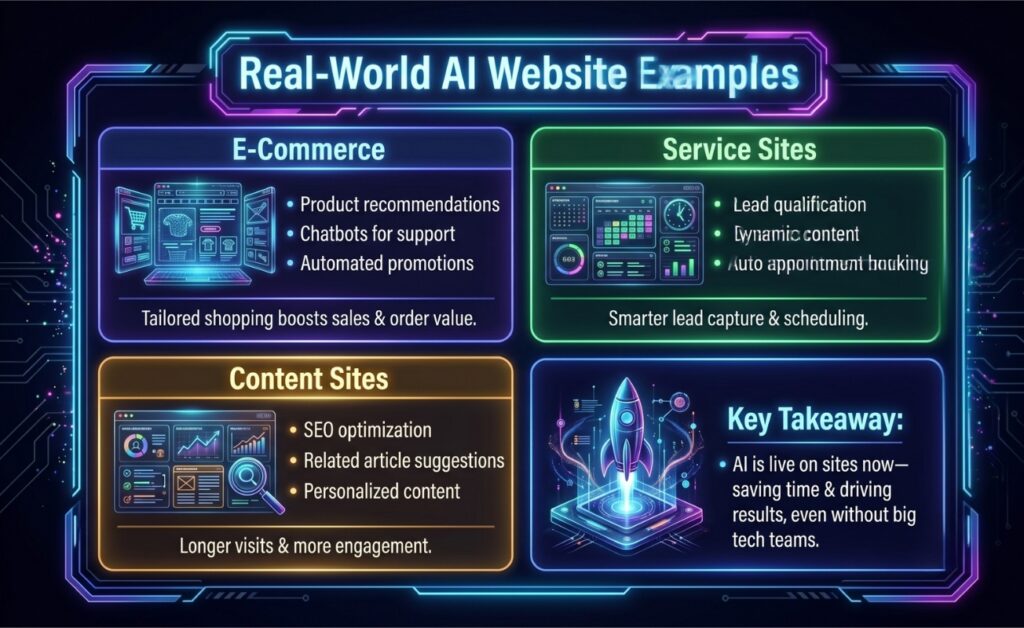
What AI-Powered Websites Look Like in the Real World

AI is already changing the way websites operate across industries. Here are some examples of how different types of sites are using it:

An infographic titled 'Real-World AI Website Examples' showing a grid of four color-coded sections detailing how AI is used on different types of sites. It includes examples for 'E-Commerce' focusing on tailored shopping and sales, 'Service Sites' focusing on lead capture and scheduling, 'Content Sites' focusing on engagement, and a 'Key Takeaway' that AI is currently live, saves time, and drives results even without large technology teams.

3. AI for Content Generation and Copywriting

  • Get first drafts, product descriptions, and meta tags done faster.
  • Use AI to break writer’s block, then polish with your own voice.
  • Experiment with different headlines and messaging without extra effort.

Content creation is where AI has made the biggest immediate impact for most of our clients. I’m not talking about generating entire blog posts and calling it done—I’m talking about using AI strategically throughout your content workflow to produce better copy faster while maintaining your authentic brand voice.

The most practical application I’ve seen is automated product descriptions. If you’re running an e-commerce site with hundreds or thousands of products, writing unique, SEO-optimized descriptions for each one is genuinely impossible without AI. Tools like Jasper, Copy.ai, and even ChatGPT can generate compelling product copy that highlights features, benefits, and use cases while incorporating relevant keywords. 

Meta titles and descriptions are another huge win. AI can analyze your page content and generate multiple SEO-optimized meta tag options that balance keyword inclusion with click-worthiness. It’s particularly good at staying within character limits and creating variations for A/B testing. Instead of agonizing over the perfect meta description for 30 minutes, you get ten options in 30 seconds and pick the best one.

The collaboration approach is where this really shines. We train AI on our clients’ brand voice by feeding it existing content, brand guidelines, and tone examples. Then we use it as a first-draft generator and rapid-iteration tool. A writer creates an outline, AI generates the first draft, the writer refines and adds expertise, AI helps optimize for SEO, the writer adds personality and specific examples. The result is content that’s produced 3-5x faster without sacrificing quality or authenticity.

Finally, AI is invaluable for A/B testing. Generate twenty headline variations in seconds, test the top five, and let the data tell you what resonates. 

Real-world use case: A wellness brand uses AI to create email subject line variations and landing page headline options continuously—they’re running more tests than ever before and their conversion rates keep climbing because they’re learning faster than their competitors.

4. AI-Assisted Design and Prototyping

  • Explore visual ideas and layouts without starting from a blank canvas.
  • Generate images and design concepts in minutes instead of days.
  • Use AI to support designers, not replace them.

AI has fundamentally changed my relationship with design work. I’m not a trained designer, but AI tools have made me dangerous enough to create compelling visuals, generate design concepts, and communicate ideas visually in ways that used to require hiring specialists for every project.

AI image generation through tools like Midjourney, DALL-E, and Stable Diffusion can become your new go-to for hero images, custom graphics, and visual concepts. Need a specific scene that doesn’t exist in stock photos? Generate it. Want product mockups before the product exists? Create them. Looking for unique icons that match your brand aesthetic? Done in minutes. 

Layout and wireframing assistance is where AI gets really interesting for designers. Figma’s AI features and tools like Relume can generate wireframe layouts based on your content requirements. Describe your page sections, and AI suggests layouts that follow UX best practices. It’s not replacing the strategic thinking that good designers bring, but it’s accelerating the exploration phase dramatically. We can test ten layout concepts before lunch and iterate based on what resonates.

AI-powered design systems are emerging too. Tools can analyze your brand colors, typography, and existing designs to generate cohesive component libraries and suggest color palettes that complement your primary brand colors. This is particularly valuable for maintaining consistency across large sites or when multiple people are creating marketing materials.

The reality check: AI design tools are outstanding for speed and generating options, but they lack the strategic brand thinking and nuanced understanding of psychology that experienced designers bring. AI might generate a beautiful hero section, but it won’t understand why your specific audience responds better to aspirational imagery versus data-driven graphics. 

AI design is best used for rapid iteration and exploration, before you bring in human judgment for final decisions and strategic direction. The best results I’ve seen come from designers who use AI to multiply their output while applying their expertise to guide and refine what the AI produces.

Real-world use case: A fintech startup uses AI to generate hero images and wireframe layouts, producing three complete homepage concepts in a single day—cutting a process that normally takes a week down to hours.

5. AI for Code Generation and Development

  • Speed up development by letting AI handle repetitive code.
  • Debug issues faster with an extra set of “eyes.”
  • Free developers to focus on bigger-picture decisions.

For coders, this is where AI can completely transform your daily workflow. You can write code 3-4x faster than you could two years ago, and the quality is often better because AI helps you follow best practices and catch errors you might have missed. Tools like Claude Code, GitHub Copilot, Cursor, and Gemini CLI are revolutionizing development.

Here’s what this actually looks like in practice. I’m building a contact form with validation, email integration, and database storage. Instead of writing every line from scratch, I describe what I need and Copilot or Cursor suggests complete, functional code blocks. It understands context from my existing codebase, follows the patterns I’m already using, and generates code in the framework I’m working with. What used to take an hour now takes fifteen minutes.

Debugging has become collaborative instead of agonizing. When something breaks, you can paste the error message into Claude or Cursor and get not just a solution, but an explanation of why the error occurred and how to prevent it in the future. A backend issue that would have cost you three hours of Stack Overflow searching can be resolved in ten minutes.

Code review and optimization is another massive win. AI can review your code for security vulnerabilities, performance bottlenecks, and adherence to best practices. It catches things like inefficient database queries, memory leaks, and accessibility issues that might slip through manual review. It’s easy to run AI code reviews on every project as an additional quality check before deployment.

The design-to-code conversion capability is mind-blowing. Tools like v0 can look at a Figma design and generate the actual React or Vue components to build it. It’s not perfect—you’ll still need developer expertise to refine the output and handle edge cases—but it eliminates the tedious manual translation work and gets you 70% of the way there immediately.

Best practices I’ve learned: use AI as an extremely knowledgeable pair programmer, not as a complete replacement for your own thinking. Review every line of code AI generates before implementing it. Use AI to handle boilerplate and repetitive patterns while you focus on business logic and architecture. Train yourself to write clear prompts that specify requirements, constraints, and preferred approaches. The developers who are thriving right now aren’t the ones resisting AI—they’re the ones who’ve learned to direct it effectively and move from writing code to orchestrating solutions.

Real-world use case: A SaaS team uses AI code assistants to generate form validation and database code, debugging errors in real time. Tasks that once took hours were completed in under 30 minutes.

6. AI-Powered Personalization and User Experience

  • Show visitors content that feels more relevant to them.
  • Recommend products or pages based on real behavior.
  • Improve engagement without building complex systems from scratch.

Personalization used to be the domain of enterprise platforms with six-figure budgets. Now AI makes sophisticated personalization accessible to businesses of any size. Simply put, personalization strategies increase conversion rates by showing different visitors exactly what they’re most likely to care about.

Dynamic content based on user behavior is the foundation. AI analyzes how visitors interact with your site—which pages they visit, how long they stay, what they click—and automatically adjusts what they see next. A visitor who’s browsing budget options gets messaging about value and affordability. Someone exploring premium features sees content emphasizing quality and exclusivity. This happens in real-time without manual segmentation rules.

Product recommendation engines have become incredibly sophisticated. Beyond basic “customers who bought this also bought that” logic, modern AI analyzes browsing patterns, purchase history, demographic data, and even session behavior to predict what specific users want. 

Personalized user journeys take this further. AI can predict where a user is in their buying journey and adjust the experience accordingly. First-time visitors get educational content and trust signals. Returning visitors who’ve visited the pricing page three times get targeted offers or sales outreach. Users who abandoned carts receive different messaging than those who completed purchases. Each visitor essentially gets a custom-tailored website experience.

The tools for this have become remarkably accessible. Platforms like Dynamic Yield, Optimizely, and even built-in features in Shopify and WordPress plugins now offer AI-powered personalization without requiring data science teams. The key is starting with clear goals—what actions do you want to increase—and letting AI discover the patterns that predict those behaviors. Within a few weeks of collecting data, you’ll start seeing personalization suggestions that make intuitive sense and deliver measurable results.

Real-world use case: An online home goods retailer uses AI to personalize homepage content based on browsing behavior, increasing engagement and click-throughs. Returning visitors see product recommendations tailored to their past interests, boosting conversions by double digits.

7. AI for SEO and Content Optimization

  • Find keyword opportunities you might otherwise miss.
  • Improve existing content instead of constantly creating new pages.
  • Prepare your site for how AI-driven search is evolving.

Search engine optimization used to require hours of manual research and educated guessing. AI has transformed it into a data-driven science where we can predict what will rank before we publish and optimize with precision that wasn’t possible before.

Keyword research has become exponentially more sophisticated. AI tools like Clearscope, Surfer SEO, and SEMrush’s AI features analyze thousands of top-ranking pages to identify not just primary keywords but semantic relationships, related terms, and content depth expectations. They tell you exactly which concepts to cover, which questions to answer, and even the optimal word count for specific queries. 

Content gap analysis is where this gets really powerful. AI can compare your content to competitors and identify topics you’re missing, questions you haven’t answered, and keywords where competitors are winning. It’s like having a competitive intelligence analyst working 24/7 to find opportunities. Your blog could be missing entire category of high-intent search queries your competitors dominate—and AI can identify the gap in twenty minutes.

Technical SEO audits have been automated and improved by AI. Tools now crawl your site, identify issues like broken links, slow load times, duplicate content, and indexing problems, then prioritize fixes based on actual impact on rankings. Instead of fixing hundreds of minor issues randomly, you focus on the twenty things that will actually move the needle.

Schema markup generation used to be tedious manual work that most businesses skipped. AI tools now analyze your content and automatically generate appropriate structured data to help search engines understand your pages better. Better schema means better rich snippets, which means higher click-through rates from search results.

Here’s what most businesses are missing: Generative Engine Optimization (GEO). As AI-powered search through ChatGPT, Perplexity, and Google’s AI overviews becomes more prevalent, traditional SEO isn’t enough. GEO focuses on making your content AI-readable and citation-worthy so it gets included in AI-generated responses. This means clear, authoritative content with proper attribution, structured data, and content that answers questions comprehensively. 

We’re already optimizing client content for both traditional search and AI search engines, and the businesses that get ahead of this shift will dominate their niches.

Real-world use-case: An e-commerce site uses AI to identify keyword gaps, generate meta descriptions, and optimize content. In a month, the team increases search visibility tenfold while focusing on creative, high-value content.

8. AI Analytics and Heatmap Tools

  • See how people actually use your site, not just where they land.
  • Spot friction points before they turn into lost conversions.
  • Turn raw data into clear, actionable insights.

Data without interpretation is just noise. AI analytics tools have transformed how we understand user behavior by finding patterns humans would miss and surfacing insights that lead to concrete improvements.

Behavioral prediction is the killer feature. AI analyzes thousands of user sessions to predict which visitors are likely to convert, likely to bounce, or likely to need support. 

Conversion optimization suggestions come directly from AI analyzing your data. Instead of guessing which page elements to A/B test, AI tells you which specific changes are most likely to increase conversions based on patterns it’s identified. It might notice that visitors who engage with your testimonials section convert at 3x the rate of others and suggest making testimonials more prominent. These aren’t generic best practices—they’re insights specific to your actual users.

User flow analysis powered by AI reveals drop-off points and friction you’d never spot manually. AI can process millions of user journeys to identify the specific sequence of actions that predicts success or failure. For example, AI tools can tell you that visitors who navigate to your “About Team” page before your services page convert at dramatically higher rates—and then restructure navigation to encourage that flow.

Anomaly detection is invaluable for catching problems and opportunities. AI monitors your analytics continuously and alerts you when something unusual happens, like sudden traffic drops, conversion rate changes, or unexpected user behavior patterns. This early warning system can save you from issues like broken payment processors and even help you capitalize on viral content opportunities before they fade.

Real-world use case: An SaaS business uses AI that identifies visitors showing “high purchase intent” behaviors and automatically triggers personalized outreach from their sales team. Their demo request rate increases by 47% because they’re catching people at exactly the right moment.

9. AI for Accessibility Improvements

  • Catch accessibility issues without manual audits.
  • Make your site easier to use for more people.
  • Improve compliance while improving overall UX.

Accessibility shouldn’t be an afterthought, and AI is making it easier to build sites that work for everyone. I’ve seen AI accessibility tools catch issues that would have taken days of manual testing and help companies avoid costly lawsuits while serving users better.

Automated alt text generation has been revolutionary for content-heavy sites. AI can analyze images and generate descriptive alt text that helps screen readers understand visual content. While human review is still important for context and accuracy, AI provides an excellent starting point and ensures nothing gets missed. Today, you can use AI to easily generate alt text for 10,000+ images in your archive—a project that would be impossible manually.

Color contrast analysis powered by AI doesn’t just check if your colors meet WCAG standards—it suggests alternative color combinations that maintain your brand aesthetic while improving readability. Tools can analyze entire sites, identify contrast issues, and provide specific hex codes that would work better. This removes the guesswork from accessible color selection.

Screen reader optimization goes beyond basic compliance. AI tools can test how screen readers actually experience your site and identify issues like confusing navigation order, unclear link text, or missing ARIA labels. Some tools even generate fixes automatically or provide code snippets to implement improvements.

With AI, accessibility compliance checking has become continuous instead of periodic. AI monitoring can scan your site regularly for accessibility issues introduced by new content or design changes. This catches problems before they impact users instead of discovering them during an annual audit. The cost of prevention is dramatically lower than remediation, and AI makes prevention automatic and affordable for any size business.

Real-world use case: An educational platform uses AI to generate alt text, adjust color contrast, and identify navigation issues, improving accessibility across hundreds of pages in just a few weeks.

10. AI-Powered Testing and Quality Assurance

  • Test updates automatically instead of manually clicking through pages.
  • Catch bugs before users do.
  • Keep your site stable as it grows and changes.

Testing has always been the bottleneck in web development. You build something great, then spend days testing it across browsers, devices, and user scenarios. AI has compressed this timeline from days to hours and caught bugs that human testers routinely miss.

Automated cross-browser testing powered by AI doesn’t just check if your site loads in different browsers—it understands user intent and tests whether features actually work correctly. AI can navigate your site like a real user, fill out forms, complete purchases, and verify that every interaction produces expected results across Chrome, Firefox, Safari, and Edge. Marketers who use these AI tools can do things like catch a Safari-specific bug in a checkout flow that would have cost you thousands in lost sales per day.

Bug detection and reporting has become predictive. AI analyzes your code as you write it and warns about potential issues before they become bugs. It identifies patterns that commonly lead to problems—memory leaks, security vulnerabilities, performance bottlenecks—and suggests corrections immediately. It’s like having a senior developer reviewing every commit in real-time.

Performance monitoring with AI goes beyond simple load time tracking. AI establishes baseline performance metrics and alerts you when anything degrades. It identifies which specific code changes caused performance problems and suggests optimizations. 

User flow testing verifies that critical paths through your site work correctly. AI can simulate hundreds of different user journeys simultaneously, testing everything from account creation to checkout to support ticket submission. This catches edge cases and interaction bugs that manual testing misses. The AI learns which flows are most critical to your business and prioritizes testing those paths with every update.

Real-world use case: A small business’s website is gradually slowing down as they add features—AI identifies that their image loading strategy is the culprit and suggests a lazy loading implementation that restores fast load times. 

Popular AI Tools by Use Case (Starting Points, Not Endorsements)

Don’t let the number of options stress you out: you don’t need all of these to get started. Most businesses begin with one AI use case that solves their biggest bottleneck, then expand as they learn what works for their site.

Use Case Example Tools What They’re Used For Who It’s For Who Might Explore This
AI Chatbots Tidio, Intercom, Chatbot.com Customer support, lead capture, basic personalization Most websites Businesses new to AI on websites
AI Website Builders Bolt, Lovable, Replit, v0 Rapid site creation, MVPs, landing pages Early-stage teams, marketers Founders, marketers, early-stage teams
AI Content Writing ChatGPT, Jasper, Copy.ai Drafting site copy, product descriptions, meta tags Content and e-commerce teams Content teams, e-commerce sites
AI Image Generation Midjourney, DALL-E, Stable Diffusion Hero images, graphics, visual concepts Marketing and design teams Marketing and design teams
AI Code Assistance Cursor, GitHub Copilot, Claude Code Faster development, debugging, code suggestions Developers Developers, technical teams
AI SEO Tools Surfer SEO, Clearscope, SEMrush Content optimization and keyword research Marketing teams Marketing teams learning AI-driven SEO
AI Design & Prototyping Figma AI, Relume Wireframes, layout ideas, early concepts Designers, UX teams Designers, UX teams
AI Analytics & Heatmaps GA4, Hotjar AI User behavior insights and optimization ideas Growth-focused teams Teams exploring data-informed decisions
AI Accessibility Tools accessiBe, AudioEye Identifying and improving accessibility issues All businesses Businesses improving site inclusivity
AI Testing & QA Testim, Mabl Automated testing and quality checks Technical teams Development and QA teams

What AI Can’t Do (Yet)

Despite all the impressive capabilities I’ve just shown you, AI has real limitations. Understanding these boundaries is just as important as knowing what AI can do, because it helps you invest your time and money wisely and keeps your expectations grounded in reality.

AI can’t understand your unique market position and competitive advantage. It can analyze competitor websites and suggest improvements, but it can’t grasp the nuanced strategic decisions about how to position your brand differently in a crowded market. That requires deep industry knowledge, understanding of your customers’ unspoken needs, and the kind of strategic intuition that comes from experience. 

AI can’t build authentic emotional connections or understand relationship nuances. While AI chatbots can handle customer service inquiries efficiently, they can’t read between the lines when a frustrated customer needs empathy more than a solution, or recognize when a casual inquiry is actually a high-value sales opportunity that needs a personal touch. 

AI can’t make judgment calls about brand reputation and ethical considerations. It doesn’t understand when a technically correct response might damage your brand, when a viral trend is worth jumping on versus staying silent, or how to navigate the complex ethical considerations that come with business decisions. AI might suggest content that’s perfectly optimized for SEO but tone-deaf to current events or your company values. Human oversight isn’t optional here.

AI can’t truly understand your company culture or the unwritten rules that make your business work. It can’t know that your CEO hates industry jargon, that your customers respond better to humor than corporate speak, or that your team has a specific way of handling difficult conversations with clients. These cultural nuances make the difference between content and communication that feels authentic versus robotic. Every time we onboard a new client, we spend significant time training AI tools on their specific voice and values, but even then, human editors catch things AI misses.

AI can’t predict black swan events or think truly creatively outside established patterns. AI is exceptional at recognizing and extrapolating from patterns in existing data, but it can’t imagine something genuinely novel or anticipate paradigm shifts. It would never have predicted that a global pandemic would transform e-commerce overnight, or that a particular social media platform would suddenly become essential for B2B marketing. Strategic foresight and creative innovation still require human imagination.

AI also cannot always detect manipulative or malicious tactics. So-called “black-hat GEO strategies” can intentionally poison search results or manipulate AI-generated recommendations. Even when AI is trained on vast amounts of data, it can miss these sophisticated attempts to game algorithms, potentially amplifying misinformation or low-quality content instead of flagging it. For a deeper look at these risks and how black-hat tactics are emerging in AI-driven search, see our detailed post on AI Poisoning & Black-Hat GEO.

The businesses that are winning with AI understand balance. They use AI to handle the repetitive, pattern-based work that bogs down their teams, then redirect that saved time and energy toward the high-value human work that AI can’t touch: building relationships, making strategic decisions, creating breakthrough ideas, and navigating the complex human elements of business. 

The Human + AI Future

After thoughtfully implementing AI tools across so many of our clients’ projects, I’m more convinced than ever that AI is an amplifier, not a replacement. The websites that perform best aren’t the ones that are “most AI-powered”—they’re the ones where human creativity, strategy, and judgment direct AI capabilities toward clear business goals.

AI is extraordinarily good at execution, pattern recognition, and handling repetitive tasks at scale. It’s not good at understanding your unique market position, connecting emotionally with your specific audience, or making strategic decisions about where your business should go. Every tool I’ve covered in this article produces better results when a knowledgeable human guides it with clear intent and evaluates its output with critical thinking.

The most successful teams I’m seeing use AI to eliminate the tedious parts of web development—writing boilerplate code, generating meta descriptions, testing across browsers—so humans can focus on the high-value work of strategy, creative direction, and relationship building.

My recommendation is to start experimenting now. Pick one application from this list that addresses your biggest pain point—maybe it’s the AI chatbot if customer service is overwhelming, or AI content generation if you’re drowning in writing tasks, or AI code tools if development is your bottleneck. Implement it, learn from it, and expand from there. 

Ready to implement AI on your website but not sure where to start? Contact us to schedule a free 30-minute AI strategy session where we’ll identify your biggest opportunities and create a custom roadmap.

Frequently Asked Questions About AI for Websites

Is AI for websites expensive? Not anymore. Most businesses can start with free or low-cost tools ($0-150/month) and see measurable results within 60 days, with many AI tools offering free tiers for basic functionality.

Can I use AI on my website without coding? Yes, absolutely. Most modern AI tools like chatbots, content generators, and website builders offer visual interfaces and no-code setup that anyone can use, regardless of technical skill.

What’s the easiest AI tool to start with for my website? AI chatbots are the easiest and deliver immediate value. Platforms like Tidio, Chatbot.com, and Drift offer free tiers and can be installed on your site in under 15 minutes with visible results from day one.

Will AI replace web developers? No, AI is a tool that makes developers more efficient, not a replacement. The best results come from combining AI’s speed and pattern recognition with human creativity, strategic thinking, and problem-solving skills.

How long does it take to implement AI on a website? Simple implementations like chatbots take 15-30 minutes, while comprehensive AI integration across multiple areas typically takes 2-4 weeks. Most businesses see their first measurable results within the first week.

What’s the ROI of AI tools for websites? It really depends, but a 3-5x ROI within the first 90 days is definitely achievable through time savings, increased conversions, and reduced operational costs. You might save about 15-20 hours per week with initial AI implementation.

Do I need a big website to benefit from AI? No, AI tools scale to any size business. Even single-page websites can benefit from AI chatbots for lead capture, AI-generated content for SEO, or AI analytics to understand visitor behavior.

What’s the difference between AI website builders and traditional development? AI builders generate functional sites in minutes from text prompts and work best for simple sites, MVPs, and landing pages. Traditional development offers more customization, unique functionality, and sophisticated features that AI can’t yet handle.

How do I know which AI tools are right for my business? Start by identifying your biggest pain point—overwhelmed customer service suggests chatbots, slow content creation suggests AI writing tools, poor SEO suggests AI optimization tools. Choose the tool that addresses your most urgent need first.

Is AI-generated content bad for SEO? No, when used properly. Google doesn’t penalize AI content—it penalizes low-quality content regardless of how it’s created. AI-generated content that’s edited, fact-checked, and optimized for user value performs just as well as human-written content. 

If you want to combine AI tools with professional design and development, our website design and development services help you build a high-performing site that maximizes both user experience and business results.

10 SEO Tips for eCommerce Sites in 2026 [With GEO]

You can’t hack your way to visibility anymore.

In 2026, SEO isn’t all about chasing search engine algorithms. Rather, your site needs to help people genuinely understand your store. And since LLMs (large language models) are now part of how users find products, your content needs to speak clearly to both humans and AI.

At bgood media, we’ve guided eCommerce brands from near invisibility to category leadership. Along the way, we’ve learned that simply plugging in the right keywords ≠ strong rankings. 

True visibility comes from connection, clarity, and structure, which is exactly what your eCommerce site needs to climb the ranks.

Let’s look at what’s driving real results this year and what’s simply wasting your time. Here are some essential eCommerce SEO tips that focus on structure, content, and AI-ready optimization for 2026.

Mobile-First Design: 2026 Is All About Mobile

First things first: your eComm site has to be mobile-friendly. Over 60% of eCommerce traffic now comes from mobile devices. This means your site needs to be designed mobile-first: fast-loading, easy to navigate, and intuitive across screen sizes. 

Time to do a quick mobile-optimization checkup on your site if you haven’t done so recently:

  • Test every product page to ensure images, buttons, and content render correctly across different devices
  • Make sure key product info like size, fit, and price, are visible without excessive scrolling
  • Test your page speed, and optimize (if needed) to prevent drop-offs—Google and LLMs reward fast, usable experiences

Remember, mobile-first isn’t just about usability—it’s about sending clear signals to search engines and LLMs that your site is efficient, user-focused, and trustworthy.

Stop Chasing Keywords. Start Matching Intent.

If your SEO strategy still starts with “what are people searching for?” you’re missing half the story. Search behavior today is less about exact phrases and more about intent.

AI-driven search results (think Google’s SGE and every chatbot out there) care less about who used a phrase like “best running shoes” and more about who actually answers the question in context.

So instead of cramming keywords into every heading, build your pages around why someone’s searching:

  • They’re researching (“what are the best shoes for flat feet?”)
  • They’re comparing (“Nike vs. Brooks for daily runs”)
  • They’re ready to buy (“women’s stability running shoes under $150”)

Your job is to map content to each stage, then layer in keywords naturally. That’s the new SEO strategy for eCommerce websites that win in 2026.

Personalization and PRO Optimization

So we’ve established that AI and LLMs increasingly favor content tailored to user intent. At bgood media, we call this PRO—personal response optimization

PRO ensures your content speaks directly to the people most likely to engage and convert, while also helping AI models understand and surface your products accurately.

Here are some actionable tips to enhance your PRO:

  • Customize pages for your target demographic instead of appealing to everyone
  • Include product-specific H1s and descriptions for each item
  • Provide clear size charts, fit guides, or bulleted benefits to help AI give precise answers

By creating pages that feel tailored, informative, and easy to navigate, you signal to search engines and AI models that your site delivers value. 

Collection Pages Are Your SEO Superpower

When most store owners think SEO, they obsess over product pages. We get it—those are the pages that sell. But in reality, collection pages drive the majority of organic traffic.

Here’s why: when someone searches “women’s running shoes,” Google doesn’t want to show them one product. It wants to show them a selection. That means your collection or category page is the one fighting for visibility.

To make those pages shine:

  • Write unique copy for each collection (no generic “shop our latest styles”)
  • Add descriptive H2s that mirror customer language (“Trail Running Shoes for Every Terrain”)
  • Link internally to your top products and related collections
  • Use breadcrumbs to show search engines (and shoppers) exactly how your site is structured

Most eCommerce sites skip this step. But when you treat your collection pages like landing pages and not just filters, that’s when you’ll see your rankings climb.

Own Your Space in Google Shopping

In 2026, Google Shopping isn’t optional. It’s where eCommerce visibility happens.

We see this mistake all the time: stores upload feeds and walk away. But your product data feed is one of your biggest SEO tools. Optimizing it helps your listings show up more often, and higher up, in Shopping results.

Here’s what matters:

  • Use full, keyword-rich product titles (think “Women’s Black High-Waisted Yoga Leggings” instead of “Yoga Pants”)
  • Add high-quality images that meet Google’s specs
  • Keep GTINs, pricing, and stock info updated
  • Use GEO modifiers when relevant (“Shipping from Los Angeles” or “Made in Austin”) as these help you appear in local searches and AI results

Google Shopping rewards clarity and completeness. If your product feed reads like a catalog built by humans, not spreadsheets, you’re halfway there.

Breadcrumbs: The Unsung Hero of eCommerce SEO

Breadcrumbs aren’t glamorous, but they’re one of the clearest signs of a healthy site structure. They help visitors know exactly where they are, and they help Google understand your hierarchy.

A simple example:
Home › Women › Leggings › Short Leggings

Each section is clickable, creating a natural flow through your site. That internal linking strengthens your SEO across multiple pages, not just one.

When you implement breadcrumbs properly, search engines start to display them in search results, too. It’s a small touch that makes your listings cleaner and more clickable.

Schema Markup: The Invisible Upgrade with Visible Results

If breadcrumbs make your structure visible, schema markup makes your data visible. Visible to Google, to AI assistants, and to anything else interpreting your content.

Schema is a small block of code that lives behind the scenes, telling search engines what your page really is. For example, a Product schema might tell Google that your leggings are in stock, cost $65, and have a 4.8-star rating.

You can’t see it on the page, but when it’s working, you’ll notice it in search results:

⭐⭐⭐⭐☆ (4.8) — $65 — In Stock

Those rich snippets (reviews, prices, availability) come directly from your schema. They don’t only make your listing prettier; they increase click-through rates dramatically.

If you haven’t already, run your site through Google’s Rich Results Test. It’ll tell you exactly which schema types are missing.

Think GEO, Even If You’re Global

Here’s the thing about eCommerce SEO: it’s never just national. Even global brands benefit from local signals.

Adding geo-targeted keywords (“sustainable swimwear from Miami”) and local schema markup helps Google understand where you’re based and helps AI systems answer location-based queries correctly.

If your products ship nationwide, use your About and Contact pages to anchor your presence. Local mentions and NAP (name, address, phone) consistency across platforms still matter. Even if you don’t have a storefront, geo relevance builds credibility and trust.

2026 Reality Check: Experience Beats Everything

The biggest shift in 2026 SEO isn’t technical, it’s behavioral.

Google’s AI-driven results are prioritizing trust, speed, and usability over backlinks. Sites that load fast, read naturally, and help real humans complete a task are rising across every category we track.

That means:

  • Compressing your images
  • Simplifying navigation
  • Avoiding intrusive pop-ups
  • Writing content that reads like a conversation, not a keyword dump

If a page feels good to use, Google’s metrics will notice.

Bonus eCommerce SEO Tip for Shopify Users: Upgrade to Shopify Plus 

If your store is on Shopify, consider upgrading to Shopify Plus. It gives you the flexibility to customize templates, update code, and implement advanced SEO features without fighting the platform. You’ll have more control over H1s, schema, breadcrumbs, and navigation—tools that make all the difference when optimizing for search engines and LLMs.

Do Good, Rank Better

At bgood media, we believe doing good serves as both a brand statement and a growth strategy.

When your content exists to help, not just sell, search engines notice. When your store structure is clear, your copy answers real questions, and your SEO prioritizes people, you build authority along with strong rankings.

That’s the future of eCommerce SEO in 2026: authentic, helpful, and built to last.

AI-Generated Websites Are Good, Not Great

If you’ve spent more than five minutes in a marketing forum lately, you’ve probably seen the same promise pop up again and again: “Build a website with AI: No code, no stress, live in minutes!

Sounds pretty magical, right?

We thought so too. But after testing, building, and breaking a few AI-generated sites ourselves (so you don’t have to), here’s our honest take for 2025: AI websites are good… but they’re not great.

And if you’re serious about growing your business, that difference matters.

The Allure of the Instant Website

AI website builders like Wix ADI, Hostinger, GoDaddy, and even WordPress plugins now promise to “create a website with AI in minutes.” And to be fair, they actually do just that.

You give the tool a few prompts, pick a theme, hit “generate,” and voilà! You’ve got a shiny new homepage.

For startups, freelancers, or small businesses that just need something online, it’s an easy win. You can upload stock photos, add a few videos, and get a decent site live before lunch.

So yes, AI websites are good for getting started. But once you start growing, that’s when you realize just how shallow “good” really is.

Where AI-Generated Sites Fall Flat

Let’s break down the not-so-glamorous truth behind those one-click websites.

1. Cookie-Cutter Design

AI-made websites are “out of the box” … and they look like it. They’re fast, but they lack personality, polish, and purpose. You won’t get a custom user journey, intentional call-to-actions, or designs tailored to your target demographic.

Instead, you’ll get a generic one-size-fits-all website that isn’t specific to your brand’s needs. Here’s a fun example of a website for Torrey Pines Golf Course that was made with AI (built by Mobirise).

AI generated website example of Torrey Pines Golf Course

(Careful when entering the site, it doesn’t currently have an SSL certificate but it’s supposedly owned by the official Torrey Pines company.)

Yeah, this isn’t anything special and it definitely doesn’t follow ADA compliance (see the white text overlaying the bright image? Then here’s a really good AI site (built using Lovable, so it’s not public, but we think it looks pretty solid with a fun and unique feel).

AI generated website example built with Lovable

Pretty sleek, modern, and has a direct CTA. We like it.

2. SEO? Not So Fast

If you’re hoping to rank on Google, AI sites are basically running with their shoelaces tied. They often:

  • Miss proper meta titles and descriptions
  • Skip structured headings (H1s, H2s)
  • Forget about mobile optimization (which is kind of shocking in 2025)
  • Ignore sitemaps and schema markup entirely

All these bad SEO practices mean your beautiful “instant” website could be invisible to search engines.

3. Not Mobile-First

We’re living in a mobile-first world. Over 60% of users now browse and buy on their phones. But if you can believe it, many AI website creators still prioritize desktop layouts! This makes your site harder to navigate, slower to load, and frustrating for anyone trying to book a tee time or buy your product on the go.

4. No Real Strategy Behind It

An AI website doesn’t think like a marketer, it just … exists. The AI site builder won’t ask questions like:

  • What action should your user take on this page?
  • Which layout best converts for your audience?
  • What messaging speaks to your buyer’s needs?

Without those strategic choices, you end up with a site with no real purpose and no conversions.

The Maintenance Problem

Even if you do manage to get a decent AI-made website up, the problems don’t stop there. Updating content? You’ll need plugins. Adding eCommerce features? Good luck integrating inventory or SKUs. Want analytics tracking or booking software?

That’ll still require manual coding or third-party tools. And if something breaks?

Don’t expect a support team on the free plan. AI sites in 2025 are kind of like IKEA furniture: affordable and fast enough to assemble without much knowledge, but if one piece doesn’t fit, you’re on your own with an Allen wrench.

Who AI Website Builders Are Actually Good For

Let’s be clear: we’re not here to dump on innovation. AI website generators have their place. They’re fantastic for:

  • Freelancers launching their first portfolio site
  • Startups testing an MVP or proof-of-concept
  • Small businesses that can’t yet afford custom web development

If that’s you, then go for it. Use an AI builder to get something online fast. Learn. Test. Grow.

But when you’re ready to turn traffic into customers, it’s time to move beyond the free AI templates and into a website designed around your audience, goals, and growth strategy. That’s where we come in.

The Future: Where AI Might Actually Shine

AI websites will absolutely evolve, and in fact we’re already seeing glimpses of that. By 2030, we expect to see AI tools that:

  • Automatically suggest what every page should include
  • Adapt layouts based on user data
  • Tailor visuals and CTAs to match audience behavior
  • Optimize for SEO in real time

That future is certainly exciting. But alas, we’re not there yet. There are some of the best dynamic website designs on DesignRush. You could take a look at these sites for inspiration and take some of their conversion funnels to implement on your website. Caveat: AI still won’t build it out as well as a design and development company will, but it will hopefully do a good enough job.

Do Good. Build Smart.

At bgood media, we love technology, especially when it empowers people to do more good. And we use AI on a daily basis, it can be great. But we also know the difference between a quick fix and a real foundation for growth.

So here are our recommendations:

If you’re just getting started, an AI-generated site is a great stepping stone.

If you’re ready to scale, attract, and convert, let the humans take the wheel.

It’s honestly going to come down to your budget, where you’re at with your business, and which AI website generator tool you want to use.

The tool is the biggest factor. We’ve only listed 2 in this article, there are now tons out there.

Because the truth is: AI websites are good. But your brand deserves great.