How to Get Your eCommerce Site Ranked in AI LLMs

For years, ecommerce SEO was all about getting your products to rank on Google, seeing them appear in the blue links next to sponsored listings (SERPs).

Now, more shoppers are asking ChatGPT, Gemini, and other AI LLMs what they should buy instead. If your product isn’t part of that answer, you don’t just lose the sale: you’re probably not even considered in the first place.  

We’ve spent the last few months reviewing hundreds of ecommerce sites and product pages to figure out how this actually works in the real world. Some people call this discipline generative engine optimization, or GEO. We call it AI Search and Agentic Commerce.

This is what we’ve found.

First, here’s a simplified look at the signals AI shopping platforms pull together before recommending a product.

Quick Highlights

No need to read the whole thing. AI is now part of the buying decision (even at times the default search experience), and this is what actually moves the needle.

  • Shopping has moved into the chat window. Buyers are asking ChatGPT, Gemini, and Copilot what to buy instead of searching for it. Adobe Analytics found shoppers referred by generative AI spend 41% more per visit than traditional channels.
  • Agentic commerce is the real shift. A chatbot that suggests products is conversational commerce. An AI that researches, compares, builds the cart, and completes the purchase is agentic commerce. Google, Shopify, and OpenAI are all building toward agentic.
  • UCP gives Shopify stores a head start. The Universal Commerce Protocol launched at the start of 2026 with 30+ companies behind it. Eligible Shopify stores are enabled by default and already syndicate to ChatGPT, Copilot, and Shop (Shop Pay). BigCommerce and WooCommerce can implement it too, as it’s an open standard, but it usually takes a developer.
  • A seat at the table isn’t a guarantee of a recommendation. You can influence what information AI systems see. You can’t control what they ultimately recommend.
  • Brand mentions now carry the weight backlinks used to. AI shopping tools pull reviews, specs, and pricing from retailer pages, review sites, and forums, and then reconcile all of it against what you say about yourself. Accurate info on your site plus messy info everywhere else is a losing combination.
  • Don’t manufacture those mentions. Reddit is catching roughly 25,000 brand-planted posts and comments a day and building detection aimed specifically at this. Earn the coverage instead.
  • Write PDPs with specifics, not adjectives. “Premium comfort” tells an AI nothing. “Merino wool blend, true to size, machine washable, rated to 20°F” gives it something to cite. A controlled study across 252,000 trials and six AI models found citations track topical relevance, list position, explicit pricing, content freshness, and completeness.
  • Your Shopify store already has an agents.md file, and it’s generic. Since May 2026 Shopify auto-generates one at yourstore.com/agents.md. The default is checkout and API boilerplate that reads identically to every other store’s. Customize it through your theme’s Liquid files or write one manually if you’re off Shopify.
  • There’s no proof yet that agents.md improves visibility. The feature is too new for credible before-and-after studies. Treat it as infrastructure worth getting right early, not a ranking hack. And keep it honest, since guardrails are likely coming.
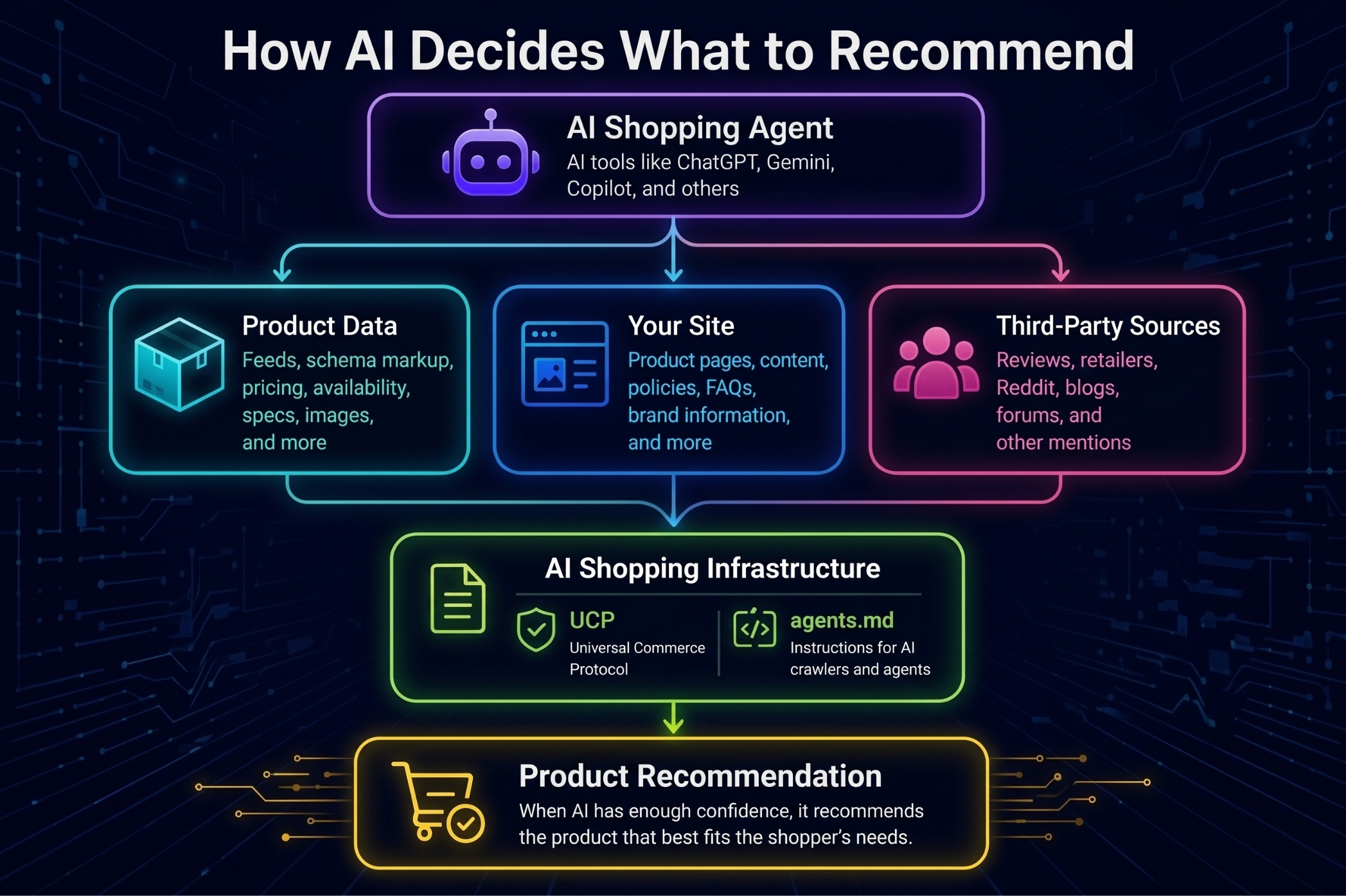
Graphic displaying how AI and LLMs determine their recommendations to users, including AI shopping agents, product data, website data, third-parties, and more.

What Is Agentic Commerce?

Agentic commerce is the term for AI systems that can browse, compare, and in some cases complete a purchase on a shopper’s behalf. Shopify draws a useful distinction: a chatbot that answers questions or suggests products is conversational commerce. An AI that researches, compares, and completes the purchase itself is agentic commerce. 

Google, Shopify, and OpenAI are all moving toward the same goal: AI that can do more than recommend products. These systems can already compare products, build shopping carts, and in some cases finish the purchase itself. That’s a very different role than simply answering a question, and it changes what ecommerce brands need to optimize for.

That’s the shift this whole piece is about: discovery and purchase decisions increasingly happening inside a chat window instead of a search results page.

The practical effect of all these changes is that your product page is no longer just talking to a human who happens to land on it. It’s also being read by a system deciding whether to recommend you at all.

If you’re wondering how AI systems actually access product catalogs, APIs, and other external data, that’s what the Model Context Protocol (MCP) was designed to help solve. We covered that in more detail in our guide to What Is Model Context Protocol?
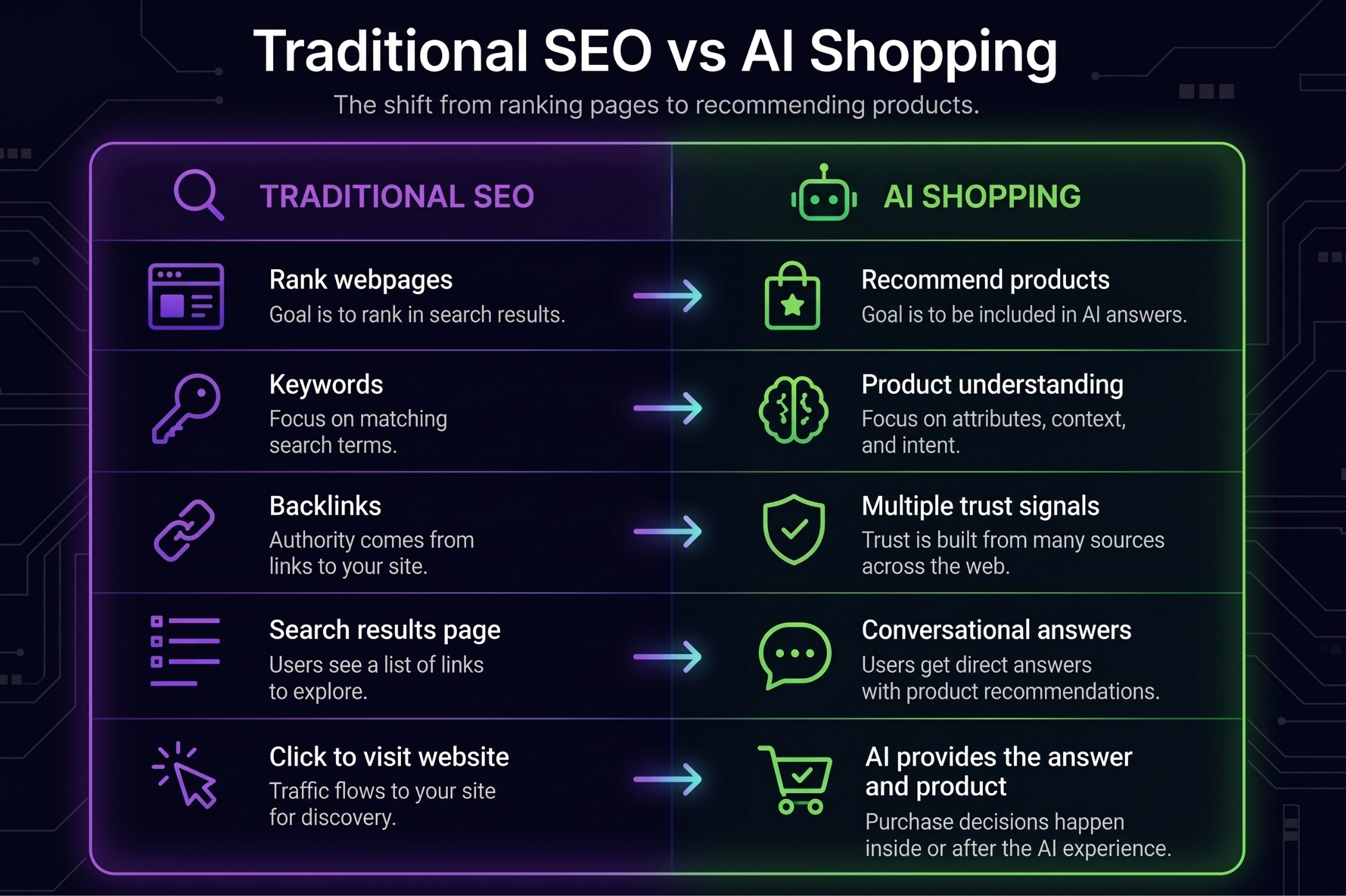
A guide highlighting all of the differences between traditional SEO and AI shopping

The Universal Commerce Protocol (UCP): Shopify’s Head Start

Shopify and Google built something called the Universal Commerce Protocol, or UCP, an open standard for how AI agents discover, evaluate, and transact with ecommerce platforms. It launched at the start of 2026 and now has more than 30 companies behind it, including some brands you’d recognize.

This is the piece that matters most for Shopify AI search visibility specifically. Eligible Shopify stores are UCP-enabled by default, and eligible products are already included in Shopify’s Catalog, which syndicates product information to ChatGPT, Copilot, Shop, and other AI surfaces. Merchants can influence what information is available, but they don’t control what an AI ultimately recommends. (Think of UCP as giving your products a seat at the table, not guaranteeing they’ll be chosen.)

If you’re not on Shopify, UCP is still an open standard, so BigCommerce and WooCommerce stores can use it too. BigCommerce’s parent company has publicly backed it, and there are already WooCommerce plugins built around it. In practice, though, getting it running usually takes a developer, since it’s not a default toggle the way it is on Shopify.

Build Brand and Product Mentions Everywhere

Most brands still aren’t thinking about brand mentions and AI search together, but that pairing is really the whole answer to how to get cited by AI in the first place. AI shopping tools do a lot more than read your website.

For example, ChatGPT’s Shopping Research explicitly pulls in reviews, specs, and pricing from other retail sources and trusted third-party sites, not just what you publish yourself.

This lines up with what we’ve seen in our own review of hundreds of product pages: brands with strong, accurate information sitting on their own site but messy or outdated information floating around elsewhere tend to underperform in AI answers compared to brands with a consistent story across the web.

If something inaccurate about your product is sitting on a retailer page, a review site, or a forum somewhere, that’s a source an AI system might reconcile against your own claims … and it might not resolve in your favor.

We wouldn’t go as far as claiming there’s a fixed sequence, like AI checks your site first, then retailers, then Reddit. Nobody’s published that as an official rule, and we haven’t seen evidence of one.

What we can say from our own testing is that AI systems tend to pull together first-party product information with third-party listings, reviews, and community discussion, and treat all of it as part of the same picture.

This is playing out publicly right now. Reuters reported this week that retailers including Walmart, Ulta Beauty, and Wayfair are actively updating their websites to rank better in chatbot results, even as they try to keep the actual transaction and customer data on their own platforms. Ulta Beauty is building shopping carts into Gemini because that’s where customers are already finding its products, while still preferring purchases happen on ulta.com. The stakes are real too: Adobe Analytics found that shoppers referred by generative AI tools spent 41% more per visit than those who arrived through traditional channels.

One caution before you go chasing every mention of your brand online: don’t try to manufacture this. Reddit in particular has become a magnet for brands seeding fake, AI-friendly posts designed to look like organic recommendations, and it’s not working out well for the brands doing it.

The Verge recently reported that Reddit’s own moderation systems are catching roughly 25,000 spammy, brand-planted posts and comments a day, and the platform is actively building detection specifically aimed at this kind of manufactured content. If you want to know more about why that approach backfires, we’ve written separately about AI poisoning and black hat GEO. The safer, more durable play is making sure what’s already being said about your brand is accurate, and earning genuine coverage and reviews rather than faking them.

Use Bullet Points on PDPs (Product Pages)

We’re calling it a “hack” because that’s how most brands will search for it, but the real move here is giving AI something specific to work with instead of marketing fluff. Product detail pages need to say something concrete, not just sound good.

Shopify’s Catalog now structures fields like materials, sizing, key features, technical specs, and value proposition specifically so agents can search and compare products more precisely. Google has rolled out something similar with what it calls “conversational attributes,” which are aimed at helping AI systems understand product nuance rather than just keywords.

In practice, this means the difference between a bullet that says “premium comfort” and one that says “merino wool blend, true to size, machine washable, rated for temperatures down to 20°F” is enormous from an AI system’s perspective. The first tells AI almost nothing. The second gives it details it can actually use.
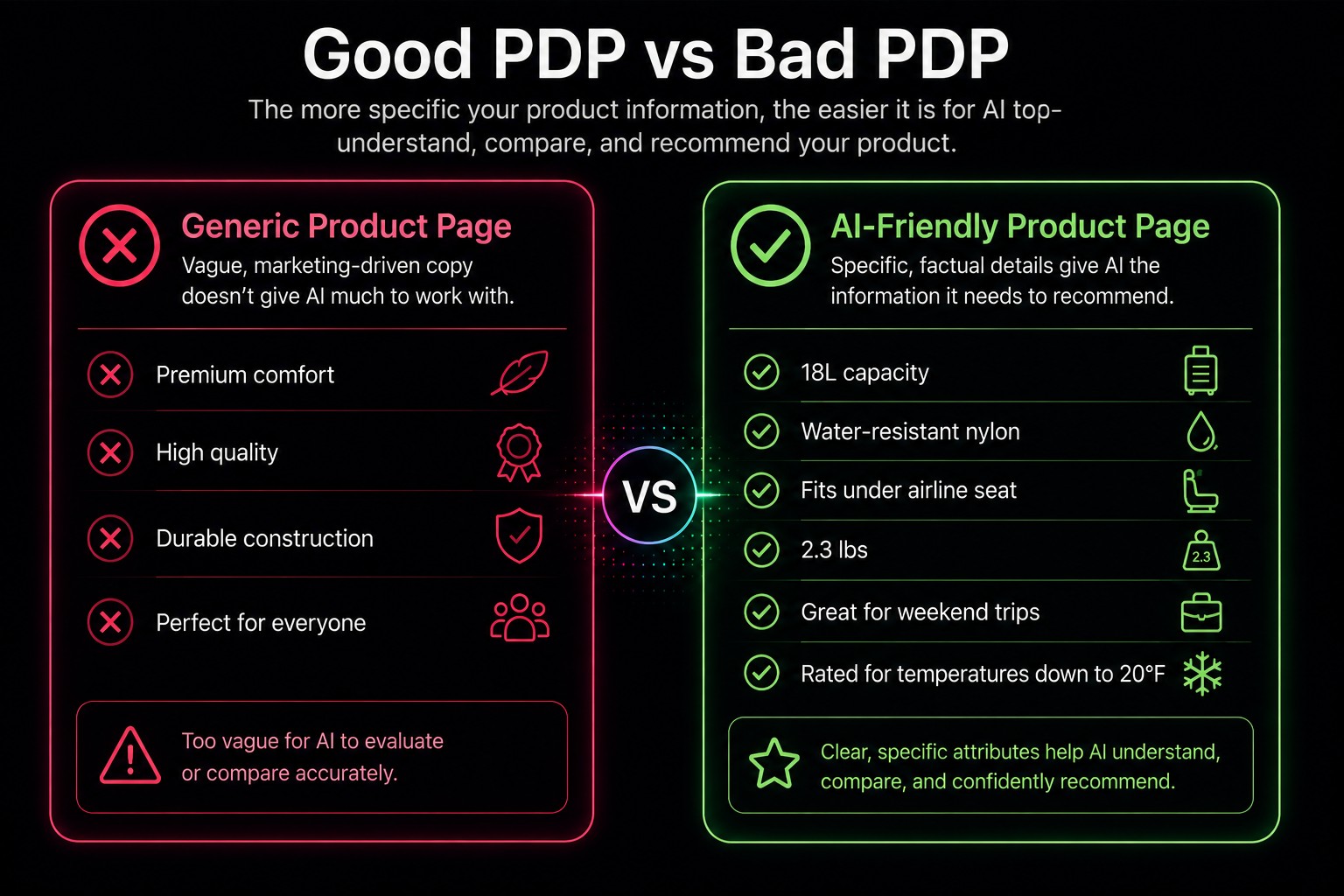
Neon pink and green graphic highlighting the differences between "good", or well performing, product pages versus "bad" PDPs for an eCommerce website.

Formatting bullets a certain way isn’t itself a magic ranking trick. A recent controlled study running 252,000 trials across six major AI models found that the strongest factors in whether a product gets cited were topical relevance, where it sits in a list, explicit price information, how fresh the content is, and completeness.

What we have found in our own testing is that bulleted, attribute-rich PDP content tends to be easier for agents to pull cleanly out of a page’s HTML than the same information buried in a paragraph.

Call that our own observation rather than an industry-proven rule, but it’s a low-effort change worth making regardless. We’ve seen it increase the accuracy of product information on AI platforms 100% of the time.

Seriously, AI takes this information into account above everything else on a given page.

Create an agents.md File: Your Brand’s AI Instruction Manual

If your store runs on Shopify, you already have one of these, whether you knew it or not. As of May 2026, Shopify automatically generates an agents.md file for every store, accessible at yourstore.com/agents.md, with /llms.txt and /llms-full.txt pointing to the same content unless you customize them.

Stores on the Agentic Storefront also expose this connection through a sitemap agentic discovery XML file, something like yourstore.com/sitemap_agentic_discovery.xml, which is what actually points agents toward the agents.md file and the rest of your agent-readable setup in the first place.

Here’s the catch, and it’s worth understanding before you get excited about it: the default file Shopify generates is mostly technical boilerplate. It tells an AI agent how to use your store’s checkout and API endpoints. It doesn’t say anything about your brand, your best sellers, or what makes you worth recommending over the store next to you. Every default Shopify agents.mdd reads almost identically to every other one. If you want an agent to actually understand what makes your brand distinct, you have to write that part yourself.

You can customize it through your theme’s Liquid template files, adding information about what you sell, what sets you apart, and which pages or collections matter most. Non-Shopify brands can and should build a version of this manually too. It’s a markdown file, nothing fancier than that.

Does agents.md Actually Improve AI Visibility?

We went looking for before-and-after case studies because we knew readers would want proof that this actually works. We didn’t find any that met that standard. That’s not especially surprising. Shopify only introduced customizable agents.md files in late May 2026, so the feature simply hasn’t been around long enough for credible longitudinal studies to emerge.

What we did find was telling in a different way. Agencies, ecommerce platforms, and AI tooling companies are already building around the standard, and Shopify has made it part of its long-term agentic commerce roadmap. That doesn’t prove a customized agents.md file will improve your visibility today, but it does suggest this is infrastructure worth putting in place before it becomes table stakes.

Our Take

Treat this as infrastructure worth getting right early, not a proven ranking hack. Keep it accurate and genuinely useful rather than treating it as another place to stuff keywords, since Shopify has signaled that rules and guardrails for these files are likely coming. Getting flagged for gaming a system before the rules even exist is a bad way to find out where the line was.

If you want a working example, we keep our own agents.md file up to date and public.

If you’d like to dig deeper, we’ve also put together a broader guide to ecommerce SEO and GEO, and a deeper look at how agentic commerce actually works if you want the bigger picture beyond the ecommerce-specific tactics here.

Where This Leaves You

If there’s one theme running through everything we’ve covered, it’s that AI doesn’t make recommendations based on a single signal. It builds confidence by comparing information from a lot of different places. That’s why product data, your own website, third-party mentions, UCP, and agents.md all matter. They’re different pieces of the same picture.

The good news is that none of this requires chasing the latest AI hack. It mostly comes down to doing the fundamentals well, presenting your products clearly, and making sure the information about your brand is accurate wherever AI is likely to find it. That’s a worthwhile investment whether you’re thinking about today’s AI shopping experiences or the ones we’ll all be using a few years from now.

If you’ve got questions about how to get your ecommerce site to rank on AI Search, reach out to us. We’d be happy to give you the blueprint on AI Search citing.

Next Steps You Should Take to Improve Your eCommerce Site’s Rankings in AI

  • Have your store connected to the UCP (Universal Context Protocol). Ensure all of your products in your catalog are available for indexing.
  • Build brand mentions and product mentions along with backlinks on authoritative 3rd party sites.
  • Create an agents.md file or markdown-formatted page on your site that describes your business, mission, team, contact information, and how an AI agent can properly crawl the site.
  • Create an llms.txt file with information regarding which pages you want the AI agent to source for information. It’s similar to a robots.txt file used in traditional SEO best practices. You’re just alert the AI agent as to where on the website you want it to go. Check out our llms.txt file here.

FAQs

What is agentic commerce? Agentic commerce refers to AI systems, like ChatGPT, Gemini, and Copilot, that can browse, compare, and in some cases complete purchases on a shopper’s behalf rather than simply answering questions about products.

Do I need Shopify to use the Universal Commerce Protocol? No. UCP is an open standard co-developed by Shopify and Google, so BigCommerce and WooCommerce stores can implement it too. It’s just not a default toggle outside Shopify, so it typically takes a developer to set up.

What is an agents.md file, and do I need one? It’s a plain markdown file that tells AI agents what your brand sells, what makes it different, and which pages matter most. Shopify generates a default one automatically for every store, but the default is generic. Every store should have a customized version, Shopify or not.

How does AI decide which products to recommend? Based on what we’ve seen across hundreds of product pages, it comes down to a mix of structured, specific product data, accurate third-party mentions and reviews, and how well a store’s technical setup lets an agent actually read and transact with the catalog. No platform has published an exact formula.

Do backlinks still matter for AI search visibility? They’re part of the picture, but they’re no longer the whole picture. AI shopping tools weigh brand and product mentions across reviews, retailer listings, and community discussion, not just links pointing back to your site.
AI Search is Now Google’s Default Search Experience

Top Takeaways

Save your time reading this whole article. AI Search is now the norm.

  • At Google I/O on May 19, 2026, Google made AI Mode the default search experience and shipped the biggest redesign to Google Search in 25 years.
  • Blue links are not gone. SERPs were demoted to a “Web” tab. Google’s VP of Search confirmed the traditional results still exist to some extent. They’re just no longer what you’ll see first.
  • AI Mode grew from roughly 100 million monthly users in late 2025 to 1 billion by Google’s I/O 2026.
  • The rollout is ongoing. More accounts and more query types get AI-first results every day.
  • Top-of-funnel and middle-of-funnel research now happen inside an AI conversation, not on your website. The end conversion is what your website is now for.
  • SEO hasn’t died. It’s still the only way your site can be crawled by Google and AI agents. If AI can’t find and read your site, it can’t cite you. Your competitor is seen instead of you.
  • Adoption is not early-adopter anymore. Google AI Overviews reportedly sits above 2.5 billion monthly users, AI Mode is now above 1 billion.
  • Ads are thin in AI Mode right now, and that’s temporary. Google announced four new Gemini-powered ad formats at Marketing Live in May 2026, built to appear inside the answer instead of above it.
  • You’re now focusing on PRO: Personal Response Optimization.

Google's new AI Mode Homepage 2026

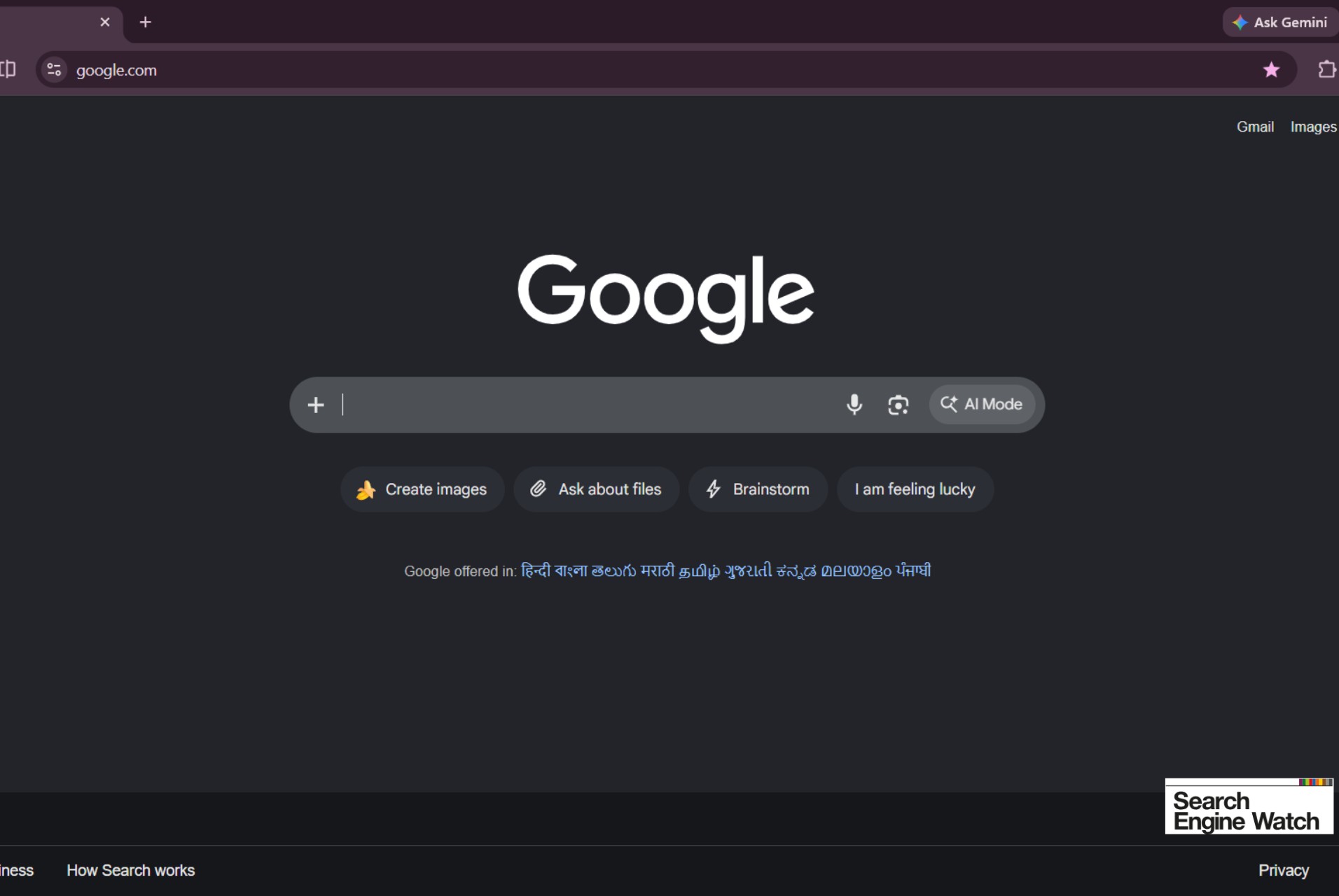
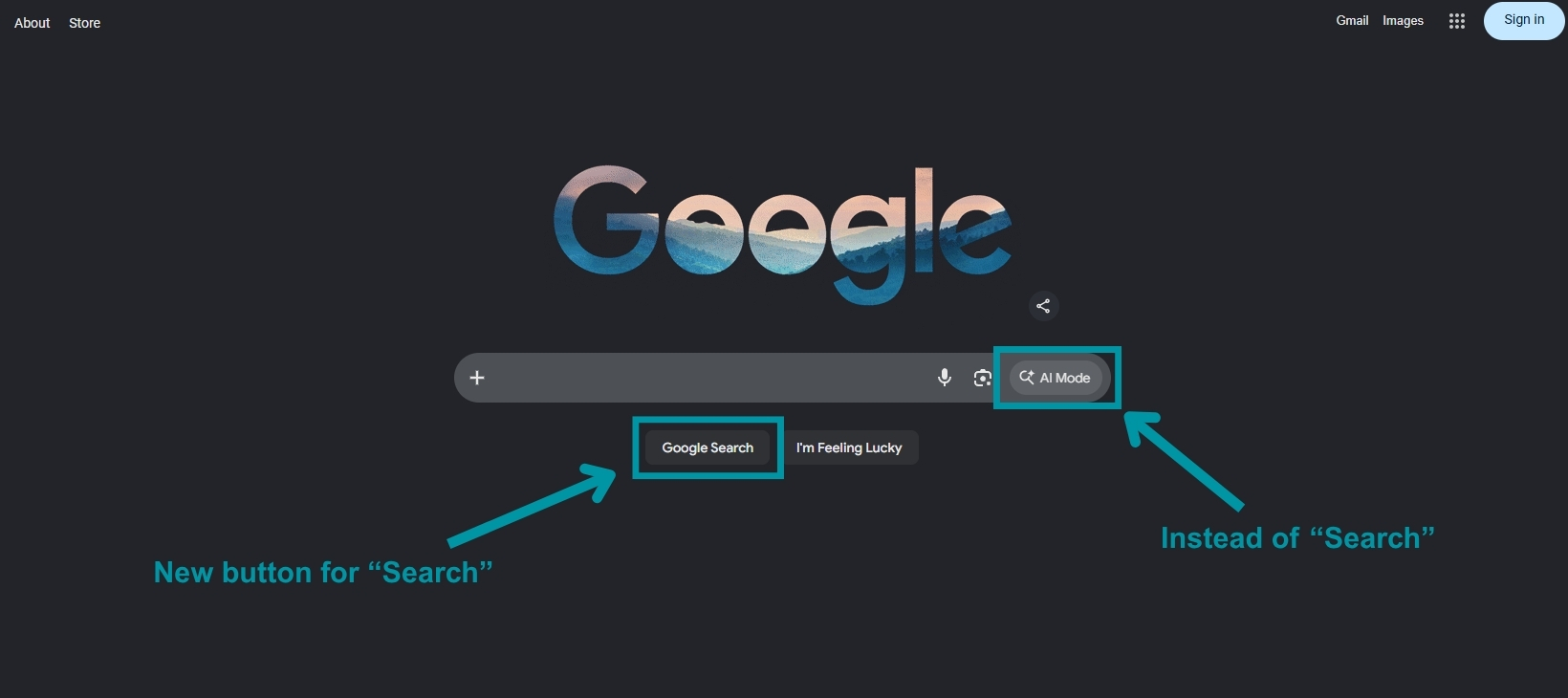
I mean, look at this! Google “Search” is now a secondary button. “AI Mode” is the first click. This is what we’ve been able to find on each browser when starting a new session, even in incognito or private windows.

Google’s New Default Homepage Change

For 25 years, a Google search returned a ranked list of links and we picked one. Google added more and more rich result features, leading to an era of zero clicks for searches. In digital marketing, we call this list the “SERPs” (search engine results pages).

That default ended in May 2026.

This has been rolling out since early 2025:

  • March 2025: AI Mode enters limited pilot through Search Labs.
  • May 2025: AI Mode launches in the US as a separate tab.
  • July to November 2025: Geographic rollout: UK, India, EU, then 180+ countries.
  • Late 2025: Roughly 75 million daily and 100 million monthly users.
  • May 19, 2026 (Google I/O): Google announces 1 billion monthly users, makes Gemini 3.5 Flash the default model globally, and ships a redesigned search box that accepts text, images, video, files, and even dragged-in Chrome tabs. (Google’s announcement)
  • Summer 2026 and what’s next: Information Agents (background research that monitors topics and prices) and Generative UI (custom layouts built on the fly) continue rolling out.

Liz Reid, VP of Search at Google, stated that “Google Search is AI search through and through.” That’s a pretty bold a*s statement!

And there you have it, Search is AI now.

The Search segment is worth the 15 minutes to keep up to date on the shift: Google I/O ’26 Search Keynote


Search Engine Watch was able to find the Homepage version that Google’s been testing. It looks a lot like what you’d see for an AI LLM like Gemini rather than the traditional search-focused Homepage we’ve seen for the last couple of decades from Google.

Search Engine Watch's screenshot of the new Google Homepage
Image Source: Search Engine Watch

The Blue Links Aren’t Gone

The SERPs with blue links and metadata still exist. Reid said so from the stage, and Google’s own announcement describes blending web and AI results, not replacing one with the other. There’s a “Web” tab, and organic results still appear alongside AI responses. What changed is the default, and that default matters.

The majority of users don’t typically change their default viewing because it’s either an inconvenience or they don’t notice. So you’re going to see a huge shift in how users actually search on Google using AI.

How Many People Are Using AI Search and AI Overviews?

It’s crazy to think about since AI Mode and Google’s AI Overviews have been seen as untrustworthy in responses and it comes up with garbage a lot of the time, but people are now relying on AI instead of traditional search results.

  • AI Overviews: reportedly more than 2.5 billion monthly users. This is the summary block most people have already seen at the top of results, and it now feeds directly into AI Mode.
  • AI Mode: more than 1 billion monthly users, announced at I/O 2026. That’s up from roughly 100 million monthly in late 2025, and Google says queries have more than doubled every quarter since launch.
  • Session behavior: third-party analyses say the share of AI Mode sessions that end without a click to an outside site somewhere in the low 90s.

The two areas are also no longer separate. AI Overviews and AI Mode were merged into one continuous flow within Google Search, so a follow-up question on an Overview slides into a full AI Mode conversation without the user choosing anything.

Why This is Completely Different from Traditional Search

Search used to take a lot more thought processing. Start with a query, get a list, then click to a website you think is your best option.

Now it’s a conversation.

Someone opens with a question or a request. The AI answers and typically suggests the next question. They go deeper. They compare options. They narrow it down. By the time they’re ready to buy or convert, they’ve done their entire education and consideration phase without landing on a single website.

Google, ChatGPT, Gemini, and Claude all propose follow-up prompts. The platform isn’t just answering what people ask. It’s shaping what they think to ask next. That’s a level of influence over the buyer journey that no channel has ever had.

And every one of those answers is personalized to the individual asking.

How Does This Affect Ads?

If you run paid search, you’ve probably noticed the same thing we have: ads show up far less often in AI Mode than on a classic results page. Yeah, ads only appear in roughly 25.5% of AI results.

Third-party tracking earlier this year put ads on roughly a quarter of AI Mode responses, meaning most AI Mode answers currently carry no ad at all.

This is the current state of ads. We all know that Google likes to make its money, so it’s probably going to start adding in more ads very quickly.

At Google Marketing Live on May 20, 2026, Google announced a new generation of Gemini-powered ad formats built specifically for AI Mode. The important detail is where they sit. The ads are designed to appear inside chats:

  • Conversational Discovery ads answer the user’s actual question inside the AI response.
  • Highlighted Answers place eligible ads inside list-style responses, where position depends on relevance rather than bid alone.
  • AI-powered Shopping ads target high-consideration purchases.
  • Business Agent for Leads handles lead capture inside the conversation.

Three things follow from this for anyone managing spend.

Impressions are being rebuilt, not removed. The inventory is moving from above the answer to inside the answer. Volume looks low today because the formats are still in testing, largely US-first.

Eligibility runs through automation. Access to these placements is tied to Performance Max and AI Max campaign types. If your account is still built entirely on manual keyword campaigns, you’re not part of this.

Your organic and paid work now have the same problem. Both now depend on the same inputs: clear, specific, well-structured information that Google’s AI LLM Gemini can read and reuse. Feed quality, product data, and page content feed the ad system and the citation system at the same time. A digital marketing agency that runs those as two disconnected departments is going to underperform in one of these areas.

What We’re Calling the New AI Search Age: PRO

“Personal Response Optimization.”

The old model optimized for keywords: broad, short-tail, long-tail. The new model optimizes for the person and the conversation they’re actually having. That means going deeper than demographics into psychographics: what your ideal customer cares about, how they phrase problems, what they’re worried about, and what they’d ask an AI at each stage.

It also means your website plays a bit of a different role. Your site is not just a brochure people browse. It’s a library that AI reads, pulling specifics on services, process, and pricing to decide whether you’re worth citing.

Even Google uses “personalize” as part of its own practice in AI Mode when trying to find relevant results for an adequate response.

bgood Has Prepped for This for Years

This shift isn’t a big surprise to us. We’ve been saying for years that AI would become everyone’s personal assistant. It wants to deliver the best results to its user, that’s its mission. Google has always said that it wants to deliver the best results to users, which now means AI as an assistant to get you there.

Be ready for this new shift. You’re going to start seeing a huge decrease in clicks to your site, an upturn in impressions (if you’re doing things right) and you’ll see competitors you’ve never had on your radar pop up ahead of you.

This new age of AI Search is going to solidify one thing: You can’t be everything to everyone, so make your brand’s stance on who you want to target as your customer group(s). Personalization on your online assets is going to be the most important play you make in 2026 and the future.

Common Questions for Us

How do I turn off AI Mode and get normal Google results back?

Click the Web tab under the search bar, or add &udm=14 to a Google search URL to force classic results. You can set that as a custom search engine in your browser to make it stick. This is worth knowing for your own research, but do not assume your customers will bother. Almost nobody changes a default, which is the whole reason this shift matters.

How do I find out whether my brand shows up in AI Mode at all?

Start manually. Write down the ten questions a real buyer would ask before hiring you, run each one in AI Mode, ChatGPT, Claude and Perplexity, and log whether you appear and what gets said. It takes an afternoon and tells you more than any dashboard. Move to a tracking tool once you have a baseline worth monitoring.

My impressions are up but my clicks are down. Is something broken? 

Probably not, because that is the expected shape of this change. You are being shown inside more AI answers while fewer people need to click through to get what they came for. Check whether the traffic you still get converts at the same rate or better. Falling clicks with steady conversions means the funnel is working; it just got shorter. 

Should I block AI crawlers to stop them using my content? 

Only if you are a publisher whose business model is pageviews. For almost everyone else it is self-sabotage: if AI cannot read your site, it cannot cite you, and your competitor gets recommended instead. Blocking protects content nobody was going to pay for while forfeiting the visibility that replaces the clicks you lost. 

Does an llms.txt file actually do anything yet? 

Not necessarily just yet. No major AI platform has committed to honoring it, so it’s more of an additional layer that could become more important in the future. Twenty minutes to add one is fine. Choosing it over structured data, clear headings, and genuinely specific content would be a mistake, though, since those are what AI systems demonstrably read today. 

What structured data should I prioritize now? 

Organization and Person schema so AI systems can resolve who you are, FAQPage on anything answering real questions, Product and Review if you sell online, and LocalBusiness if you have a service area. Entity clarity matters more than volume, which means being unambiguous about what you are beats marking up every page on the site. 

If clicks are not the metric anymore, what is? 

Track four things: how often you are cited in AI answers for your key questions, branded search volume, impressions in Search Console, and conversion rate of the traffic that does arrive. The first is the leading indicator and the last is the one that pays you. Clicks become a middle metric rather than the headline. 

Does this hit local and service businesses the same way? 

Less severely, at least so far. Location-based intent still resolves to maps, listings, and a phone call more often than a conversation, so local businesses have kept more of their clicks. Do not read that as safety, because the research phase before someone calls you has already moved into AI, even when the final action has not. 

Do I need to rewrite all my existing content? 

No. Audit before you rewrite. Take your top twenty pages and check whether each one answers a specific question plainly in the first hundred words, uses honest headings, and states real specifics like process, pricing, and limitations. Most pages need tightening and better structure, not a rewrite. 

How often should I be checking my AI visibility? 

Monthly is enough for most businesses, and quarterly is enough if your category moves slowly. Check after any major Google announcement, after you publish something significant, and any time branded search or conversions move for no obvious reason.

Businesses Have the Wrong Expectations for Marketing

A neon blue megaphone and pink bullseye target on a scale, representing lead volume versus targeted conversion balance.

Marketing is not sales.

For some reason, this seems to be the largest misconception business owners have.

I’ve been meaning to make a post about this for a long time because I think it’s important to create a distinction for people so they know what real success looks like for marketing. Not going to go on a rant, but this definitely needed to be said.

It’s not responsible for hitting your monthly revenue number; it’s not a lever you pull when the pipeline looks thin, and it’s definitely not the department to put immediate blame on when a bad quarter happens. I know a lot of people might become defensive hearing that, but it’s the truth.

I’ve sat across from enough founders and marketing leads to know the pattern. Revenue dips, leadership panics, and the first question in the room is “what is marketing doing about this?” Or even worse, “which part of marketing should we cut?”

Never mind that the product had a rough launch, or the sales team lost two reps, or the market itself softened. Marketing gets treated like a faucet you can just turn up. It isn’t, and treating it that way is quietly wrecking a lot of good marketing teams and businesses.

The Misconception That Is Killing Your Marketing Team

Maybe we’ve got bias since we’re a digital marketing studio, but we know where we stand in marketing compared to the rest of the company. So many things affect marketing, and marketing can help or damage every other part of the business.

Think about it: Marketing is meant for getting your brand’s message out there and reaching your consumers.

Sales is for hitting concrete numbers and knocking down doors.

Here’s the pattern I keep running into: leadership wants every dollar of marketing spend tied to a specific closed deal. Sounds reasonable on paper, but in practice, it doesn’t work.

Direct revenue attribution works fine for the last click before checkout. It falls apart the moment you try to apply it to everything marketing actually does, because most of marketing’s job isn’t the last click: it’s the twelve touchpoints before the purchase.

It’s the blog post someone read eight months before they became a lead. It’s the brand impression that made them open your email instead of deleting it. The social post that made a stranger recognize your logo when a competitor pitched them. None of that shows up cleanly in a CRM report, but none of it is any less real, and it’s hard to measure.

When a marketing team is judged purely on what can be attributed to a dollar figure this month, something predictable happens: they stop taking risks.

Why would they publish anything that doesn’t have an obvious, immediate payoff? Why pitch the bold campaign when the safe one is easier to defend in a meeting? I’ve watched genuinely talented marketers get boxed into producing the same three “safe” content types on repeat, not because they lacked better ideas, but because leadership made it clear that anything else wouldn’t be forgiven if it didn’t convert.

That’s how you end up with a marketing team full of smart people producing forgettable work.

What Marketing Is Actually For

Strip away the KPI dashboards for a second and ask what marketing is actually supposed to do. It comes down to three things.

Brand awareness.

Before anyone buys from you, they have to know you exist. Sounds obvious, but it’s the part businesses skip past fastest when they’re impatient for results. That long-term investment matters because most potential customers aren’t ready to buy today anyway. In fact, research from the Ehrenberg-Bass Institute and LinkedIn’s B2B Institute found that 95% of B2B buyers are out of market at any given time. That means most of the people you’re trying to reach aren’t ready to buy today—but they still need to know who you are when they eventually are.

Industry authority and positioning.

This is the work that makes you the name people think of first in your category. Content, social presence, PR, showing up consistently with a point of view. It’s the reason some businesses get inbound leads that already trust them, while their competitors are cold-calling into a void.

Perception building.

How someone feels about your brand before they ever talk to a salesperson. Great marketing pre-sells. It shapes the story in someone’s head before your sales team says a word, which is exactly why sales conversations go faster and close rates go up when marketing has done its job well upstream.

None of these three things are optional add-ons or side benefits to marketing. They are the job. They are the foundation that makes sales easier in the first place.

Marketing Supports the Entire Customer Journey

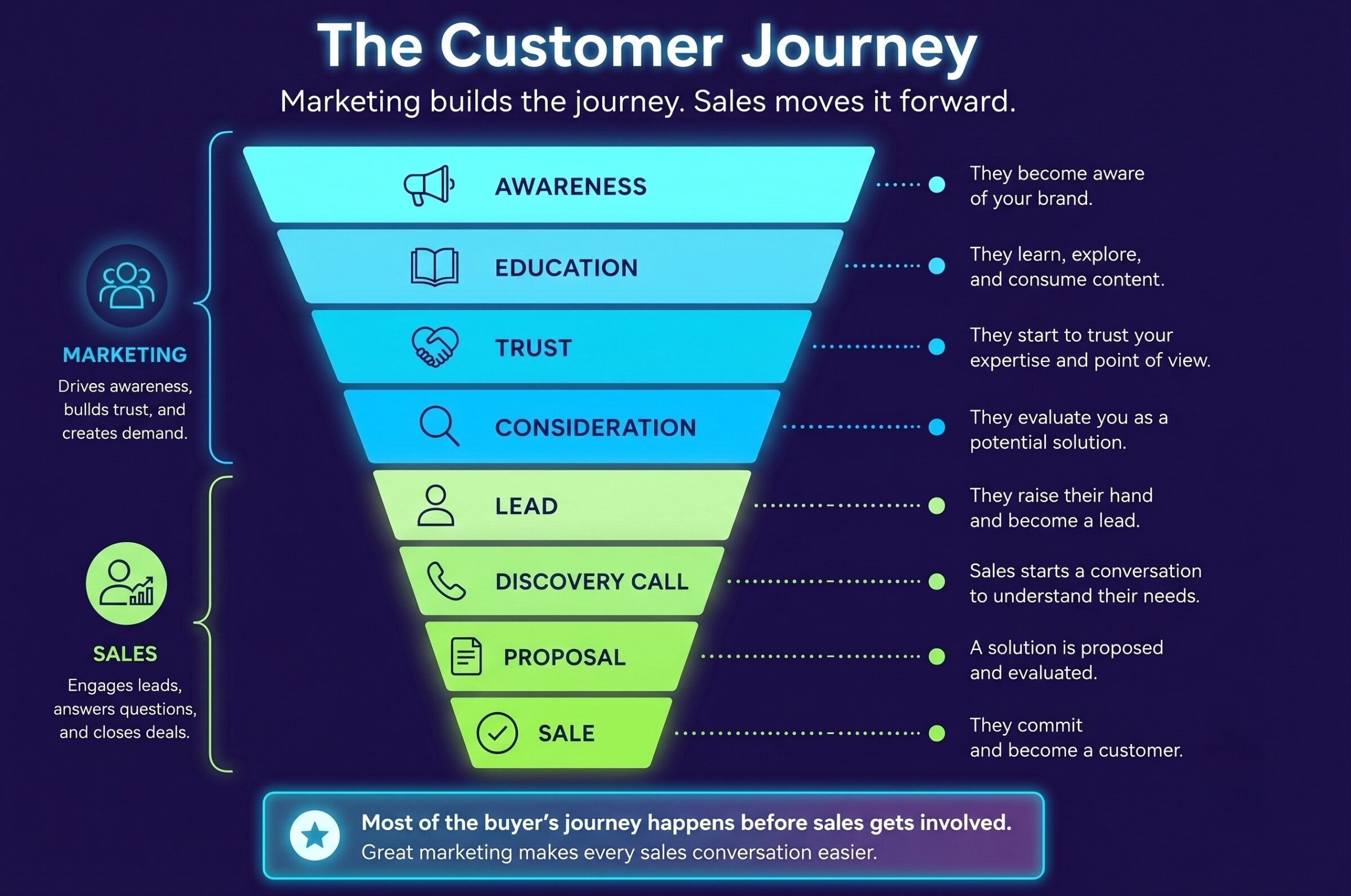
Every customer moves through a journey before making a purchase. Marketing supports every stage of that journey by building awareness, establishing credibility, and creating positive brand experiences long before someone reaches out to your sales team.

Full-funnel diagram showing The Customer Journey strategy including awareness, education, trust, consideration, lead, discovery, proposal, and sale stages.

Marketing vs. Sales: The Real Distinction

Sales is a conversation. It’s a pipeline, a series of calls, a close. Marketing builds the world in which that conversation is even possible in the first place.

Think of it like this: sales is the person knocking on the door. Marketing is the reason the person on the other side already recognizes the name on the business card and decides to answer. You can have the best closer in the world, but if nobody’s ever heard of you and nothing about your brand feels credible, that closer is starting every single conversation from zero.

The mistake I see over and over is businesses asking marketing to do sales’ job: close the deal, hit the number, own the revenue outcome directly. That’s not marketing’s function, and forcing it into that role doesn’t make your revenue problem go away. It just makes your marketing worse at the thing it’s actually good for.

Marketing and Sales Measure Success Differently

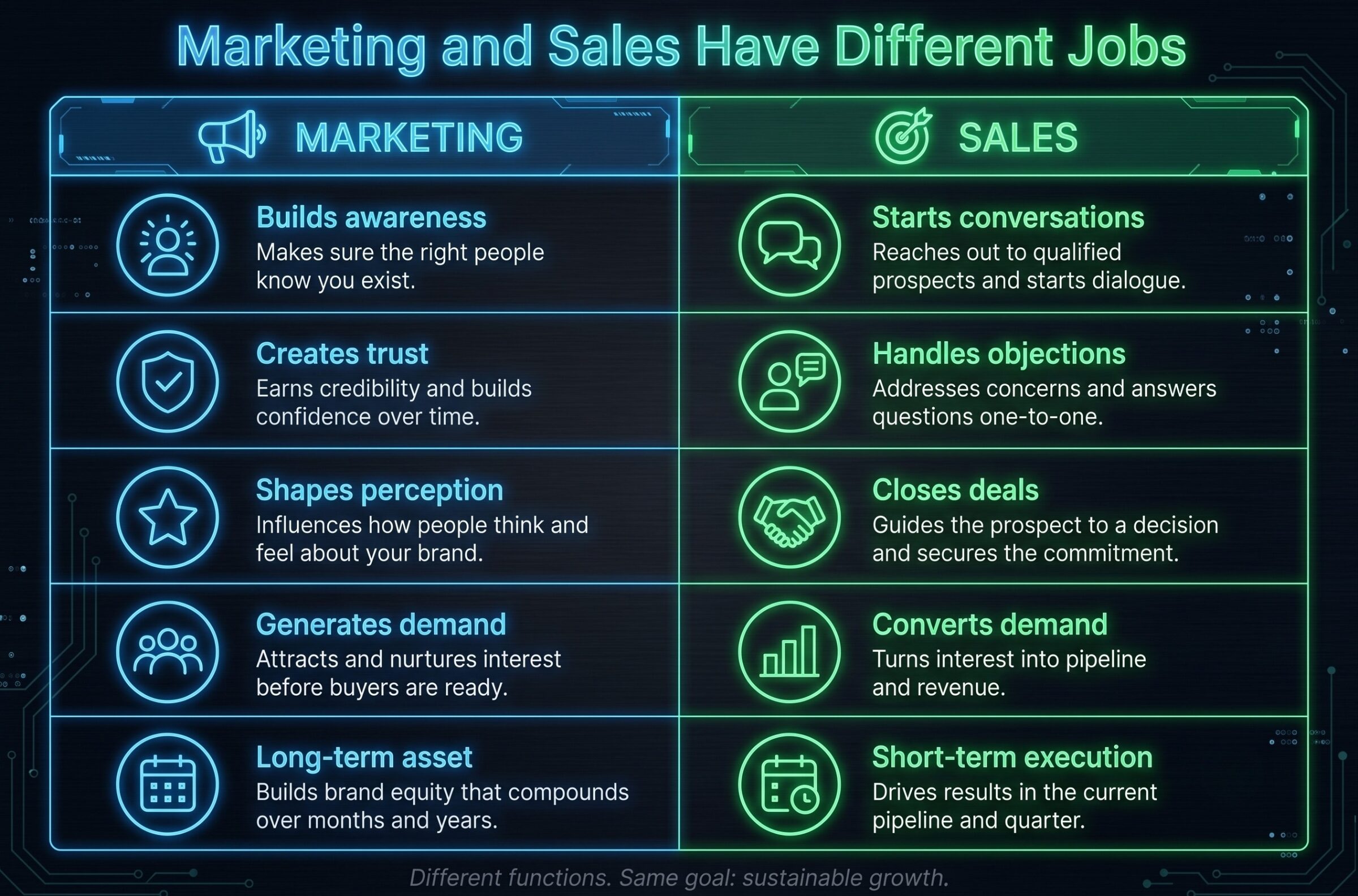
One of the biggest mistakes businesses make is assuming marketing and sales should be judged by the same metrics. While both contribute to revenue, they do so in different ways. Marketing builds the foundation that makes sales easier, while sales focuses on converting that momentum into customers.

Cyberpunk-themed infographic table comparing the roles of Marketing in blue (demand generation, trust building, perception) against Sales in green (conversation starting, objection handling, closing deals).

The KPI Trap: What Marketing Metrics Should Actually Look Like

I’m not telling you to throw out measurement. Direct revenue attribution to a single campaign is often genuinely misleading, though, because brand-building doesn’t move in a clean straight line from touchpoint to close.

The better question isn’t “did this post make us money this week.” It’s whether share of voice in your category is growing. Whether organic traffic is trending up over months, not days. Whether people are searching your brand name more than they used to. Whether engagement quality is improving, not just impression counts. Whether the leads coming through content are converting at a healthier rate over time, even if you can’t point to the exact post that did it.

Redefine what you’re measuring instead of measuring nothing. A marketing team with no accountability is its own problem. But holding brand-level work to a sales-level yardstick just guarantees you’ll misjudge the work every time.

None of this means marketing exists separately from business outcomes. Great marketing should, of course, ultimately contribute to growth. The mistake is expecting every activity to produce immediate, directly attributable revenue when much of marketing works by influencing decisions over time.

Modern SEO/GEO strategies and thoughtful website design are good examples of this long-term approach to marketing. When properly implemented, success compounds over time rather than delivering instant revenue.

What Happens When Everyone Starts Dictating Marketing

Once every stakeholder in the building has an opinion on marketing’s output, creative work starts getting run through committee. Every post gets softened until it says nothing controversial, and nothing controversial usually means nothing memorable either. Marketers who joined the company because they wanted to make sharp, opinionated work end up spending their time defending safe, forgettable work instead. Eventually the good ones leave, and you’re left with a team that’s optimized for not getting blamed rather than for actually building the brand.

I’ve seen this exact cycle play out at businesses of every size: a marketing team starts strong, leadership gets nervous about a slow quarter, oversight increases, creative risk drops, results flatten out, and leadership concludes marketing “isn’t working”… never connecting that the flattening happened right after they started micromanaging it. 

How to Set Marketing Expectations That Actually Work

If you want marketing that actually moves your business forward, here’s where to start.

  1. Define marketing’s role in writing, before the campaigns launch, not after a bad quarter forces the conversation. 
  2. Agree on brand-level metrics that are separate from sales metrics, so nobody’s comparing apples to a completely different fruit. 
  3. Give the team creative autonomy inside a clearly defined brand framework, so they know the boundaries without having every decision run through a dozen people. 
  4. Separate your marketing budget from your sales budget, measuring each against its own goals instead of one number that neither was ever designed to hit alone.

Implementing these changes requires drawing clearer lines. However, it does not require a bigger marketing budget.

What Great Marketing Actually Looks Like

Marketing is not a revenue machine you can turn up and down on demand. When it’s working, you’ll know. Here are some of the telltale signs that your marketing team is doing a great job:

  • Consistent brand presence that builds recognition over months and years, not a single viral moment. 
  • Content that educates and positions the brand well before the audience is anywhere near ready to buy. 
  • Marketing that makes people want to work with you before your sales team ever picks up the phone. 
  • A team that’s trusted enough to do good work without fifteen rounds of committee approval standing between an idea and the world.

These are the things you’re actually paying for when you invest in marketing. Marketing is a long-term asset that makes every other part of your business easier, sales included. Set it up that way, and stop asking it to be something it was never built to be.

Ready to build a marketing strategy that supports long-term growth? Let’s talk.

Common Questions for Us

Realistically, how long before marketing shows results? 

Paid media moves in weeks. Conversion and website work shows up in one to two quarters. SEO, content, and brand take six to twelve months to become visible and keep compounding after that. The failure is not the timeline; it is agreeing to a six-month strategy and reviewing it against thirty-day expectations. 

What percentage of revenue should go to marketing? 

Commonly cited ranges run from roughly 5% of revenue for established businesses to well over 10% for those pursuing aggressive growth, with B2C typically higher than B2B. Treat any benchmark as a starting point rather than an answer, because your growth stage, margins, and sales cycle matter far more than an industry average. 

What should a monthly marketing report actually contain? 

Three sections. What moved and why, including the things that went badly. Leading indicators, such as branded search, share of voice, organic trend, engagement quality. And what is being tested next, with what would count as a win. If the report is a wall of green metrics with no decisions in it, nobody is learning anything. 

How do I know when marketing genuinely is the problem? 

When the leading indicators are flat. If branded search is not growing, nobody can describe what you do, your content is indistinguishable from competitors, and organic and referral traffic have not moved in a year, that is a marketing failure. If those are all healthy and deals still are not closing, the problem is downstream. 

How do I hold an agency accountable without last-click attribution? 

Agree in advance on leading indicators and a review cadence: Organic sessions to money pages, branded search growth, share of voice, qualified lead volume, and content or link output against plan. Then, ensure they explain the movement in those numbers. Accountability is about whether they can account for the work, not whether a CRM can trace it. 

Do brand-level metrics work for small businesses? 

Yes, in a simpler form. You may not have share-of-voice software, but you can track branded search in Search Console, count how many inbound enquiries already know what you do, and ask every new customer how they heard about you. That is enough to see whether awareness is compounding. 

Is this not just an excuse for marketing to avoid accountability? 

It would be, if it stopped at not measuring. A marketing team with no accountability is its own problem and deserves the scrutiny it gets. The argument is for a different yardstick, not a missing one, so hold the work to leading indicators, output against plan, and honest reporting on failures. That is harder to hide behind than a lead count. 

What Is the Value of a Website?

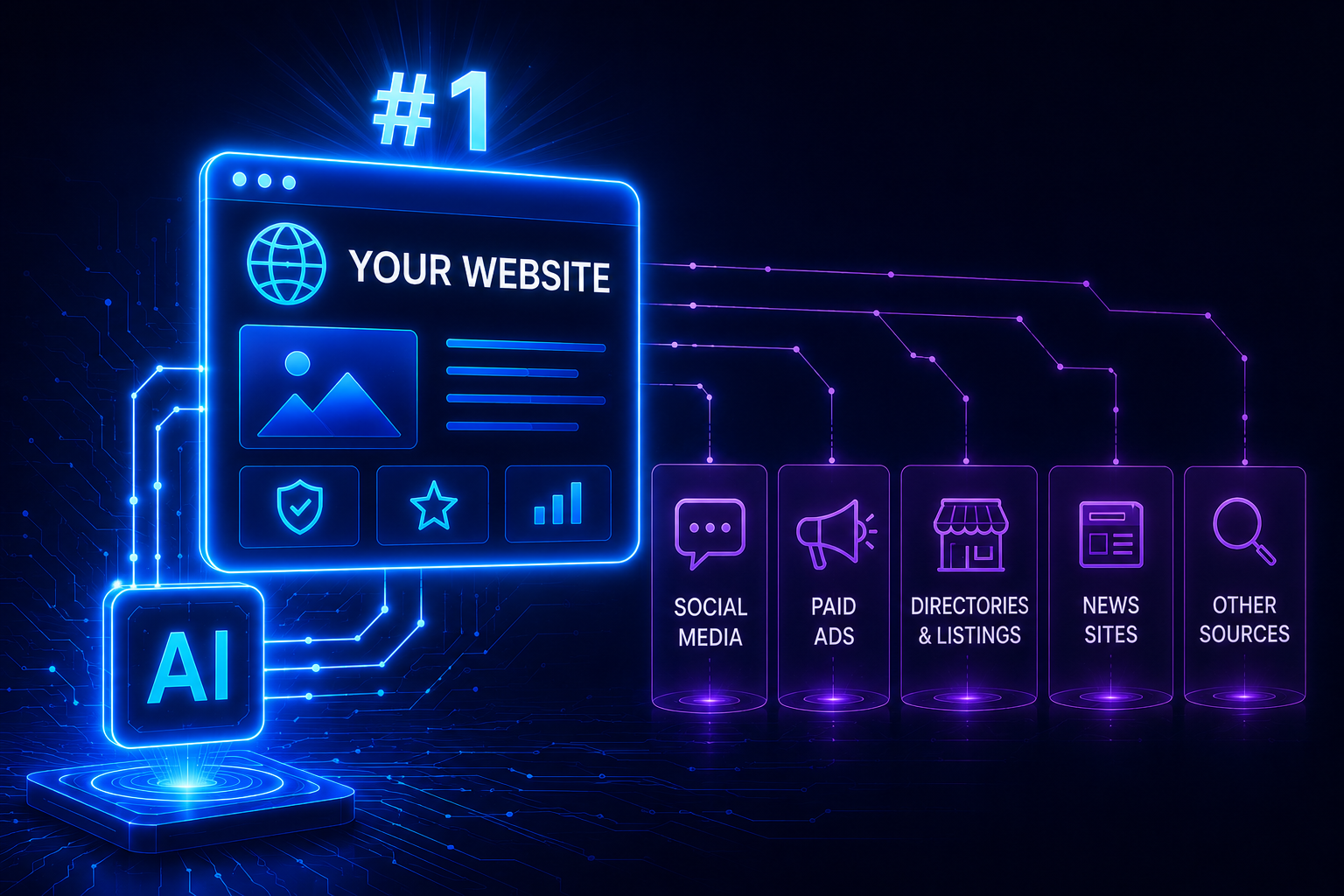
A digital infographic showing an AI module routing traffic to a website from social media, paid ads, directories, news sites, and other sources.

81% of customers research a business online before they buy anything from it. If they search for yours and find nothing, where do you think they go instead?

Straight to a competitor. That’s just how people shop now.

And they’re doing it on Google and AI Search platforms (ChatGPT, Gemini, Perplexity, etc.).

We get asked some version of “do I really need a website?” more than almost any other question in our line of work, usually from a business owner who’s doing fine on Instagram, gets most of their customers from referrals, and doesn’t see the point of paying for something they’re not sure anyone will use. I get the skepticism.

But in 2026, not having a website means you don’t really exist to Google, and you certainly don’t have all of the required information for the AI assistant your next customer just asked for a recommendation. That’s especially true for online retailers that don’t have an e-commerce storefront that’s their own. Agentic Commerce is getting adopted more every day.

Unlike social media posts, which are buried by an algorithm you don’t control, a website is the one piece of digital real estate that’s actually yours. And it’s also become the thing that determines whether AI tools even know your business is an option.

The Numbers Behind the Web

Let’s ground this in scale for a second, because the size of the web says a lot about what you’re competing against.

There are somewhere around 1.34 billion websites on the internet right now, though only about 15% of them are actually active and maintained. That huge gap means most of the web is noise, parked domains, and abandoned projects. The businesses that show up when it counts are the ones in that smaller, active slice. 

As for how all these websites were created, WordPress alone powers roughly 43% of all websites globally, which tells you how standardized the tools for building one have become. (There’s genuinely no excuse for “it’s too technical” anymore.)

On the human side, there are over 6 billion internet users worldwide, representing close to three-quarters of the planet. And boy, do we buy a lot of stuff online. Global online retail sales are on track to cross $6.88 trillion in 2026. Despite all that, nearly one in five small businesses still doesn’t have a website. About 83% do, which sounds like a lot until you realize that means millions of businesses are virtually invisible to search engines and AI assistants by default.

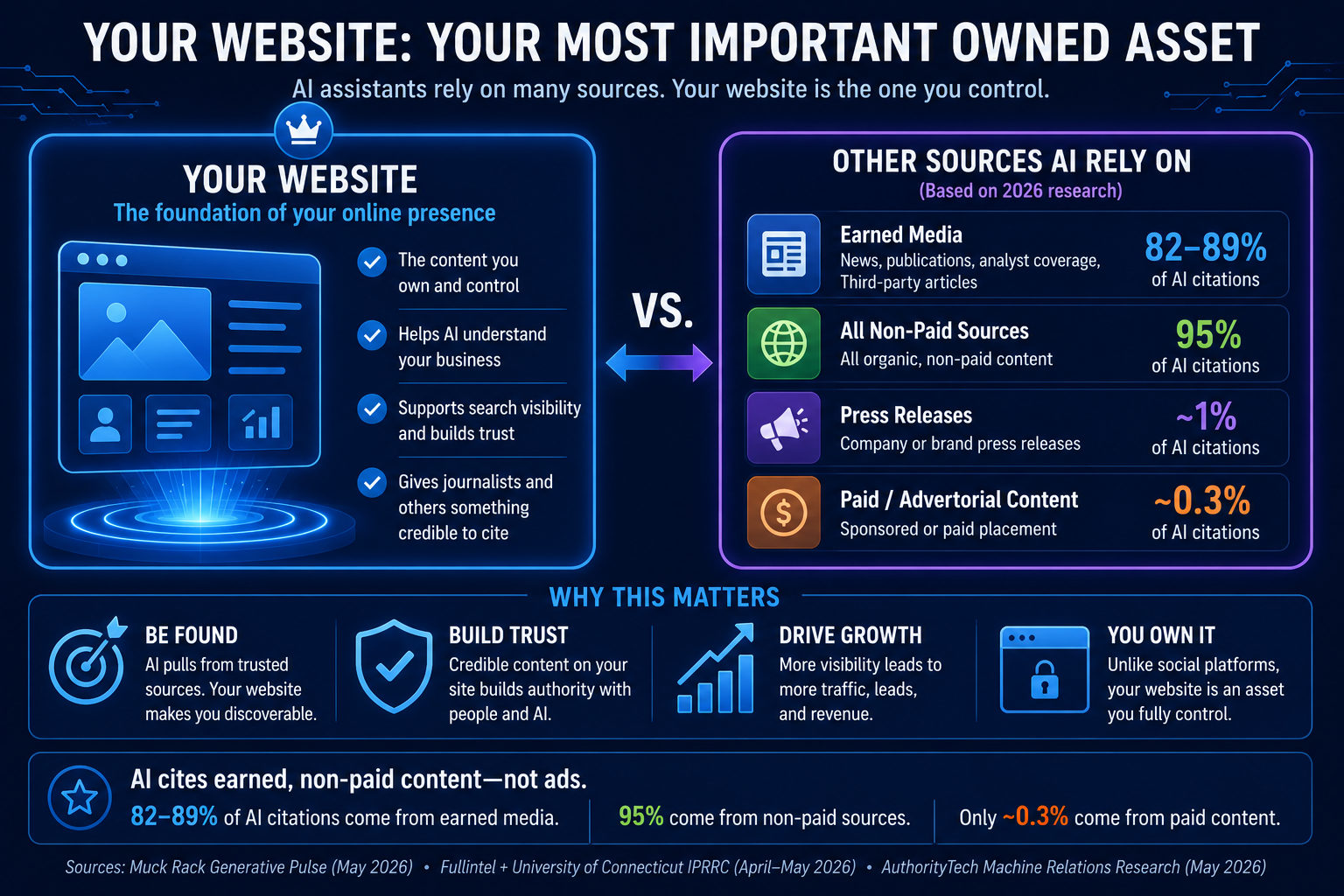
AI assistants like ChatGPT, Perplexity, and Google’s AI Overviews build their answers from information they can crawl and understand across the web. That includes websites, news articles, review sites, forums, and other authoritative sources. Research shows that 82% to 95% of AI citations come from earned, non-paid web content, highlighting the importance of having a credible online presence. While a website isn’t the only source AI systems use, it’s the one place where you control how your business is presented and the information those systems can access. 

An infographic titled "Your Website: Your Most Important Owned Asset" comparing website benefits against sources AI assistants rely on for citations.

The Typical Three Types of Business Websites

Not every business needs the same kind of website, and part of why people get overwhelmed is that they’re picturing the wrong one. There are really three categories, and figuring out which one fits you makes this whole decision a lot less abstract.

Business Card Sites

This is your digital identity: your name, what you do, your services, your contact info, maybe a few reviews. Low complexity, high necessity. Think local service providers, consultants, contractors, a boutique law practice. You’re not trying to sell online; you’re trying to make sure that when someone searches your name or “plumber near me,” something legitimate shows up.

Lead Gen Sites

These are built to capture contact info and move people toward a decision: landing pages, forms, clear calls to action, content that answers objections before a salesperson has to. This is the sweet spot for B2B companies, agencies, coaches, and service-based businesses where the sale usually happens inside of a conversation (not a checkout screen).

E-commerce Sites

You’re selling products directly online. This is the highest complexity option, but also the highest ROI potential, and it’s absolutely not reserved for big retailers anymore. A small business with a well-built ecommerce site can compete directly with much larger players, especially now that AI shopping assistants are starting to evaluate and recommend products directly from structured product data.

Look at that list and be honest with yourself about where you land. Most of the businesses I talk to who are on the fence about “needing a website at all” are actually just picturing the wrong type and assuming it has to be complicated. It doesn’t.

Your Website in the Era of AI

This is the part of the conversation that’s changed the fastest, and it’s the reason I’d push back hard on anyone still asking whether a website is optional.

AI assistants are increasingly the first stop for people researching a purchase. When someone asks one of these tools “what’s a good [your industry] near me” or “which brand should I buy,” the assistant is pulling its answer from content it can actually crawl and understand. If your business doesn’t have a website, or has one with thin, outdated, or poorly structured content, you’re not in the running. And you’re not just ranked lower, like in traditional Google search results. In the world of agentic AI search, you’re not even being considered at all.

The businesses most likely to show up in AI-generated answers are the ones with real, content-rich, well-structured websites that give these systems something solid to reference. We’ve written before about how unreliable and even malicious web content can shape what AI models learn about a topic or a brand, and separately about why AI-generated websites still fall short without real substance behind them (both are worth a read if you want the deeper technical picture). But the business takeaway is simple: a website is more than a place potential customers visit; it’s the primary source material AI tools use to decide whether to recommend you at all.

What Happens When Customers Can’t Find You

Let’s make this concrete, because “you’ll lose customers” is easy to say and easy to ignore.

Someone in your market searches for what you offer. You don’t have a website, or yours hasn’t been touched since 2022. A competitor does have one, and it’s decent. Guess who gets the click, the call, and eventually the sale? It’s not always the better business that wins here. It’s the one that comes up on Google.

Or, say that an AI assistant gets asked for a recommendation in your category. It has nothing to pull from for your business, so it either leaves you out entirely or, worse, surfaces outdated or incorrect information about you from a third-party listing you don’t control. You don’t get a say in how you’re represented, because you never gave the system anything better to work with. More likely than not, the AI agent won’t even mention your business as an option at all.

What about other ways customers might find you apart from your website? Word of mouth, as good as it is, has a ceiling. Referrals only reach people who are already one degree away from someone who knows you. Social media reach is dictated by an algorithm that changes its mind about your content constantly. None of that scales the way a website does, and none of it shows up when someone Googles you at 11pm trying to decide if you’re legit.

Website vs. Social Media: Why You Need Both

I want to be clear about something: I’m not telling you to abandon social media. It’s genuinely valuable for reach, for personality, for staying top of mind. But social media and a website do different jobs, and treating one as a replacement for the other is where businesses get into trouble.

Here’s the core issue: you don’t own your social media presence. You’re a tenant. The platform can change its algorithm overnight and tank your reach. It can update its policies in a way that limits what you can post. It can, in rare but real cases, shut down or lock you out entirely. Everything you’ve built on that platform lives at the pleasure of a company that owes you nothing.

Your website is the one piece of digital real estate you fully own. Nobody can deprioritize it in a feed. Nobody can change the rules on what you’re allowed to say about your own business. Social media is where you amplify and build relationships. Your website is where you convert, and where AI systems and search engines actually go to understand who you are. You need both, working together, but only one of them is truly yours.

The Real ROI of a Business Website

I know the objection that’s still sitting there: it costs money, and you’re not sure it pays off. Let’s talk numbers.

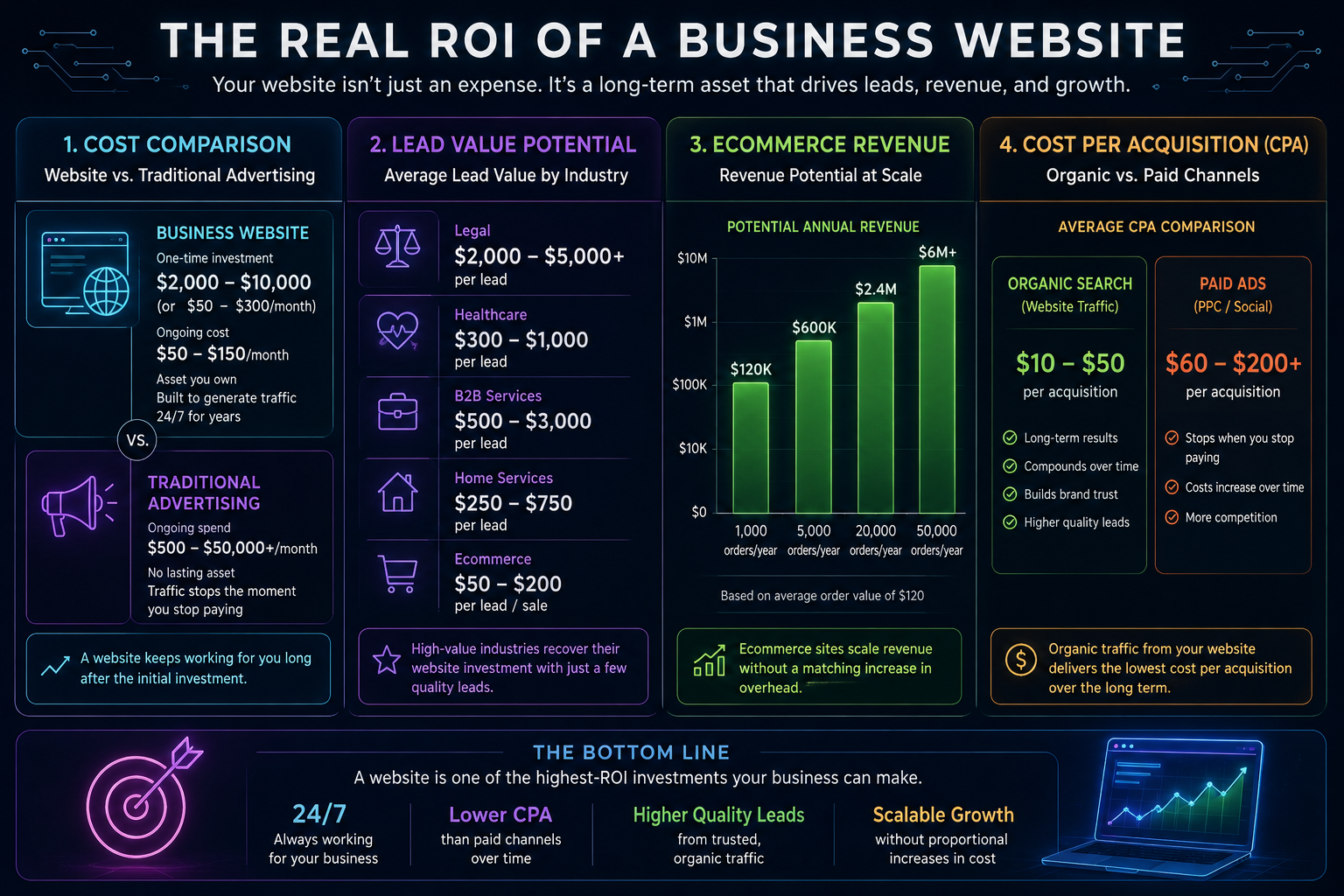
Compare the cost of a well-built website against traditional advertising. A website is a one-time build with modest ongoing maintenance that keeps working for you 24 hours a day, every day, indefinitely. A print ad or a billboard stops working the moment you stop paying for it. Organic traffic from a website that’s built to rank, and increasingly to be cited by AI tools, has a dramatically lower cost per acquisition over time than most paid channels, because you’re not paying per click for the same visitor twice.

Lead value varies by industry, but the math tends to work in your favor if a site is built to actually convert, not just exist. And for ecommerce specifically, the revenue potential scales with your catalog and your traffic in a way that a physical storefront or a social presence alone simply can’t match.

It’s true that a website that just sits there, unmaintained, with no real content, isn’t going to move the needle much. But a website that’s built intentionally, kept current, and structured so both people and AI tools can actually understand what you offer? This is the foundation for everything else your marketing sits on top of.

The numbers below illustrate why a website is one of the highest-return marketing investments a business can make. While the exact return varies by industry, a well-built website continues generating value long after it’s launched.

An infographic titled "The Real ROI of a Business Website" broken into four sections comparing costs, lead value, ecommerce scaling, and acquisition costs.

Common Questions We’re Asked

Do I really need a website if I’m already on social media?

Yes. Social media builds reach and relationships, but you don’t own the platform, and algorithms decide who sees your content. A website is the one asset you fully control, and it’s what search engines and AI assistants actually pull information from when someone’s looking for what you offer.

How much does a business website cost to build and maintain?

It varies widely based on complexity, from a few hundred dollars for a simple business card site on a platform like WordPress or Squarespace, to a much larger investment for a full ecommerce build. Ongoing maintenance is typically a small monthly cost, but it’s a meaningful one; an outdated, unmaintained site can hurt you more than having none at all.

Can I build a website myself or do I need a developer?

For a simple business card or lead gen site, modern website builders and AI website generators make DIY genuinely realistic. For e-commerce, or any site where performance, structure, and AI visibility really matter, working with someone who knows what they’re doing pays for itself. You can vibe code a website yourself if you really want to do everything on your own. Tread carefully though. There’s a lot of factors to think about like security that make this a very unsafe option.

Does a website help with AI search engines like ChatGPT or Perplexity?

Absolutely, and increasingly this is the whole game. These tools build their answers from real, crawlable web content. A well-structured, content-rich website gives them something to reference and recommend. No website, or a thin one, means you’re simply not part of the conversation.

How long does it take to see results from a new website?

Immediate value comes from having a credible, findable presence the moment it goes live. SEO and AI visibility results tend to build over a few months as search engines and AI systems index and trust your content. This is a compounding asset, not a one-time campaign.

Not having a website in 2026 isn’t a neutral choice anymore. It’s an active decision to be invisible to the tools that an increasing number of your future customers are using to make decisions. The good news is that fixing it is more achievable than it’s ever been, and the businesses that get this right now are the ones that will still be found five years from now, no matter how people are searching.

Ready to make your business easier to find online?

Whether you’re launching your first site or improving an existing one, bgood media can help you create a website that’s built for search, AI visibility, and long-term growth. Reach out to us.


Sources for statistics: 


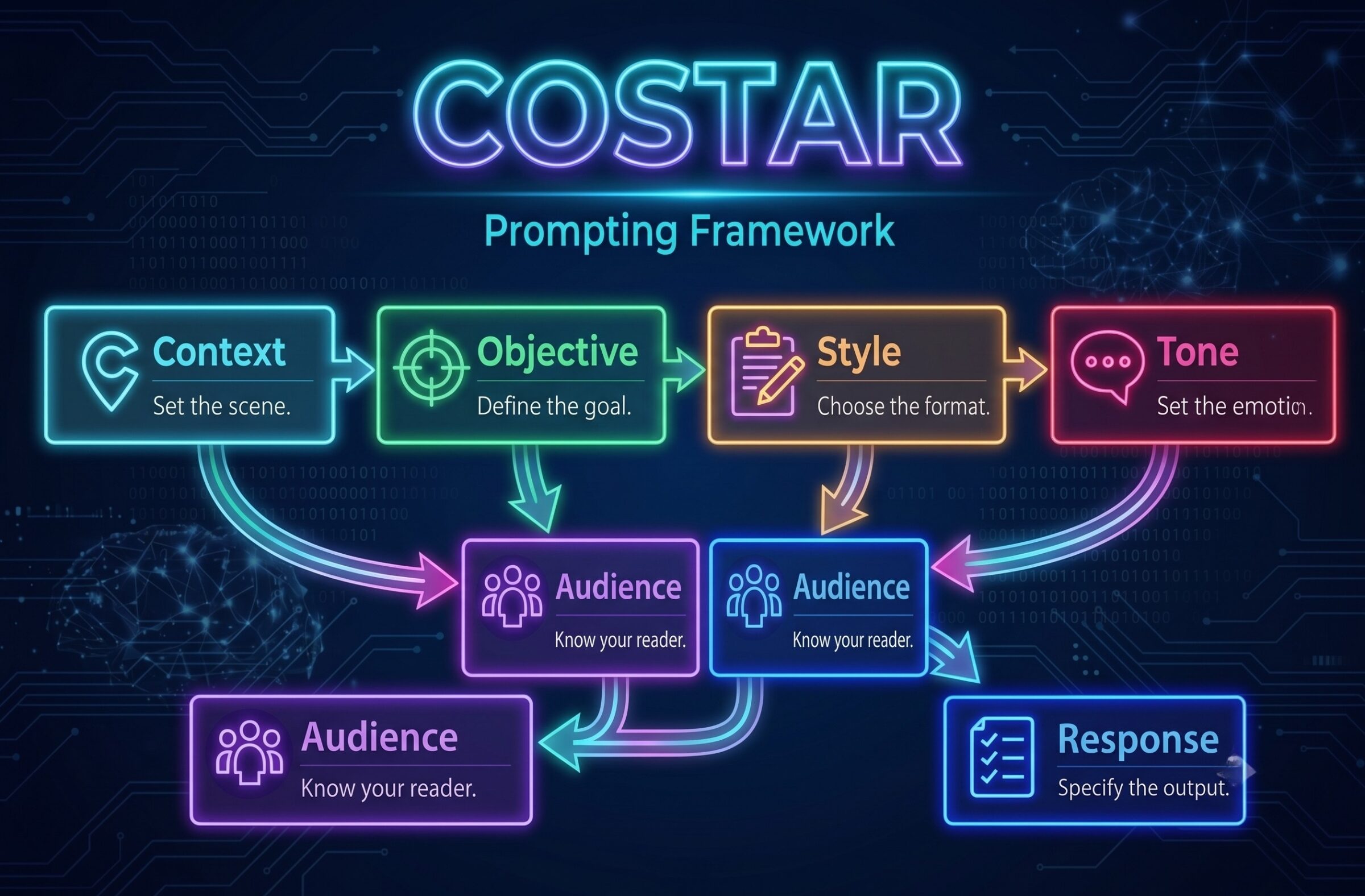
What Is Magic & Markdown Prompting? (Two Techniques That Make AI Actually Listen)

You ask AI to write something creative. It hands you back the most predictable, committee-approved version of the idea imaginable. You ask it to follow specific instructions. It follows three of them and invents the rest. You try again, slightly differently, and wonder if you’re the problem.

You’re not. The prompts are.

There are two techniques to fix this: one that unlocks the creative range AI is actually hiding from you, and one that makes your instructions impossible to misread. They’re called magic prompting and markdown prompting, and they work well separately.

Together, they’re the difference between an AI agent that kind of helps and one that does exactly what you meant.

Think of this as your practical guide on how to prompt AI properly. No jargon, no “AI expert” required, just two structured prompting techniques you can use in the next ten minutes with immediately better results. These are already being used by AI consultants and internal AI teams to improve output reliability at scale.

If you want to understand the deeper infrastructure that makes AI context-aware in the first place, our breakdown of how structured AI systems use MCP for context management is a good companion read.

An AI Prompting Guide for Structured & Creative Results

Before diving into the techniques, here’s what applying them looks like in practice.

Client scenario: A financial services client came to us struggling with inconsistent AI output across their marketing team, different writers were prompting the same tools differently and getting wildly different quality results. We built them a library of markdown prompt templates with variables for their most common content types: client emails, social posts, compliance disclosures, and campaign briefs. Within two weeks, their team’s average prompt quality was consistent enough that a junior writer was producing output on par with their senior copywriter. Magic prompting got layered in for the campaign work specifically, where they needed genuine creative variety rather than the first decent idea. The combination cut their revision cycles in half.

That’s the practical upside. Now here’s how both techniques actually work.

Part 1: Magic Prompting — Unlocking AI Creativity

What Is Magic Prompting?

Magic prompting is a technique where you ask the AI to generate several possible responses with confidence scores before choosing one. Instead of the model jumping straight to its safest answer, it first maps out the landscape of what’s possible, then picks the best option.

It sounds simple because it is! But the results are not what you’d expect.

In October 2025, researchers from Northeastern University and Stanford published Verbalized Sampling: How to Mitigate Mode Collapse and Unlock LLM Diversity, a study tested across creative writing, dialogue simulation, open-ended QA, and synthetic data generation. When you ask an AI to explicitly surface multiple options and assign probability scores to each, responses become measurably more diverse and creative, 1.6 to 2.1 times more so compared to standard prompting. For a technique that requires zero technical setup, that’s a meaningful return.

How Magic Prompting Works

The alignment training that makes AI models safe and agreeable also makes them boring. Models are trained to converge on responses that feel correct, appropriate, and unlikely to cause problems. Researchers call this typicality bias, or the tendency to produce the most statistically average answer rather than the most interesting or useful one.

Magic prompting breaks that pattern by forcing the model to consider its options out loud before committing. It’s the difference between asking someone, “What should we do tonight?” and getting “I don’t know, whatever you want”, versus asking them to name three options before deciding. That little bit of structured deliberation produces better thinking.

The Magic Prompt Formula

Copy this and keep it somewhere useful:

Before answering, please:

  1. Generate 3-5 different possible responses
  2. Assign a probability/confidence score to each (0-100%)
  3. Briefly explain why each answer might be valid
  4. Then select the best one and provide that as your final answer

Paste that before any creative request and watch what changes.

When to Use Magic Prompting

Use it when there’s no single correct answer. Creative tasks are the obvious ones, jokes, story ideas, campaign concepts, taglines, headlines. But it also works well for:

  • Brainstorming sessions where you want genuine variety, not the first five things that come to mind
  • Marketing copy where multiple angles exist and you want to pick the strongest
  • Problem-solving where different approaches have different tradeoffs
  • Generating synthetic examples or training data where diversity matters

When NOT to Use Magic Prompting

Don’t use it when you already know what you want, or when speed matters. Skip it for:

  • Straightforward factual questions
  • Simple yes/no decisions
  • Time-sensitive back-and-forth conversation
  • Any time you’re paying per token and the extra output isn’t worth the cost

What to Expect

The Northeastern University and Stanford research showed a 1.6 to 2.1x increase in response diversity.

In practice: genuinely different ideas rather than variations on the same one, more surprising angles, and a higher ceiling on the best option in the set. The tradeoff is real, responses take longer and use more tokens. For high-stakes creative work, that’s usually worth it.

One caveat: results vary by model. The technique works best with capable frontier models such as ChatGPT’s latest models, Claude’s higher-tier versions (Sonnet, Opus, and the beautiful Fable), and Gemini Pro. On smaller or older models, you may see less dramatic improvement, or occasional confusion about what you’re asking for. Test it on your tool of choice before committing to it as a default.

Part 2: Markdown Prompting: Structure That AI Understands

What Is Markdown?

Markdown is a simple formatting system created in 2004. It uses plain-text symbols to add structure, pound signs for headings, hyphens for bullet points, asterisks for bold or italic text, and backticks for code. You’ve seen it everywhere: GitHub, Reddit, Notion, Discord, most documentation on the internet.

You don’t need to be a developer to use it. If you can type a # and a dash, you’re already doing it. Wonder why AI uses a lot of em dashes? It’s used to reading markdown (MD) formatting.

Why Markdown Makes AI Smarter

When you give an AI a wall of text, it has to infer what’s important, what’s context, and what’s instruction. That inference process is where things go wrong.

Markdown removes the ambiguity. Clear headings tell the model what each section is for. Bullet points make instructions sequential and scannable. Bold text signals priority. Code blocks show exactly what format you expect. 

Multiple studies back this up. A 2025 review in ScienceDirect found that modifying both the structure and content of a prompt has a notable influence on model behavior, and that well-constructed prompts can directly reduce hallucinations. A separate PMC-published study testing GPT-4, LLaMA 2, and DeepSeek found that vague, unstructured prompts produced hallucination rates more than twice as high as structured equivalents. And The Prompt Report, a systematic survey of 1,565 papers on prompting techniques, concluded that structured prompt design is the single most reliable lever for improving output accuracy across model types. Structured input produces structured output. That treats a probabilistic reasoning system like the tool it actually is, not a search engine you’re just throwing keywords at.

Essential Markdown Elements for Prompting

# Headings — use for your primary goal (H1), context and instructions (H2), specific details (H3). Creates clear hierarchy so AI distinguishes between main goals and sub-instructions.

– Bullet lists / 1. Numbered lists — bullets for unordered requirements, numbers for sequential steps. Makes instructions scannable and ensures the AI follows each item systematically.

**Bold** and *italic* — bold for critical requirements, italic for emphasis or terminology. Draws AI attention to priorities.

`Code blocks` — use to show precise output format or exact strings the AI should preserve. Prevents formatting errors.

The Markdown Prompting Framework

Save this template. Use it every time a request has more than two moving parts:

# GOAL

[What you want to achieve in one sentence]

## CONTEXT

[Background information the AI needs]

## INSTRUCTIONS

– Step 1

– Step 2

– Step 3

## OUTPUT FORMAT

[Exactly how the response should look — length, structure, tone]

## EXAMPLES

[One or two examples of what good output looks like]

Using Variables in Prompts

One underused technique that pairs naturally with markdown: variables. Instead of rewriting a prompt from scratch each time, use placeholder text in brackets that you swap out as needed.

# GOAL

Write a [CONTENT TYPE] for [AUDIENCE] about [TOPIC].

## TONE

[TONE — e.g. conversational, authoritative, playful]

## LENGTH

[TARGET LENGTH]

This turns a one-off prompt into a reusable template. Swap the bracketed values, run the prompt, get consistent results. It’s prompt engineering 101, and it’s the fastest way to build a library of reliable, structured prompting templates your whole team can use. If you’re looking for a prompt engineering definition that actually means something practical: it’s this, designing inputs that reliably produce the outputs you need.

When to Use Markdown in Prompts

  • Complex multi-step instructions
  • When you need consistent formatting across repeated uses
  • For reusable prompt templates
  • When working with capable models like GPT-4, Claude, or Gemini Advanced, these are trained on markdown-heavy data and parse it reliably

When NOT to Use Markdown

  • Simple, single-sentence questions
  • With smaller or specialized models that may treat symbols as literal characters
  • For raw data inputs like JSON or CSV

Over-engineering a simple prompt is its own kind of problem.

Before & After Examples

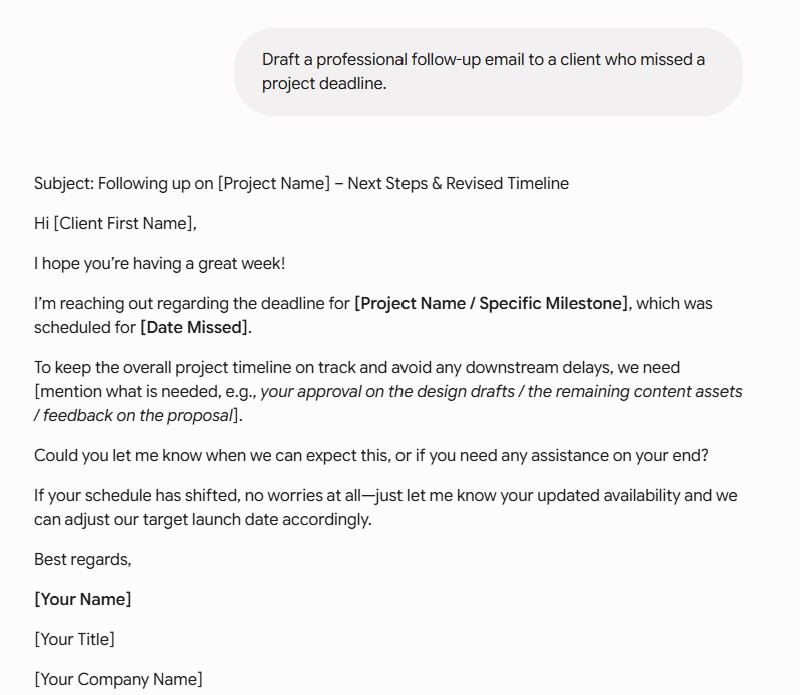
Example 1: Email Draft Request

Plain prompt:

Write me an email to a client who missed a deadline asking them to update me without being rude. Keep it professional but personable.

AI Response:

Basic prompt and response using Gemini for email creation to a client

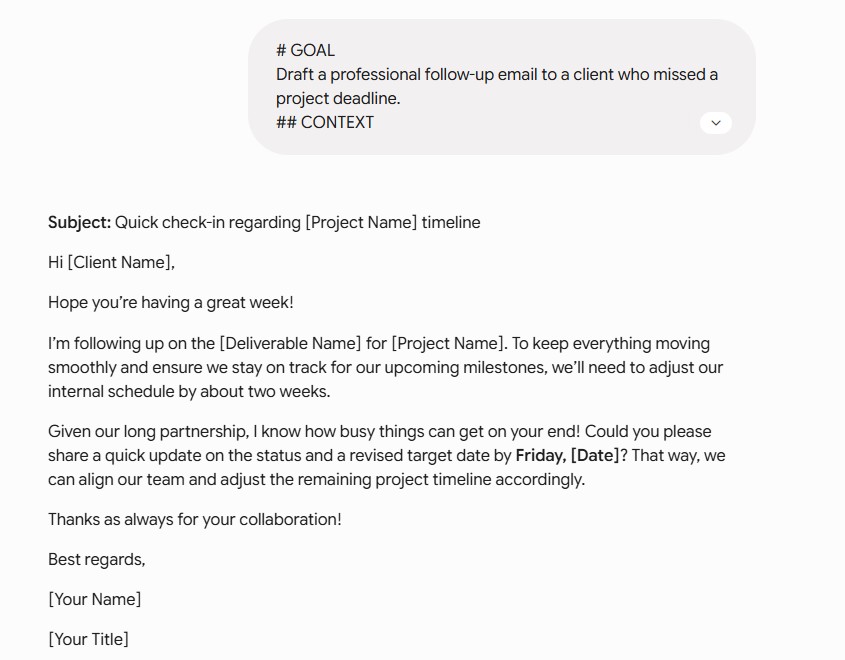
Markdown prompt:

# GOAL

Draft a professional follow-up email to a client who missed a project deadline.

## CONTEXT

– The client is a long-term partner (3 years)

– The missed deadline affects our internal timeline by two weeks

– We want to maintain the relationship while getting a clear update

## INSTRUCTIONS

– Keep the tone warm but direct

– Ask for a specific update by end of week

– Avoid language that assigns blame

## OUTPUT FORMAT

Subject line + email body, under 150 words

AI Response:

Markdown prompt example using Gemini for a client email

Example 2: Content Brief Creation

Plain prompt:

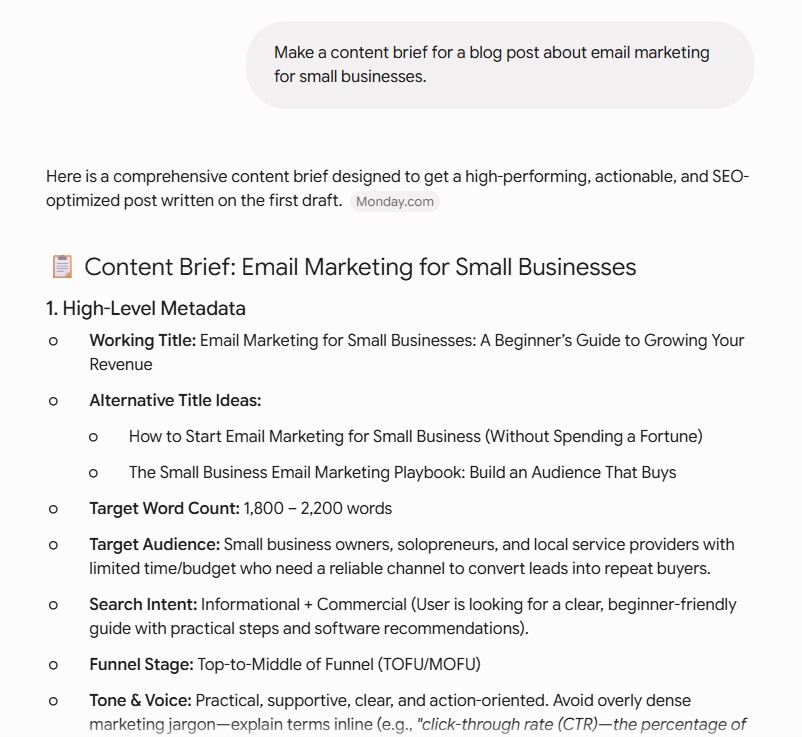
Make a content brief for a blog post about email marketing for small businesses.

AI Response: (I truncated some of the responses because they were way too big. This one had 5 sections 😬)

standard AI prompt for creating a design brief using Gemini

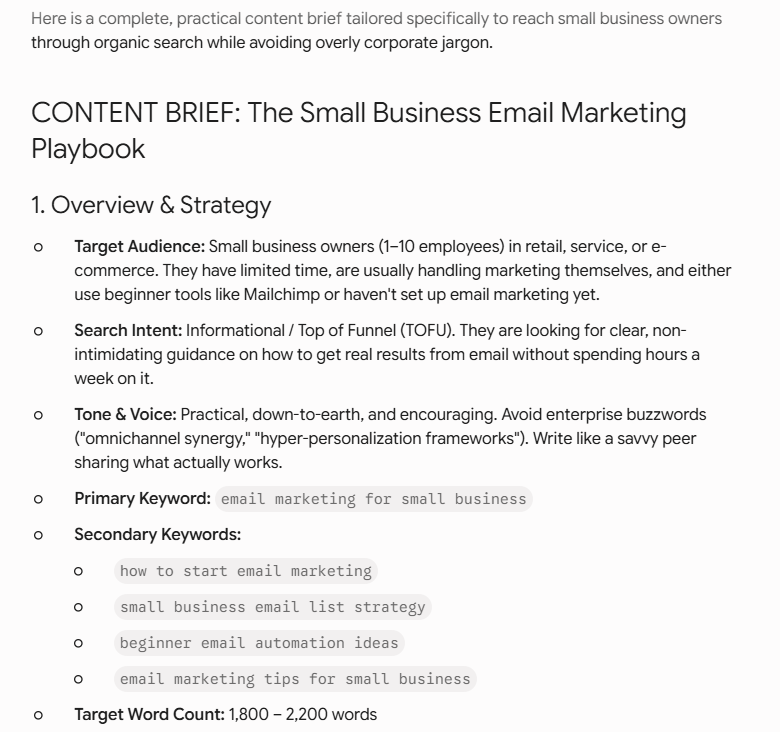
Markdown prompt:

# GOAL

Create a full content brief for a TOFU blog post on email marketing for small business owners.

## CONTEXT

– Audience: Small business owners with 1-10 employees

– They’re likely using Mailchimp or just starting out

– Competitors are HubSpot, Klaviyo blog. We need to be more practical and less corporate

## INSTRUCTIONS

– Include target keywords, required sections, and internal linking opportunities

– Flag which sections should include examples or data

## OUTPUT FORMAT

Match the structure of a standard content brief with headings for each component

AI Response: (This was INSANELY in-depth. Again, truncated here for space purposes but it’s massive and included a ton of great research suggestions.)

markdown prompt for AI using Gemini to create a content brief

Example 3: Code Generation

Plain prompt:

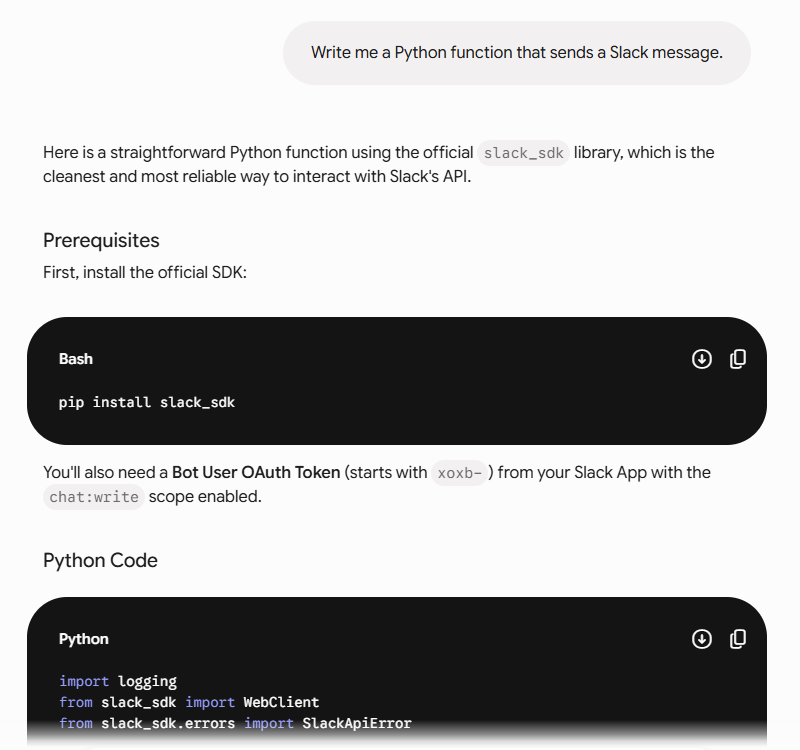
Write me a Python function that sends a Slack message.

AI Response:

your standard/typical basic AI prompt for a Python code script to use with sending Slack messages

The output actually wasn’t all that bad; it just didn’t have all of the details I needed.

Here’s the code it gave me:

slack_notify.py
import logging
from slack_sdk import WebClient
from slack_sdk.errors import SlackApiError
def send_slack_message(token: str, channel: str, text: str) -> bool:
    """
    Sends a message to a Slack channel using the WebClient API.
    :param token: Your Slack Bot OAuth Token (xoxb-...)
    :param channel: Channel name (e.g., "#general") or Channel ID (e.g., "C1234567890")
    :param text: Plain text or markdown-formatted message to send
    :return: True if sent successfully, False otherwise
    """
    client = WebClient(token=token)
    try:
        response = client.chat_postMessage(
            channel=channel,
            text=text
        )
        print(f"Message sent successfully to {channel}!")
        return True
    except SlackApiError as e:
        # e.response contains the error breakdown from Slack
        print(f"Failed to send message: {e.response['error']}")
        return False
# --- Example Usage ---
if __name__ == "__main__":
    # Best practice: Load your token from an environment variable rather than hardcoding!
    SLACK_TOKEN = "xoxb-your-bot-token-here"
    CHANNEL_NAME = "#general"
    MESSAGE = "Hello from Python! 🚀"
    send_slack_message(token=SLACK_TOKEN, channel=CHANNEL_NAME, text=MESSAGE)


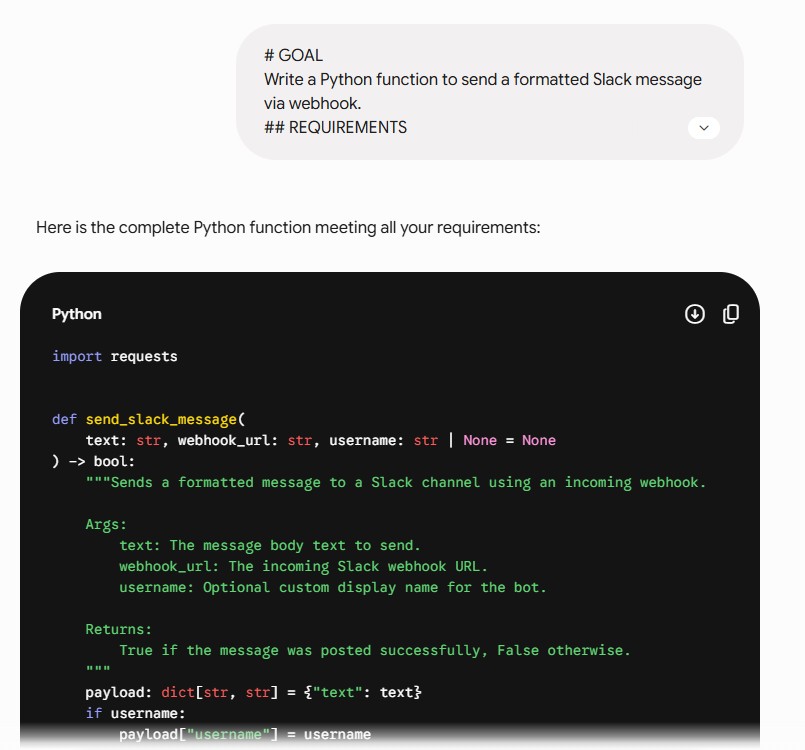
Markdown prompt:

# GOAL

Write a Python function to send a formatted Slack message via webhook.

## REQUIREMENTS

– Use the `requests` library only (no Slack SDK)

– Accept message text and optional username as parameters

– Return True on success, False on failure with a printed error

## OUTPUT FORMAT

Include type hints and a docstring

## EXAMPLE USAGE

send_slack_message(“Deployment complete”, username=”DeployBot”)

AI Response:

markdown AI prompt for Phyton code script

Here’s the code this markdown prompt gave me:

slack_webhook.py
import requests
def send_slack_message(
    text: str, webhook_url: str, username: str | None = None
) -> bool:
    """Sends a formatted message to a Slack channel using an incoming webhook.
    Args:
        text: The message body text to send.
        webhook_url: The incoming Slack webhook URL.
        username: Optional custom display name for the bot.
    Returns:
        True if the message was posted successfully, False otherwise.
    """
    payload: dict[str, str] = {"text": text}
    if username:
        payload["username"] = username
    try:
        response = requests.post(webhook_url, json=payload, timeout=10)
        response.raise_for_status()
        return True
    except requests.exceptions.RequestException as e:
        print(f"Failed to send Slack message: {e}")
        return False
# --- Example Usage ---
if __name__ == "__main__":
    WEBHOOK_URL = "https://hooks.slack.com/services/YOUR/WEBHOOK/URL"
    # Minimal usage
    # send_slack_message("Deployment complete", webhook_url=WEBHOOK_URL)
    # Usage with custom username
    success = send_slack_message(
        "Deployment complete", webhook_url=WEBHOOK_URL, username="DeployBot"
    )
    print("Success:" if success else "Failed:")


This one was to the point and added everything that I required because it had explicit instructions for what I wanted. That’s the difference!

More context = better understanding.

Part 3: Combining Magic & Markdown for Maximum Impact

Why These Techniques Work Together

Markdown gives the AI a clear map of your request. Magic prompting gives it permission to explore the territory before committing to a path. Together, they produce outputs that are simultaneously well-structured and creatively ambitious.

On their own, each technique solves half the problem. Markdown fixes clarity. Magic prompting fixes range. Combined, you get an AI that understands exactly what you need and brings its best thinking to filling it.

The Ultimate Prompt Template

# GOAL

[Your objective in one sentence]

## CONTEXT

[Background the AI needs]

## INSTRUCTIONS

Before providing your final answer:

  1. Generate 3 creative approaches to this problem
  2. Assign confidence scores to each approach
  3. Note the pros and cons of each
  4. Select the best approach and execute it fully

## OUTPUT FORMAT

[Specify exactly what the final response should look like]

## CONSTRAINTS

– [Any hard limits or requirements]

Example: Marketing Campaign Creation

The request: campaign concepts for a new oat milk brand targeting Gen Z, across TikTok, Instagram, and out-of-home.

The magic + markdown prompt:

# GOAL

Generate marketing campaign concepts for a new oat milk brand targeting Gen Z consumers.

## CONTEXT

– Brand is new, no existing recognition

– Target audience: 18-26, values authenticity, skeptical of corporate marketing

– Budget tier: mid-market

– Channels: TikTok, Instagram, out-of-home (OOH)

## INSTRUCTIONS

Before providing your final recommendation:

  1. Generate 3 distinct campaign concepts with different creative directions
  2. Score each concept (0-100%) on: audience fit, originality, executional feasibility
  3. Note one risk for each concept
  4. Select the strongest concept and fully develop it across all three channels

## OUTPUT FORMAT

– Campaign name

– One-line concept

– Scored options in table format

– Full development of winning concept with channel-specific executions

## CONSTRAINTS

– No corporate speak or polished brand voice

– Must work with user-generated content on TikTok

– OOH execution needs to work without a logo (brand awareness phase)

The output you get from that prompt versus “give me some oat milk campaign ideas” is not a marginal improvement. It’s a different category of response.

This kind of structured, context-rich prompting is also what makes AI-generated content actually usable at a professional level. If you’re curious how AI is being applied to broader creative work, our piece on AI-generated websites and what they can and can’t do covers where the technology stands today, and where human judgment still matters.

Making It Work in Your Favorite AI Tool

For ChatGPT Users

Both techniques work in free and paid tiers. On ChatGPT Plus, you can save markdown templates inside Custom GPTs so they’re pre-loaded every time, worth setting up if you use the same prompt structure repeatedly.

For Claude Users

Claude has some of the strongest markdown parsing available. It’s trained heavily on structured text and responds well to clear hierarchy. The Projects feature lets you save system prompts with your templates built in, so you’re not re-pasting the framework every session.

For Gemini Users

Gemini handles markdown well across its tiers. Gemini Advanced handles complex multi-section prompts reliably. The free tier handles most markdown, though very nested structures occasionally get flattened.

Quick Reference Cheat Sheet

Magic Prompting Template

“Before answering, show me 3-5 options with confidence scores, then pick the best one.”

Key Markdown Symbols

#       Main heading

##      Subheading

–       Bullet point

  1.     Numbered step

**bold**

*italic*

`code`

When to Use What

Magic prompting → creativity, brainstorming, campaign concepts, anything where multiple valid answers exist

Markdown → complex instructions, reusable templates, multi-part requests, formatting-sensitive outputs

Both together → high-stakes requests, marketing briefs, content creation, anything where quality matters and you have a minute to prompt properly

Common Mistakes to Avoid

Using markdown on simple questions. “What’s a good subject line for this email?” doesn’t need five headings. Match the structure to the complexity.

Using magic prompting when you need speed. In a fast back-and-forth conversation, the extra deliberation step slows everything down. Save it for work that matters.

Inconsistent formatting. If you use ## for instructions in one section and plain text in another, you’ve recreated the ambiguity you were trying to eliminate.

Not testing before saving as a template. Run your prompt a few times before treating it as reusable. Edge cases show up fast.

Forgetting the output format. The most common reason AI gives you a response in the wrong structure is that you never specified the right one. Tell it exactly what you want back.

FAQs

What is a prompt engineer, and do I need to be one to use these techniques?

A prompt engineer is someone who specializes in designing inputs that get reliable, high-quality outputs from AI models. It’s become a real job title at a lot of companies, but you don’t need the job title to use the techniques. Magic prompting and markdown prompting are accessible advanced AI prompting techniques that anyone can apply, no engineering background required. The difference between a prompt engineer and a regular user is mostly practice and intentionality, both of which you’re building right now.

Do I need to know how to code to use these techniques?

No. Markdown is plain text with a few symbols. Magic prompting is a sentence you paste at the top of your request. Neither requires any technical background.

Will this work with free versions of AI tools?

Yes. Both techniques work with free tiers of ChatGPT, Claude, and Gemini. Paid tiers handle complex markdown structures more reliably, but the fundamentals work everywhere.

How long does it take to learn these?

You can try both in the next ten minutes. Getting consistently good results takes a few days of experimentation — mostly figuring out when to use which technique and when to skip both.

Can I combine these with other frameworks like CO-STAR?

Yes, and it’s worth doing. CO-STAR gives you a proven structure for the content of your prompt. Markdown gives you the formatting. Magic prompting gives you the creative range. They’re additive, not competing.

Does this cost more?

Magic prompting uses more tokens because you’re getting multiple responses before the final one, so yes, if you’re paying per token, it adds up. Markdown doesn’t add meaningful cost. It’s just formatting.

The Bottom Line

Most people use AI the same way they Google things: toss in a question, take whatever comes back, move on. That approach treats a probabilistic reasoning system like a search engine, and then people wonder why it underperforms.

Magic prompting fixes the creativity ceiling. Markdown fixes the instruction-following. Together, they turn a capable model into one that’s actually working with you instead of around you.

The techniques take ten minutes to learn and a few days to make habitual. After that, you’ll find it genuinely annoying to go back to unstructured prompting, not because it doesn’t work at all, but because you’ll know exactly what you’re leaving on the table.

Consider this your AI prompting guide for getting started. Next up: our prompt engineering guide on CO-STAR — a structured framework that pairs naturally with everything covered here.

Ready to build AI into your marketing in a way that actually moves the needle? Get in touch with the bgood media team.


What Is COSTAR Prompting? The Framework That Makes AI Consistently Excellent

You’ve been there. Twenty minutes into rewriting the same prompt, getting slightly different versions of mediocre, wondering what the person next to you is doing to get AI output that’s actually usable. The answer is almost always a framework. Usually, the person who’s getting usable AI results has a system … and you don’t.

That frustration is exactly what the CO-STAR prompting framework was designed to fix.

Before I started building prompts systematically with CO-STAR, I had the same problem. What changed it was treating prompting like a creative brief: thinking through structured dimensions before writing anything. Once I did this, output quality went up and revision cycles dropped!

Think of CO-STAR as your prompt engineering tutorial for the framework that closes the gap between occasional good results and consistent ones. It was created by GovTech Singapore’s Data Science & AI Division, adopted by AWS and enterprise teams globally, and validated in academic research. 

This guide is for marketers, founders, strategists, and operators who use AI daily and want it to behave less like a slot machine and more like a system. It pairs directly with the magic prompting and markdown techniques we covered previously, and it’s the piece that ties the whole system together.

What is CO-STAR Prompting?

A high-tech, neon-styled flowchart illustrating the what is COSTAR Prompting Framework. Context, Objective, Style, Tone, Audience, and Response

The Framework Explained

CO-STAR is a structured approach to writing AI prompts that covers six dimensions of any good request: Context, Objective, Style, Tone, Audience, and Response. Instead of writing a prompt and hoping the AI figures out what you meant, CO-STAR forces you to think through every variable that determines output quality before you write a single word.

CO-STAR was developed by data scientist Sheila Teo as part of GovTech Singapore’s Data Science & AI Division, first published in her winning entry in Singapore’s first GPT-4 Prompt Engineering competition, then formally adopted into GovTech’s Prompt Engineering Playbook. It has since been adopted by AWS in their Amazon Bedrock prompt engineering documentation, validated through the CO-STAR-A academic study, and used by enterprise teams across industries.

The fact that it came from a government context is actually the point: these were people who needed AI to work reliably, not occasionally. CO-STAR is built for that standard.

Why It Works

Most bad AI outputs aren’t the model’s fault. They’re ambiguity failures, the model was missing information it needed and filled in the gaps with assumptions. CO-STAR eliminates those gaps by making you supply everything the model needs before it starts generating. If you want a working “prompt engineering” definition: it’s the practice of designing inputs that reliably produce the outputs you need. CO-STAR is the most systematic way I’ve found to do that.

The research backs this up. The Prompt Report, a systematic survey of 1,500+ papers co-authored by 31 researchers from the University of Maryland, OpenAI, Stanford, Princeton, and other institutions, found that structured prompt design is the most consistent lever for improving output accuracy across model types. A 2025 peer-reviewed study in Frontiers in Artificial Intelligence found that structured prompting strategies significantly reduce hallucinations compared to vague, unstructured equivalents.

CO-STAR vs. Trial-and-Error

The difference in practice:

Trial-and-error: Write prompt → bad result → guess what’s wrong → rewrite → slightly less bad result → repeat until frustrated.

CO-STAR: Think through six dimensions → write complete prompt → good result. Refine once, then save as a template.

The second approach takes slightly longer the first time. Every time after that, it’s faster because you’re working from a template instead of starting from scratch.

CO-STAR vs. Other Prompting Frameworks

CO-STAR isn’t the only prompt engineering framework out there. A quick comparison:

RISEN (Role, Instructions, Steps, End Goal, Narrowing) — focuses heavily on task decomposition. Good for multi-step workflows, less comprehensive on audience and tone. CO-STAR covers more dimensions.

CRISPE (Capacity, Role, Insight, Statement, Personality, Experiment) — similar coverage to CO-STAR with slightly different labeling. CO-STAR has broader adoption and more institutional backing (GovTech, AWS).

RTF (Role, Task, Format) — a stripped-down three-part framework. Faster to write, but skips tone, audience, and context, which is exactly where most prompts fail. Good for simple tasks, not professional-grade work.

Just being more specific — the instinct most people start with. The problem isn’t specificity in general, it’s knowing which dimensions to be specific about. CO-STAR is the checklist that makes sure you don’t miss the ones that matter.

In my experience, CO-STAR is the right default for marketing and professional work because it’s comprehensive without being overly academic. RTF is fine for quick internal tasks. Everything else is either redundant or narrower in scope.

The 6 Elements of CO-STAR Explained

C — Context: Setting the Scene

Context is the background information that tells the AI who you are, what situation you’re in, and what it needs to know to give a relevant response. Without it, the model is making assumptions about every one of those things — and assumption-driven output is generic output.

Good context answers three questions: Who are you in this scenario? What’s the situation? What relevant background does the AI need?

CONTEXT ❌  Write an email ✅  I’m a marketing director at a B2B SaaS company. We just launched a new feature that our enterprise clients have been requesting for months.

O — Objective: Defining the Task

The objective is the specific outcome you’re trying to achieve. Not a vague direction — an actual goal with a measurable result. Use action verbs. Be specific about what success looks like.

Common mistake: confusing Objective with Response. Objective is what you want to accomplish. Response is how the output should be formatted. Keep them separate.

OBJECTIVE ❌  Help me with marketing ✅  Write a launch announcement email that drives at least 30% open rate and includes a clear CTA to book a demo

S — Style: Matching the Format

Style is the writing approach, format, or voice you want the output to use. A McKinsey report and a HubSpot blog post are both professional writing, but they’re completely different things. Telling the AI which one you want saves three rounds of revision.

Reference styles the AI will recognize: specific publications, authors, or formats. Specify structure (blog post, bullet points, table, executive summary). Set the technical level.

STYLE ❌  Make it professional ✅  Write in the style of a HubSpot blog post: conversational but authoritative, with actionable takeaways and real examples

T — Tone: Setting the Emotion

Tone is the emotional quality of the response, how it feels to read it. Two emails can have identical structures and say the same things, but one lands well and one doesn’t, because the tone is off.

Use specific adjectives: empathetic, urgent, authoritative, playful, reassuring, direct. Consider the emotional state of your audience when they read it. Align with your brand voice.

TONE ❌  Be nice ✅  Use an empathetic and reassuring tone, acknowledging that data migration is stressful while projecting confidence in the solution

A — Audience: Knowing Who You’re Writing For

Audience is the specific person or group who will read and act on the output. A message written for a VP of Marketing is a different document than one written for their intern, even if the topic is identical. Knowledge level, priorities, decision-making authority, all of it changes the output.

Define role and seniority. Specify knowledge level. Note what they care about and what they’re likely to push back on.

AUDIENCE ❌  For our customers ✅  For VP-level marketing leaders at mid-market companies (50-500 employees) exploring marketing automation for the first time, who need to justify ROI to their CEO

R — Response: Specifying the Output Format

Response is the exact structure, length, and format you want back. Without this, the AI chooses its own format, and it will often choose one that doesn’t match your actual need. Specify word count, number of sections, whether you want headers, and what must be included or excluded.

RESPONSE ❌  Give me some ideas ✅  Provide exactly 5 campaign ideas formatted as: Campaign Name / Target Audience / Key Message (1 sentence) / Primary Channel / Expected Outcome. Total: under 300 words.

Putting It All Together: The CO-STAR Template

Save this CO-STAR prompt template. Use it as your starting point for any complex AI request:

# CONTEXT

[Who you are, what situation you’re in, relevant background]

# OBJECTIVE

[The specific goal or outcome you want to achieve]

# STYLE

[The writing style, format, or approach to use]

# TONE

[The emotional quality and attitude of the response]

# AUDIENCE

[Who will read/use this output — their role, knowledge level, needs]

# RESPONSE

[The exact format, length, and structure you want]

CO-STAR in Action: Real Marketing Examples

These are the three prompt types I use most often with clients, and the ones where the difference between a structured and unstructured prompt is most obvious.

Example 1: Social Media Campaign Brainstorm

The prompt:

# CONTEXT

I’m a social media manager for an eco-friendly home goods brand. We’re launching a

new line of bamboo kitchenware in 3 weeks. Past campaigns focused heavily on

sustainability messaging, but engagement has plateaued.

# OBJECTIVE

Generate creative Instagram campaign ideas that highlight product benefits while

standing out from typical eco-friendly messaging.

# STYLE

Brainstorming format with creative, unexpected angles. Think Liquid Death energy

applied to home goods.

# TONE

Bold, fun, and slightly irreverent while still authentic to the sustainability mission.

# AUDIENCE

Millennial and Gen Z home cooks (25-40) who care about sustainability but are tired

of preachy eco-marketing.

# RESPONSE

5 campaign concepts, each including:

– Campaign name/tagline

– Core message angle

– 3 specific post ideas

– Hashtag strategy

– Why it breaks the mold

What changes: instead of a list of generic eco-friendly campaign ideas, you get five genuinely differentiated concepts with a specific creative direction. The Liquid Death reference in Style alone shifts the entire output register, the AI understands you want provocative, not earnest.

Example 2: Difficult Client Email

The prompt:

# CONTEXT

I’m an account manager at a digital marketing agency. A client just received their

monthly report showing a 15% drop in organic traffic due to a Google algorithm update

that affected their entire industry. They’re understandably concerned and questioning

our SEO strategy.

# OBJECTIVE

Write an email that acknowledges the drop, explains the industry-wide cause, reassures

them of our strategy, and proposes proactive next steps.

# STYLE

Professional client communication: structured with clear sections, data-backed

explanations, and a solutions-focused approach.

# TONE

Empathetic and confident. Acknowledge their concern without being defensive.

Project expertise and partnership.

# AUDIENCE

CMO of a $50M B2B SaaS company. Data-driven, results-focused, basic SEO knowledge

but not technical. Currently worried about reporting this to their CEO.

# RESPONSE

Email format with:

– Subject line

– 4 paragraphs maximum

– 2-3 bullet points explaining the situation

– Clear next steps section

– Total length: 300-400 words

What changes: without the Audience section, the AI writes a generic SEO explainer. With it, knowing this person is about to have an uncomfortable conversation with their CEO, the email shifts to something that helps them manage upward, not just understand what happened.

Example 3: Content Brief Creation

This one is self-referential, using CO-STAR to generate the kind of briefs bgood media produces for clients:

# CONTEXT

I’m a content strategist creating a brief for a blog article about email marketing

automation. Target audience is small business owners who currently send manual

campaigns and are considering automation tools.

# OBJECTIVE

Create a detailed content brief that a freelance writer can follow to produce

a comprehensive, SEO-optimized article.

# STYLE

Structured content brief format following industry best practices.

# TONE

Professional and thorough, this is an internal document, clarity matters

more than being conversational.

# AUDIENCE

Experienced freelance B2B writer who understands marketing but may need

specific product/feature details.

# RESPONSE

Content brief including:

– Target keywords with search volume

– Content purpose and intent

– Required sections with rationale

– Word count target

– Internal linking opportunities

– Tone and style guidelines

If you’re curious how far AI-generated content has come, and where it still needs human oversight, our piece on AI-generated websites covers the current state of AI creative output in practice.

How CO-STAR Improves AI Accuracy

Reducing Hallucinations

Hallucinations happen when the model doesn’t have enough information and fills in the gap with something plausible-sounding but wrong. CO-STAR systematically closes those gaps. Complete context means the AI isn’t guessing who you are or what situation you’re in. Specific objectives mean it isn’t inventing success criteria. Clear audience definition grounds the response in something concrete rather than an imagined generic reader.

The mechanism is straightforward: a model that has everything it needs doesn’t need to fabricate anything.

Measurable Results

Beyond the GovTech origin and the general research on structured prompting, there’s CO-STAR-A, an adapted version of the framework studied in controlled academic settings, which has shown measurable performance improvements, particularly for multi-step instructions, complex reasoning tasks, and creative work with specific constraints (though peer-reviewed literature on this specific variant is still developing).

The pattern across the research is consistent: structured prompts outperform unstructured ones, especially as task complexity increases. For simple one-liners, the difference is marginal. For anything with multiple moving part, which describes most professional work, the gap is significant. I’ve seen this play out with clients repeatedly: the teams that build CO-STAR template libraries get consistently better outputs than the ones prompting ad hoc, even when they’re using identical models.

Cost Efficiency

Every revision cycle has a cost, in time, in tokens if you’re paying per use, and in the organizational drag of back-and-forth. First-time-right outputs from a well-constructed CO-STAR prompt eliminate most of that. At scale, for teams using AI daily, that compounds quickly. If you want to build this kind of system across your marketing team, it’s one of the things we do at bgood media, see how our AI consulting works.

Integrating CO-STAR with Other Techniques

CO-STAR is a strong framework on its own. Combined with the magic prompting and markdown techniques covered in the previous article, it becomes a complete system.

CO-STAR + Magic Prompting

Add magic prompting inside your Objective or as an instruction in your Response section:

# OBJECTIVE

Generate campaign concepts for our Q3 product launch.

Before providing the final answer, generate 3 different approaches

with confidence scores, then select the strongest.

Result: a structured, fully-contextualized prompt that also explores the creative range before committing to one direction.

CO-STAR + Markdown Formatting

Use markdown to add hierarchy within each CO-STAR section, especially for complex Context or Response requirements:

# CONTEXT

## Company Background

[Info]

## Current Situation

[Info]

# OBJECTIVE

– Primary goal: [X]

– Secondary goal: [Y]

# RESPONSE

## Format

– [Spec 1]

– [Spec 2]

## Length

[Word count or paragraph count]

This is particularly useful for enterprise use cases where the Context section alone might have multiple dimensions worth separating.

CO-STAR + Chain-of-Thought

For tasks that require reasoning, analysis, strategy recommendations, diagnostic work, add a chain-of-thought instruction to the Objective:

# OBJECTIVE

Analyze our Q3 campaign performance and recommend a Q4 strategy.

Show your reasoning step-by-step before providing the final recommendation.

The model walks through its logic explicitly before committing to a conclusion, which both improves accuracy and makes the output easier to interrogate and refine.

CO-STAR Across Different AI Models

ChatGPT (GPT-4 and above)

Excellent CO-STAR support. GPT-4 handles complex, multi-section prompts reliably and follows detailed Response specifications well. On ChatGPT Plus, Custom GPTs can have CO-STAR templates built into their system prompt, so every conversation starts with your standard context pre-loaded.

Claude

Superior at following structured instructions, Claude’s training makes it particularly responsive to detailed Context sections and precise Response formatting. The Projects feature is ideal for CO-STAR: save your standard context and style preferences as a project system prompt, and every new conversation inherits them automatically.

Gemini Pro / Advanced

Strong CO-STAR performance, particularly good at maintaining context through longer exchanges. Gemini Advanced handles the full six-section framework reliably. Worth testing the full template rather than simplifying, it tends to use everything you give it.

Smaller Models — A Note of Caution

Research on CO-STAR-A shows mixed results with models under 8 billion parameters. Smaller or specialized models may not parse a full six-section prompt correctly, some will treat the section headers as literal content rather than structural cues. If you’re working with a smaller model, test the full framework first, and simplify to two or three sections if output quality degrades.

Common CO-STAR Mistakes and How to Fix Them

  1. Context too vague.
CONTEXT ❌  I work in marketing ✅  I’m a demand gen manager at a 200-person B2B SaaS company targeting mid-market enterprises in the logistics sector
  1. Confusing Objective with Response.

Objective is what you want to accomplish. Response is how the output should be formatted. They answer different questions and belong in different sections.

OBJECTIVE ❌  Give me 5 ideas in a list ✅  Generate campaign ideas that increase webinar registrations by 20%
RESPONSE ❌  (leave empty or vague) ✅  Provide exactly 5 ideas in bullet point format, each with a headline and one-sentence description
  1. Mixing Style and Tone.
STYLE vs TONE ❌  Style: Friendly blog post ✅  Style: Conversational blog post with H2 sections and bullet points  |  Tone: Friendly and approachable but authoritative
  1. Generic Audience definition.
AUDIENCE ❌  For business people ✅  Series A startup founders with a technical background, evaluating their first marketing hire
  1. Vague Response format.
RESPONSE ❌  Write an email ✅  200-word email with: subject line, 3 short paragraphs, one CTA — no sign-off needed

The CO-STAR Worksheet

Before writing any complex prompt, run through these questions:

CONTEXT

□  Who am I in this scenario?

□  What’s the background or situation?

□  What does the AI need to know that it wouldn’t assume correctly?

OBJECTIVE

□  What specific outcome do I want?

□  How will I know if it’s successful?

□  What should the AI actually accomplish?

STYLE

□  What format should this take?

□  What’s the reference style or benchmark?

□  What’s the complexity level?

TONE

□  What emotion should it convey?

□  How formal or casual?

□  What’s the brand voice or context?

AUDIENCE

□  Who’s reading this?

□  What’s their knowledge level?

□  What do they care about? What will they push back on?

RESPONSE

□  What’s the exact format?

□  What’s the length?

□  What must be included — and what should be left out?

Quick Reference: CO-STAR Cheat Sheet

The Six Elements

  • Context — Background and scenario
  • Objective — Specific goal
  • Style — Format and approach
  • Tone — Emotional quality
  • Audience — Who it’s for
  • Response — Output format

When to Use CO-STAR

  • Complex tasks requiring precision
  • When you need consistent results across multiple uses
  • For templates your team will reuse
  • When quality matters more than speed
  • Business and professional applications

When to Simplify

  • Quick one-off factual questions
  • Simple single-step requests
  • When using smaller AI models
  • Time-sensitive back-and-forth conversation

Pro Tips

  1. Write the sections in order — each one builds on the last
  2. Save completed prompts as templates for common task types
  3. Test and refine once, then treat it as your standard
  4. Combine with markdown for complex Context or Response sections

FAQs

Do I have to use all six elements every time?

No, but more complete prompts produce better results. Use all six for complex tasks until the framework becomes intuitive. For simpler requests, Context, Objective, and Response are the minimum effective set.

Is CO-STAR only for business or professional prompts?

No. It works for creative tasks, personal projects, research, and learning too. The framework is useful for any prompt where partial information would lead to a generic or incorrect response.

How is CO-STAR different from just being more specific?

CO-STAR ensures you’re specific about the right things. Being specific randomly doesn’t help if you specify the wrong dimensions. CO-STAR is a checklist that makes sure you’ve covered every variable that affects output quality, not just the ones that come to mind first.

Can I use CO-STAR with free AI tools?

Yes. Works with ChatGPT Free, Claude (free tier), and Gemini, any modern AI model. The framework itself costs nothing to use.

Does CO-STAR work in languages other than English?

Yes. The structure translates well across languages. The clarity and completeness of the framework matter more than the specific language you write it in.

How quickly will I see improvement?

Immediately. Your first complete CO-STAR prompt will almost certainly outperform your previous attempts on a comparable task. The learning curve is in building the habit of filling in all six sections before you start writing.

Is there research behind CO-STAR?

Yes. Developed by data scientist Sheila Teo and formally adopted by GovTech Singapore after winning their first GPT-4 Prompt Engineering competition. Since then it’s been incorporated into AWS’s Amazon Bedrock prompt engineering documentation, tested in the CO-STAR-A academic study, and is consistent with the broader research on structured prompting from The Prompt Report and Frontiers in Artificial Intelligence. This is a documented, tested framework with institutional backing, not something that circulated on Twitter.

From Frustration to Consistency

Most people treat prompting as a writing problem. If the output is bad, the instinct is to rewrite the prompt, but bad outputs are usually a systems problem. Without a framework, every new prompt starts from scratch, guessing at what the model needs. That’s slow, inconsistent, and frustrating even for strong writers.

CO-STAR gives you the structure to stop guessing. A well-built CO-STAR prompt produces a usable output on the first or second attempt, and once you’ve built a template library, that quality scales across your whole team without anyone having to reinvent the wheel.

At bgood media, we use it daily, in our own work and in the prompt systems we build for clients. Combined with magic prompting for creative range and markdown for structural clarity, it’s the foundation of a complete prompting practice. After this article, you have everything you need to start.

Your Next Steps

  1. Try it now — take your last frustrating AI interaction and rewrite it using the CO-STAR template above
  2. Build a template library — create CO-STAR prompts for your three most common AI tasks and save them somewhere your team can access
  3. Combine techniques — layer in magic prompting for creative work, markdown for complex structure
  4. Download our CO-STAR worksheet — print it or save it as a reference until the framework becomes habit
  5. Go deeper — if you want a custom prompt engineering system built for your marketing team, that’s what bgood media does

For context on how prompting fits into the broader AI landscape, including how AI connects to your actual business data and tools, our piece on Model Context Protocol is worth reading alongside this one.

If your team is using AI daily but still prompting ad hoc, it’s time to build a real system. That’s what we do. Let’s talk.

What Is AI Digital Marketing? Your Complete Guide (And Why You Should Care)

A futuristic graphic titled "AI Digital Marketing: Smarter, faster, better decisions," showing a glowing robotic profile looking at a laptop displaying a marketing analytics dashboard, alongside a megaphone and social media icons.

Last quarter, I watched one of our client campaigns go from idea to fully optimized, AI-powered execution in a single afternoon. Normally, that process would have taken weeks with planning, A/B testing, manual audience segmentation, and endless spreadsheet work. AI digital marketing made it possible in just a couple hours.

AI is changing how marketers make decisions, personalize content, and connect with customers. From predictive analytics to automated content generation, AI is transforming marketing into a data-driven, creative powerhouse.

At bgood media, we have been hands-on with AI marketing tools across industries, including finance, wellness, and travel, and we have seen how it accelerates campaigns, drives smarter targeting, and uncovers opportunities that might otherwise be missed. 

Whether you’re a CMO trying to stay ahead of the curve, a small business owner wondering if this AI stuff is worth the hype, or a marketer worried about your job security (spoiler: you’ll be fine), this guide will break down everything you need to know about AI digital marketing.

What is AI Digital Marketing? The Simple Definition

AI digital marketing uses artificial intelligence to help businesses plan, execute, and optimize their marketing efforts. Instead of relying solely on human intuition and manual processes, AI tools analyze data, spot patterns, and make recommendations, or even take actions automatically.

At its core, AI digital marketing combines machine learning, data analysis, and automation to deliver smarter campaigns. That means everything from predicting which products a customer is likely to buy, to personalizing email content, to automatically adjusting ad bids in real-time. Unlike traditional marketing, which depends on manual research, repetitive tasks, and broad targeting, AI marketing gives you insights and capabilities at scale, often faster than a human team could manage.

Put simply, AI digital marketing doesn’t replace human creativity, it supercharges it. You still set the goals, shape the brand, and make strategic decisions, but AI handles the heavy lifting of data crunching, pattern recognition, and repetitive execution.

How AI Digital Marketing Actually Works

Here’s where it gets interesting. AI marketing operates in what I call “the continuous improvement loop,” and once you understand this, everything else clicks into place.

A glowing neon infographic titled 'The AI Marketing Loop' by bgood media, showing a continuous cycle of Data Collection, Analysis & Pattern Recognition, Decision & Action, and Learning & Optimization surrounding a central Feedback Loop clock on a dark cybernetic background.

Step 1: Data Collection
AI systems gather data from every customer touchpoint, website behavior, email interactions, social media engagement, purchase history, search patterns, even the time of day someone typically browses your site. (We’re talking hundreds or thousands of data points per customer.)

Step 2: Analysis & Pattern Recognition
Predictive analytics is where machine learning flexes its muscles. The AI analyzes all that data to identify patterns humans would never spot. It can use natural language processing (NLP) to analyze social media posts, customer reviews, or email responses to understand sentiment, intent, and emerging trends. For example, NLP might detect that customers mentioning “hard to use” in product reviews often churn within 30 days, or that certain email phrases like “need help” predict high engagement with support content. The AI finds these hidden correlations.

Step 3: Decision Making & Action
Based on those data patterns, the AI makes real-time decisions. It might automatically adjust your ad bid for a high-value customer segment, personalize website content for a returning visitor, or trigger a specific email sequence based on browsing behavior. This happens in milliseconds.

Step 4: Continuous Learning & Real-Time Optimization
Here’s the magic: every outcome feeds back into the system. The AI learns what worked and what didn’t, continuously refining its approach. That campaign that underperformed? The AI has already adjusted its strategy for next time.

This entire loop happens continuously, 24/7, across all your marketing channels simultaneously. It’s like having a thousand expert marketers working around the clock, each one learning from the others.

The difference between this and traditional campaign management is night and day. We used to launch campaigns, wait weeks for enough data, manually analyze spreadsheets, make adjustments, and repeat. Now, AI tools are testing, learning, and optimizing while we sleep.

Key Applications of AI in Digital Marketing

Here’s where AI is making the biggest impact right now, and how we’re using it at bgood media:

Content Creation and Optimization
AI writing tools can generate first drafts, suggest headlines, optimize content for SEO, and even analyze which topics will resonate with your audience before you write a single word. We use AI to identify content gaps, predict trending topics, and A/B test hundreds of headline variations. 

Personalization and Customer Segmentation
Gone are the days of blasting the same message to everyone. AI analyzes individual user behavior to create micro-segments (sometimes segments of one) and delivers personalized experiences. Product recommendations, dynamic website content, customized email campaigns, AI makes true one-to-one marketing possible at scale.

Predictive Analytics and Forecasting
AI can predict which leads are most likely to convert, which customers are at risk of churning, and what your ROI will be before you spend a dollar. We’ve used predictive models to identify high-value prospects, letting sales teams focus their energy where it matters most.

Marketing Automation
Smart automation goes way beyond scheduled social posts. AI-powered automation can trigger complex, multi-channel workflows based on customer behavior, automatically allocate budget across campaigns for maximum ROI, and adjust sending times for each individual subscriber based on when they’re most likely to engage.

Chatbots and Customer Service
Modern AI chatbots don’t just answer FAQs, they understand context, remember previous conversations, qualify leads while you sleep, and seamlessly hand off to humans when needed. 

Ad Targeting and Optimization
AI has revolutionized paid advertising. Platforms like Google and Meta use machine learning to automatically optimize bids, identify lookalike audiences, predict which creative will perform best, and prevent ad fatigue by rotating content. We’ve seen cost-per-acquisition drop significantly just from letting AI handle bid optimization.

SEO and Voice Search
AI tools now help with keyword research that actually understands search intent, content optimization that goes beyond keyword density, technical SEO audits that would take humans days, and voice search optimization as more people ask Alexa and Siri for recommendations.

Real-World Examples and Results

Numbers tell the story better than I ever could.

Netflix uses AI to personalize everything from thumbnail images to content recommendations. Their algorithm saves them $1 billion annually in customer retention. That’s not a typo. Billion with a B! According to Netflix’s own analysis, over 80% of what subscribers watch comes from personalized recommendations, not search—a testament to how effective AI-powered personalization can be.

Spotify creates personalized playlists like Discover Weekly using machine learning to analyze your listening habits, the listening habits of people with similar tastes, and the acoustic properties of songs themselves. Discover Weekly has generated over 100 billion streams since its 2015 launch, igniting over 56 million new artist discoveries every week. The playlist accounts for roughly 20% of Spotify’s total streaming volume—a massive impact from one AI-powered feature.

Sephora implemented an AI chatbot and Virtual Artist tool that provides personalized makeup recommendations and virtual try-ons. By 2018, the Virtual Artist saw over 200 million shades tried on, and customers who used these AI tools were 3 times more likely to complete a purchase than those who didn’t. The company’s e-commerce sales grew from $580 million in 2016 to over $3 billion in 2022 as a direct result of their AI investments.

The North Face partnered with IBM Watson to create an AI shopping assistant that asks customers about their needs and recommends products based on natural language conversations. During their pilot program, the tool achieved a 60% click-through rate to recommended products, with 75% of users saying they would use it again.

As for the broader impact, McKinsey estimates that AI could deliver $1.4 to $2.6 trillion of value in marketing and sales globally. And research from Harvard Business Review shows that businesses using AI marketing tools report an average 50% increase in leads and appointments, with some seeing even more dramatic results.

We’ve seen similar transformations with our own clients. After implementing AI-powered personalization, their email conversion rates jump noticably. Predictive analytics also help us identify clients’ most valuable customer segments, leading to higher customer lifetime value.

The Benefits of AI Marketing (Why Everyone’s Talking About It)

Let me be straight with you about why AI marketing has become non-negotiable for staying competitive.

Speed and Efficiency That Feels Like Magic

Tasks that used to take hours now take minutes. Campaign optimizations that required quarterly reviews now happen in real-time. I can set up complex automation workflows in an afternoon that would’ve taken a team weeks to build and manage manually. This frees up your team to focus on strategy, creativity, and the human stuff that actually moves the needle.

Personalization at Scale

You can now deliver Netflix-level personalization whether you have 100 customers or 100 million. Every visitor gets a unique experience tailored to their interests, behavior, and stage in the buyer journey. This level of relevance was simply impossible before AI.

Data-Driven Decisions (No More Guessing)

Instead of debating which campaign approach might work better, AI tells you with statistical confidence. Instead of wondering which customers to prioritize, predictive models rank them by likelihood to convert. The guesswork disappears, replaced by data-backed insights.

Serious Cost Savings

Between reduced manual labor, better ad spend efficiency, improved conversion rates, and lower customer acquisition costs, AI typically pays for itself several times over. We’ve seen clients cut their cost per lead in half while actually increasing lead volume.

The Competitive Advantage

Here’s the uncomfortable truth, your competitors are probably already using AI. The businesses that embrace these tools early are pulling ahead fast. The gap between AI-powered marketing and traditional approaches is widening every month.

Challenges and Limitations (The Stuff Nobody Wants to Talk About)

Okay, real talk time. AI marketing isn’t a magic wand, and anyone telling you otherwise is selling something.

Data Quality Is Everything

AI is only as good as the data you feed it. Garbage in, garbage out, as they say. If your data is incomplete, outdated, or biased, your AI will make flawed decisions. We’ve seen companies rush into AI tools only to realize their data infrastructure wasn’t ready. You need to fix your data foundation first.

The Learning Curve Is Real

AI tools need time to learn and optimize. Don’t expect perfect results on day one. Most AI systems need at least a few weeks (sometimes months) of data before they really hit their stride. This means patience is not optional.

Privacy, Compliance, & AI Marketing Ethics

With great data comes great responsibility. GDPR, CCPA, and other privacy regulations mean you need to be extremely careful about how you collect, store, and use customer data. AI makes it easier to personalize, but also easier to accidentally violate privacy laws if you’re not careful. Beyond legal compliance, AI marketing ethics requires thoughtful consideration of how you use customer data and whether your AI applications respect user privacy and autonomy.

AI Can Be Biased
Machine learning algorithms learn from historical data, which means they can perpetuate existing biases. If your past marketing inadvertently favored certain demographics, AI might amplify that bias. You need humans in the loop to catch and correct these issues.

“Black Hat” AI Is Here

Bad actors can deliberately poison AI systems to misrepresent brands or suppress competitors in AI-generated results. Research shows it takes surprisingly few malicious documents to create these “backdoors.” It’s a new frontier of black hat tactics that marketers need to defend against. We’ve covered AI poisoning and how to protect your brand in depth if this concerns you.

The Generic Content Problem

AI-generated content can sometimes feel… soulless. Generic. Like it was written by a very smart robot (because it was). This applies to everything from blog posts to entire AI-generated websites that might look decent but lack strategic strength. AI is getting better fast, but you still need human creativity to inject personality, brand voice, and emotional resonance into your marketing.

When AI Isn’t the Answer

Some marketing challenges require human judgment, creativity, and strategic thinking that AI can’t replicate. Brand positioning, crisis management, relationship building, creative breakthroughs, these still need humans driving the bus.

Will AI Replace Digital Marketers?

A professional sitting at a desk pointing at data dashboards while collaborating with a glowing holographic AI assistant, representing human-AI integration in marketing and data analytics.

I get asked this question at least once a week, usually with a hint of anxiety in the person’s voice.

Short answer: No. But your job will change, and that’s actually exciting.

Here’s the thing: AI is incredibly good at processing data, identifying patterns, automating repetitive tasks, and optimizing within defined parameters. You know what it’s terrible at? Understanding nuanced human emotions and motivations, developing creative brand strategies, building authentic relationships, making judgment calls in ambiguous situations, and innovating beyond existing patterns.

The future of marketing isn’t human versus AI. It’s human plus AI.

Think of it this way: calculators didn’t replace accountants, they just freed them from manual calculations so they could focus on strategy and analysis. Word processors didn’t replace writers, they made them more productive. AI won’t replace marketers, it’ll handle the tedious stuff so we can focus on the strategic, creative, and interpersonal work that actually requires human intelligence.

The most successful marketers I know are the ones who’ve embraced AI as a superpower. They use AI for data analysis, automation, and optimization, which frees them up to spend more time on creative strategy, building relationships, understanding customer psychology, and the kind of innovative thinking that creates breakthrough campaigns.

The Skills You Actually Need

Instead of worrying about being replaced, focus on developing these AI-era marketing skills: strategic thinking and business acumen, creative problem-solving, emotional intelligence and empathy, critical thinking to evaluate AI outputs, basic understanding of how AI works (you don’t need to code), and adaptability to learn new tools quickly.

The emerging role of the AI marketing strategist combines traditional marketing expertise with the ability to leverage AI tools effectively, bridging human creativity with machine intelligence.

How to Use AI Marketing: Getting Started (Without Losing Your Mind)

Alright, so you’re convinced AI marketing is worth exploring. Now what?

Start Small and Specific

Don’t try to revolutionize everything at once. Pick one area where AI could have immediate impact. Maybe it’s automating your email personalization, or using AI for better ad targeting, or implementing a chatbot for common customer questions. Get a win, learn from it, then expand.

Practical First Steps

Begin by auditing your current data (is it clean, accessible, and sufficient?), identifying your biggest marketing time-sinks (these are prime AI automation candidates), and talking to your team about pain points and inefficiencies. Then research tools that specifically address those issues rather than looking for an all-in-one solution.

Tools to Try

For beginners, there are great free AI marketing tools and low-cost options: ChatGPT for content ideation and drafting, Claude for market research and business development ideation, HubSpot’s free CRM with AI features, Google Analytics’ predictive metrics, Mailchimp’s send-time optimization.

As you scale up, consider platforms like Jasper for content, Seventh Sense for email optimization, Persado for copy optimization, or Acquisio for paid ad management.

Common Mistakes to Avoid

  1. Don’t set it and forget it! AI needs ongoing monitoring and adjustment. 
  2. Don’t trust AI outputs blindly; always apply human judgment. 
  3. Don’t neglect data privacy compliance. 
  4. Don’t expect instant miracles; give AI time to learn. 
  5. And please, don’t use AI to spam people with garbage emails or text messages. We all know it’s AI and we hate it.

When to Bring in the Experts

Look, I’m biased here, but there are times when DIY isn’t the best approach. If you’re spending more time figuring out tools than actually marketing, if you’ve hit a plateau with your current efforts, if you’re making significant budget investments in AI tools, or if you need a comprehensive AI strategy across multiple channels, that’s when it makes sense to work with people who live and breathe this stuff.

At bgood media, we’ve spent years testing tools, making mistakes, and figuring out what actually works versus what’s just hype. Sometimes the ROI of working with specialists who can fast-track your success just makes sense.

Frequently Asked Questions

What’s the difference between AI marketing and digital marketing?

Digital marketing is the broad category that includes all online marketing efforts, SEO, social media, email, paid ads, content marketing, etc. AI marketing is digital marketing supercharged with artificial intelligence to make it smarter and more efficient. You can do digital marketing without AI (people did for years), but AI marketing is always a subset of digital marketing.

Do I need to know coding to use AI marketing tools?

Absolutely not. Most modern AI marketing tools are designed for marketers, not developers. They have user-friendly interfaces, visual workflows, and plenty of templates. You need to understand marketing fundamentals and be willing to learn new software, but you don’t need to write a single line of code.

How much does AI marketing cost?

This varies wildly. Some AI features are built into tools you might already use (like Google Ads or Facebook Ads) at no extra cost. Standalone AI tools can range from free tiers to $50-500+ per month for small businesses, up to enterprise solutions costing thousands monthly. However, you can start with free or low-cost tools and scale up as you see ROI.

What are the best AI marketing tools?

The “best” tool depends on your specific needs, but here are some standouts: HubSpot for all-in-one marketing automation with AI, ChatGPT/Jasper for content creation, Seventh Sense for email send-time optimization, Acquisio for paid ad management, Drift for conversational marketing, and Persado for AI-powered copywriting.

Is AI marketing worth it for small businesses?

100% yes! And maybe even more so than for large enterprises. Small businesses typically have limited time and resources, which is exactly where AI delivers the biggest impact. You can compete with much larger competitors by using AI to personalize experiences, optimize ad spend, and automate time-consuming tasks. Many AI tools have affordable tiers specifically designed for small businesses. 

AI Marketing is Here to Stay

Here’s what I know after years of testing, implementing, and sometimes failing with AI marketing tools:

This isn’t a trend or a fad. AI has fundamentally changed how effective marketing works. The businesses that embrace these tools thoughtfully will have a massive advantage over those that don’t. But, and this is important, AI is a tool, not a replacement for strategic thinking, creativity, and genuine human connection.

The most exciting part is that we’re still in the early days. The AI marketing tools available today will look primitive in five years. The opportunities for businesses willing to experiment and adapt are enormous.

Your Next Steps
Start by picking one AI application that addresses a current pain point. Test it, measure the results, learn from the experience. Don’t try to boil the ocean. Small wins build confidence and competence.

And if you want to talk through your specific situation, whether you’re just exploring AI marketing or you’re ready to go all-in, we’d love to help. At bgood media, we’ve helped dozens of businesses navigate this AI transformation, and we’re kind of obsessed with figuring out what actually moves the needle versus what’s just shiny and new.

The future of marketing is human creativity amplified by artificial intelligence. Let’s make sure you’re ready for it.

Want to explore how AI could transform your specific marketing challenges? Let’s talk. We promise to skip the buzzwords and focus on what’ll actually work for your business.

What Is Vibe Coding? The Complete Guide

Last month, I built a custom CRM integration tool in a few hours.

Ok, it was more like 30 hours but I’m picky with what I want in my builds. I used Claude Code with Opus 4.8 before Fable 5 came out.

Three years ago, that same project would’ve taken months and probably required hiring a software engineer, costing me tens of thousands of dollars. No way I wanted to spend that kind of cash.

The difference was vibe coding: a new way of building software by having conversations with AI instead of writing code line by line.

Agent loops weren’t really a thing so I only used back-and-forth chat prompts.

AI-assisted development has completely transformed how software gets created. Marketing automation tools, client dashboards, and custom analytics platforms are now being built without writing traditional code. Not to be dramatic, but this has been game-changing for businesses across industries, ours included.

When Andrej Karpathy (former AI director at Tesla and OpenAI) coined the term “vibe coding” in February 2025, he perfectly captured what we’d been experiencing: a fundamental shift in how software gets made. Instead of meticulously typing out every function and debugging syntax errors at 2 AM, we’re having conversations with AI that turn ideas into working applications.

But vibe coding isn’t magic, and it’s definitely not without its challenges. After spending a lot of time in this world, I’ve learned what works, what doesn’t, and when you should absolutely not rely on AI to write your code. Let’s walk you through everything.

What Is Vibe Coding? The Simple Definition

A neon-style infographic titled "What is Vibe Coding?" set against a dark, glowing circuit board background. A five-step flowchart illustrates the process left-to-right with glowing arrows: "Idea" (a person at a laptop with a lightbulb), "Prompt" (chat interface bubbles), "AI" (a robot surrounded by glowing energy processing code), "Test" (a checklist with a magnifying glass and bug), and "App" (a completed mobile application interface). At the bottom, glowing text reads, "You describe the vibe. AI writes the code." The color palette features vibrant neon blues, purples, pinks, and greens.

Vibe coding is a development approach where you describe what you want to build in natural language, and AI assistants generate the code for you. Instead of writing code yourself, you’re essentially having a conversation with an AI about your vision, then refining and iterating on what it creates.

This represents a fundamental shift in how software development works. Traditionally, developers spent their time writing code line by line—typing out every function, every variable, every conditional statement. With vibe coding, the developer’s role changes from being the writer to being the guide. You’re directing the AI, explaining what you need, reviewing what it produces, and steering it toward the right solution. The AI handles the actual code writing while you focus on the problem-solving and decision-making.

Think of it like this: traditional coding is like building furniture by hand with individual tools and materials. Vibe coding is like describing the furniture you want to an expert craftsperson who then builds it while you provide feedback and adjustments.

Now, I need to make an important distinction here. There are really two types of vibe coding:

“Pure” vibe coding is exploratory and experimental. You’re throwing ideas at AI, seeing what sticks, building throwaway prototypes to test concepts. This is perfect for side projects, learning, or rapid prototyping where code quality isn’t critical.

Responsible AI-assisted development is what professionals use for actual client work and production applications. You’re still using AI to generate code, but you’re reviewing it, understanding it, testing it thoroughly, and maintaining professional standards. The AI is your assistant, not your replacement.

Both are valuable, but knowing which approach you’re using makes all the difference in outcomes.

How Vibe Coding Actually Works

The vibe coding process follows a conversational back-and-forth that feels almost nothing like traditional programming.

Here’s how it works:

Step 1: Describe what you want. You tell the AI what you’re trying to build using natural language. The more specific you are, the better the results. You can do this using traditional prompt styles like magic, markdown, or CO-STAR.

Step 2: The AI generates code. Based on your description, the AI writes the initial code, sets up file structures, and even suggests libraries or frameworks.

Step 3: Test and evaluate. You run the code, test the functionality, and see how close it is to your vision.

Step 4: Refine and iterate. You provide feedback, point out issues, request changes, and the AI updates the code accordingly.

A modern neon-style infographic cycle titled "How Vibe Coding Works" on a dark, futuristic circuit background. It details the iterative human-AI collaboration process for software creation, with four key steps connected in a counter-clockwise loop: 'Describe What You Want', 'AI Generates Code', 'Test & Evaluate', and 'Refine the Prompt', connected to a central 'Refine & Repeat' core.

Let me give you a real example. Say you need a tool to automatically pull Instagram engagement metrics and format them for client reports. In the past, building something like this would take a developer 15-20 hours of work. Today, with vibe coding, you can have a working version in under two hours.

Here’s roughly how it goes:

Your prompt: “I need a Python script that uses the Instagram Graph API to pull engagement metrics for the last 30 days and export them to a formatted Excel spreadsheet with charts showing engagement trends over time.”

What the AI generates: A complete Python script with API authentication, data fetching logic, pandas for data manipulation, and openpyxl for Excel generation including basic charts.

What you refine: “The chart colors don’t match our brand. Use #2C5F8D for the primary color. Also, add error handling for when the API rate limit is hit, and include a progress indicator.”

Final result: A production-ready tool built in a fraction of the time traditional development would require.

The full application lifecycle for vibe coding looks like this: ideation (what problem are you solving?) → generation (AI creates initial code) → refinement (iterative improvements through conversation) → deployment (shipping to production with proper testing and review).

Vibe Coding vs. Traditional Programming

Understanding when to use vibe coding versus traditional programming is crucial. Here’s how vibe coding compares to traditional programming:

Aspect Vibe Coding Traditional Programming
Development Speed 5-10x faster for standard features Slower but more precise control
Required Expertise Basic technical understanding, strong problem-solving Deep programming knowledge, syntax mastery
Developer Role Product manager, reviewer, guide Hands-on builder, architect
Learning Curve Shallow—start building immediately Steep—months to years of learning
Best For Prototypes, internal tools, standard applications Complex algorithms, performance-critical systems, novel solutions
Code Quality Variable—depends on prompts and review Consistent with developer skill level
Debugging Can be challenging without code knowledge More straightforward with expertise

When deciding which approach to use, consider these factors:

Use vibe coding when:

  • You need something built quickly
  • The application is relatively standard (CRUD apps, dashboards, integrations)
  • You’re prototyping or validating ideas
  • Development resources are limited
  • You understand the domain even if you can’t code it yourself

Stick with traditional programming when:

  • Performance is absolutely critical
  • You’re building novel algorithms or unique solutions
  • Security requirements are extremely high
  • The codebase will need extensive long-term maintenance
  • You’re working on large-scale, complex systems

For most business applications and marketing tools, vibe coding wins hands down.

Vibe Coding vs. AI-Assisted Development

It’s also worth noting that you don’t have to choose pure vibe coding or traditional programming; you can also choose AI-assisted development, which is basically traditional coding with some help from AI.

Vibe coding sits at one end of the spectrum (fully conversational, AI generates entire features), traditional programming at the other end (hand-coding everything), and AI-assisted development falls somewhere in between (developers still write code but get AI suggestions and autocomplete).

Related approaches like no-code or low-code platforms exist as well, but they’re a different category entirely: these rely on drag-and-drop templates and visual builders rather than generating fully custom code through conversation with AI. They can be faster for simple apps, but much less flexible for complex or unique solutions.

Popular Vibe Coding AI Tools & Platforms

The vibe coding ecosystem has exploded over the past year. If you’re wondering what the best vibe coding AI tools are, here’s a breakdown of the major vibe coding AI tools and what they’re each good for:

Google AI Studio / Firebase Studio / Gemini Code Assist Google’s suite of vibe coding tools integrates beautifully if you’re already in their ecosystem. AI Studio is great for quick prototypes, Firebase Studio excels at full-stack applications with database integration, and Gemini Code Assist works within your existing IDE for code generation and assistance.

Replit This is where most people start with vibe coding. Replit’s interface is incredibly intuitive, and you can go from idea to deployed application without leaving the browser. Their AI agent handles everything from environment setup to deployment. Perfect for rapid prototyping and learning.

Cursor If you’re a developer who wants AI assistance within a professional code editor, Cursor is probably your best bet. It’s built on VS Code, so it feels familiar, but with powerful AI integration that can edit across multiple files and understand your entire codebase context.

GitHub Copilot More of a coding assistant than a pure vibe coding tool, but incredibly powerful for developers who want AI suggestions while they write. It autocompletes entire functions based on comments and context.

Claude Code A newer command-line tool that’s excellent for developers who live in the terminal. It’s particularly good at understanding complex codebases and making architectural decisions.

If you’re just starting, begin with Replit. Once you understand the fundamentals, you can experiment with the others based on your specific needs.

Real-World Applications: What You Can Build with Vibe Coding

Here’s where this gets exciting. We’re already using vibe coding at bgood media to build real tools that solve real business problems, fast. We can use vibe coding to build:

Business applications and internal tools: We’ve used vibe coding to spin up custom internal tools like lightweight CRMs, content production dashboards, and client reporting systems tailored to how we actually work. The kind of tools that replace $50–$200/month SaaS subscriptions — without forcing us into someone else’s workflow. Instead of adapting our processes to software, we build software around our processes. And we do it in days, not quarters.

Rapid prototypes for client projects: When a client comes to us with “what if we built…” energy, vibe coding lets us answer with “cool, let’s see it.”

We’ve used AI-assisted development to create working prototypes for new services, internal tools, and data workflows in hours instead of weeks. That means clients can validate ideas before committing serious budget to full-scale development. It’s faster feedback, lower risk, and way fewer expensive surprises.

Marketing automation tools: This is where vibe coding shines for marketing teams. We’ve built custom tools for things like:

  • Content planning and publishing workflows
  • SEO audits tailored to specific industries
  • Campaign tracking dashboards that pull from multiple platforms

Unlike bloated expensive marketing software, our AI marketing tools are built to do exactly what’s needed — nothing more, nothing less.

Custom integrations: Some of the most powerful use cases we’ve seen involve stitching systems together that were never meant to talk. With vibe coding, we’ve created tools that pull data from multiple sources, clean it, analyze it, and generate reports automatically — workflows that used to require a developer team, long timelines, and ongoing maintenance contracts.

And this isn’t just us experimenting on the fringes.

According to Y Combinator, 25% of their Winter 2025 batch had codebases that were 95% generated by AI. That’s not a future prediction; it’s happening right now. These are funded startups building real products that real customers use.

The Benefits of Vibe Coding for Businesses

Here’s why this matters for your business (TLDR: higher ROI):

Faster time-to-market: Development times are 5-10x faster than traditional coding for standard applications. Ideas that would’ve taken months can now ship in weeks or even days.

Lower barriers to entry: You don’t need to hire a full development team to build custom software anymore. Someone with business domain expertise and good communication skills can now build functional applications.

Democratization of development: Marketing teams can build their own tools. Operations managers can create custom dashboards. Sales teams can prototype new customer experiences. The power to create software is spreading beyond traditional engineering teams.

Significant cost savings: Traditional development might cost $50,000-$150,000 for a custom application. With vibe coding, you can build comparable solutions for 10-20% of that cost, especially if someone internal learns to do it.

Innovation enablement: When the cost and time to test ideas drops dramatically, you can experiment more. Multiple prototypes can be built and tested to discover what actually works.

For small to medium businesses especially, vibe coding levels the playing field. You can now build custom solutions that previously only enterprises with huge IT budgets could afford.

The Limitations & Challenges You Need to Know

Vibe coding is powerful, but it’s not perfect. Here are the challenges you need to understand:

Technical complexity for advanced use cases: When you need complex algorithms, intricate data structures, or highly optimized performance, AI-generated code often falls short. Complex projects may still require traditional developers.

Code quality and maintainability issues: AI sometimes generates code that works but is poorly structured, uses outdated patterns, or includes unnecessary dependencies. Without review and refactoring, technical debt builds up quickly.

Debugging difficulties: When something breaks in code you didn’t write and don’t fully understand, fixing it can be frustrating. Hours can be spent debugging AI-generated code that might have taken minutes with traditionally written code.

Security vulnerabilities: This one is serious. One cautionary example comes from the vibe coding platform Lovable: security researchers discovered that projects generated with Lovable were exposing sensitive data due to insufficient Row Level Security on database endpoints, highlighting the need to carefully review and secure AI-generated code (Matt Palmer, CVE-2025-48757).

When vibe coding is NOT appropriate:

  • Financial systems handling transactions
  • Healthcare applications with HIPAA requirements
  • Large-scale systems serving millions of users
  • Applications where downtime costs thousands per minute
  • Systems requiring custom algorithms or novel approaches

There’s also what some call the “vibe coding hangover.” It’s that moment when you realize the prototype built in two hours now needs to be production-ready, and you’re staring at AI-generated code you don’t fully understand. The key is building in time for review and refactoring from the start.

Best Practices for Effective Vibe Coding

Here’s what actually works when using vibe coding:

Be specific and clear in prompts. “Build a website” will get you garbage. “Build a landing page for a yoga studio with a hero section featuring a background video, three class package options with pricing cards, an instructor bio section with headshots, and a contact form that emails to studio@example.com” will get you something useful.

Break down complex tasks. Don’t ask the AI to build your entire application in one prompt. Build it piece by piece: first the data model, then the API endpoints, then the UI components, then the integration logic. This makes debugging much easier.

Test and validate continuously. Don’t wait until the AI has generated thousands of lines of code to test it. Test each component as it’s built to catch issues early.

Implement version control and checkpoints. Even with AI-generated code, use Git. Commit frequently. When something breaks (and it will), you want to be able to roll back to the last working version easily.

Review and understand generated code. You don’t need to understand every line, but you should understand the general approach, key functions, and data flow. If you can’t explain what the code does at a high level, you’re setting yourself up for problems.

A vibrant neon-style infographic featuring a cute cartoon pencil character giving a thumbs-up and a speech bubble reading "Code smarter, not harder!" Next to the character is a glowing checklist of five "Best Practices for Vibe Coding" on a dark digital background.

Security considerations:

  • Never trust AI with authentication code without review
  • Always sanitize user inputs
  • Use environment variables for sensitive data, never hardcode
  • Run security scans on generated code
  • Have a security-knowledgeable person review anything customer-facing

Successful vibe coders treat AI as a junior developer who’s incredibly fast but needs supervision, not as a senior architect who can be trusted blindly.

The Future of Vibe Coding & What It Means for Your Business

The future of software development isn’t just for developers anymore. It’s for anyone with good ideas and the willingness to learn.

Here’s where vibe coding/AI-assisted development is headed:

Multimodal programming is already emerging. Instead of just typing descriptions, we’re starting to see vibe coding that accepts sketches, screenshots, voice commands, and even video demonstrations. Imagine drawing a UI mockup on a napkin, taking a photo, and having AI generate the working application.

The evolution toward VibeOps means AI won’t just generate code—it’ll manage deployments, monitor performance, auto-scale infrastructure, and even debug production issues. We’re moving from “AI helps you code” to “AI manages your entire technical stack.”

Developer roles are shifting. The role isn’t disappearing, but it is changing. Developers are becoming architects, reviewers, and system designers rather than syntax writers. The valuable skill is knowing what to build and how systems should work together, not memorizing programming language syntax.

What businesses should prepare for:

  • Everyone needing to understand the tech, not just developers
  • Faster innovation, which means making decisions quickly and iterating often
  • Using software as a growth and strategy tool, not just a task manager
  • Teams creating their own custom tools instead of waiting on IT

Within three years, most business software will be at least partially AI-generated (you’ll be seeing a lot more AI-generated websites, too). The companies that learn to leverage vibe coding now will have a massive advantage over those who wait.

Frequently Asked Questions

Is vibe coding the same as AI coding? Vibe coding is a type of AI coding. The term specifically refers to describing what you want in natural language and having AI generate complete applications, rather than line-by-line coding assistance.

Do I need to know how to code to use vibe coding? Not necessarily, but basic technical understanding helps. You should understand concepts like variables, functions, databases, and APIs even if you can’t write them from scratch.

What skills are needed for vibe coding? You need a basic understanding of how software works, clear communication skills to explain what you want, and enough technical judgment to review, test, and refine AI-generated code. You don’t need to be an expert programmer—but you do need to know when something works, when it doesn’t, and how to guide the tool in the right direction.

Can you vibe code with ChatGPT or Claude? Yes, but with limitations. Chat interfaces can generate code snippets but aren’t full vibe coding platforms. For serious vibe coding, you’ll want dedicated platforms like Replit or Cursor that can execute and deploy code.

Is vibe coding suitable for production applications? It depends. For standard business applications and internal tools, yes—with proper review and testing. For critical systems handling sensitive data or high-traffic applications, use vibe coding cautiously with expert review.

Will vibe coding replace developers? No. Developers are becoming more productive and focusing on harder problems. Meanwhile, non-developers are building things they never could before. The demand for software is growing faster than AI can replace human developers.

Getting Started with Vibe Coding

The best way to understand vibe coding is to try it. Start small, be patient with the learning curve, and don’t expect perfection immediately.

Your next steps:

  1. Create a free account on Replit or any other AI agent platform that builds code and create something simple—a simple website, a to-do app, anything that interests you
  2. Start with a clear, specific goal rather than a vague idea
  3. Test early and often, catching issues before they compound
  4. Join communities where people share prompts and solutions
  5. Build something real that solves an actual problem you have

The technology is accessible, powerful, and improving rapidly. The businesses that figure out how to leverage AI-assisted development now will be miles ahead of competitors still doing things the old way.

At bgood media, we’re already using vibe coding to build internal tools, prototype new services, and create custom solutions for clients faster than traditional development ever allowed. It’s become a core part of how we experiment, iterate, and turn ideas into working products without waiting months to see what’s possible.

Want to explore how AI-assisted development could transform your business? We’re always happy to talk about what’s possible. The question isn’t whether vibe coding will change how software gets built—it’s whether you’ll be ready when it does.

Reach out today and let’s see if we vibe!

Why Digging Into a Niche Is the Smartest Way to Grow Your Business

At bgood media, we’ve seen a lot of businesses with incredible potential stall out for one simple reason: they’re trying to talk to everyone. And when you try to speak to everyone, you end up connecting with almost no one.

In today’s hyper-personalized world, where the almighty algorithm curates your feeds, your recommendations, and basically your entire digital life — people expect brands to feel like they were built specifically for them. And that level of connection doesn’t come from broad messaging. It comes from owning your niche.

Generalists Don’t Stand Out. Specialists Do.

There was a time when saying “we work with anyone!” made you sound impressive. Today, it makes you sound like you haven’t figured out who you really serve.

When your message is too broad, it falls flat:

  • You can’t speak directly to someone’s pain points
  • You can’t hit the emotional cues that build trust
  • And you definitely can’t differentiate yourself in a crowded marketplace

In other words: generalists blend in. Specialists stand out. 

What Niching Down Really Does for You

Here’s a real-life example. We recently looked at ProSwift, a brand built specifically for construction project managers. Not “construction workers.” Not “anyone in the industry.” A clear, defined role with clear, defined needs.

Because they know exactly who they’re talking to, all of their messaging hits the mark:

  • Language that matches how project managers think
  • Search intent that reflects real questions
  • A tone that feels familiar and relevant

That’s what niche positioning does. We’ve seen businesses go from “kind of doing a little bit of everything” to “wow, this is exactly what we’ve been looking for.” And that shift happens because they finally picked a lane.

How We Think About It at bgood: PRO (Personalized Response Optimization)

At bgood, we use a simple framework we call PRO (Personalized Response Optimization). It’s our way of grounding everything in one goal: to make your messaging feel like it was written for a real human, not a category.

PRO means:

  • You know exactly who you’re serving
  • You speak their language
  • You create content and experiences that reflect their values, fears, questions, and aspirations
  • And you do it with authenticity, not manipulation

When brands embrace PRO, everything gets easier, from marketing and storytelling, to conversions and brand loyalty. It’s like your audience suddenly realizes, “Oh… they actually get me.”

People want to feel seen, and your niche helps them feel that way.

Why We Believe in Niche-Focused, People-First Marketing

bgood media exists because we watched too many agencies stop caring about the people they serve. These big agencies took on too many clients and spread themselves too thin, losing their edge (and their profitability!) along the way.

We wanted to bring the humanity back to marketing.

We built bgood to serve brands that care about doing good: financial, travel, and wellness companies that genuinely want to improve lives and communities. Our niche keeps us focused and aligned with our purpose. And we get to work with people who share our same mission.

Finding your niche can do the same for your business. When you embrace your niche, you make it easier for the right people to find you, connect with you, and choose you. 

The Bottom Line: Your Niche Is Your Advantage

It’s time to stop trying to win over everybody on the internet and start talking directly to the people who actually want to be there. 

When you dig into your niche, you gain:

  • Clearer messaging
  • More aligned customers
  • A stronger brand identity
  • Better conversions
  • And a deeper sense of purpose

Choosing your niche doesn’t shrink your business. It shapes it. It gives you direction, clarity, and a path to the work you actually want to be doing. And when you grow within a niche you care about, you end up doing more good than you ever expected.

Ready to Stand Out in Your Space?

If you’re tired of broad, forgettable marketing and you’re ready to build a brand that actually resonates with the people who matter most, we’d love to help. Reach out to bgood media, and let’s craft a niche-driven strategy that feels personal, purposeful, and powerfully you.

Frequently Asked Questions

How do I actually pick a niche? 

Look backward before you look forward. List your last twenty clients and find where profit, retention, referrals, and your own enthusiasm overlap. That intersection is usually already visible in your books. Picking a niche from a market report rather than your own track record is how businesses end up committed to an audience they have never served well. 

What if my niche is too small? 

Most are not, and owning a small market beats being invisible in a large one. Sanity-check it with real numbers: enough businesses to sustain your revenue target at your average deal size, with budget and a recurring need. If that maths works, the niche is big enough. If it genuinely does not, widen the geography before you widen the audience. 

Do I have to turn away work outside my niche? 

No, and you probably should not at first. Niching is about what you market and what you are known for, not a contractual refusal to take good work. Point your website, content, and outbound at the niche while still serving the adjacent clients who find you. The positioning changes what arrives; it does not have to change what you accept. 

Can I serve more than one niche? 

Yes, if each one gets its own real positioning: its own pages, its own language, its own proof. Two well-served niches work. Five niches sharing one generic homepage is just being a generalist with extra steps. The constraint is whether you can be specific about each, not how many you list. 

How long before niching down pays off? 

Inbound lead quality usually improves within a quarter, because you are finally speaking to someone specific. Volume often dips first while the positioning takes hold, which is the part that makes people lose nerve. Give it two to three quarters before judging, and watch close rate and deal size rather than raw lead count. 

How do I test a niche before committing everything to it? 

Build one landing page, one piece of genuinely useful content, and one outbound campaign aimed squarely at that audience. Run it for a quarter against your generalist baseline. If response rate and conversation quality improve, you have your answer without having rebuilt your brand to find out. 

What if I pick the wrong niche? 

You change it, and it costs less than staying vague. Repositioning means rewriting your site and your content, which is a few months of work, not a business restart. Almost every firm that niched down has adjusted at least once. The expensive mistake is not picking wrong; it is spending three years undecided. 

Will competitors just copy my positioning? 

They can copy the words. They cannot copy the case studies, the referral network, or the pattern recognition that comes from doing the same work fifty times. Positioning is a claim anyone can make; earned depth in a niche is what makes the claim credible. That is the part that takes years. 

How does niching change my website? 

Substantially, and it should. Your homepage names the audience rather than the service list. Case studies come from one industry rather than seven. Your content answers questions only that audience asks, in their vocabulary. If your site would read identically after a find-and-replace on the industry name, you have not actually niched. 

Does niching help with AI search? 

Meaningfully, yes. AI systems build a picture of what a business is known for, and a clear, consistent, narrow signal is far easier to resolve than a generalist who claims everything. When someone asks a model for help in your specific category, depth in one niche is what gets you named, and breadth is what gets you left out. 

Should You Hire an In-House Marketing Team or Outsource It?

If you’ve hit that point in your business where “we really need marketing” keeps popping up in meetings, you’re probably also wondering:

Do we hire someone in-house… or just outsource it?

On paper, hiring internally sounds great. Someone who knows the brand, sits in the office, answers Slacks instantly … perfect! Right?

But the deeper you go into what’s actually needed for modern marketing (SEO, ads, AI visibility, content, analytics), the more it becomes clear:

You’re not hiring a marketer.

You’re hiring a whole team.

So let’s break down the real differences between hiring an in-house marketer vs. outsourcing and what we know from doing this every day.

The Real Appeal of Hiring In-House

Hiring internally feels comforting. You get:

  • Someone who “lives” your brand daily
  • Quick answers, tight collaboration
  • Long-term consistency
  • Easier alignment with sales and product

All good things.

But then reality hits:

Marketing isn’t one job. It’s… a lot of jobs.

A real in-house team requires:

  • SEO pro
  • Content strategist
  • Writers
  • Social media manager
  • Designer
  • Paid ads specialist
  • Analyst
  • Someone who understands AI search
  • A CMO to run it all

And unless your budget is sitting in the “enterprise-level” category, you’re probably not hiring all of these people anytime soon.

Most businesses end up trying to hire a “unicorn”, i.e., one marketer expected to do everything. And that’s exactly where things start breaking down.

Why Outsourcing Usually Makes Way More Sense

This is the part business owners don’t hear enough:

Outsourcing gives you an entire team of senior-level specialists for a fraction of what it costs to hire even one internally.

Here’s what you actually get when you outsource:

1. Senior talent without senior salaries

Agencies are full of people who’ve been doing SEO, analytics, ads, and content for years.

Hiring that level in-house? $120K+ per person. Outsourcing? A fraction of that.

2. Specialists instead of one overworked marketer

Instead of one person trying to “do it all,” you get:

  • SEO pros
  • Writers
  • Strategists
  • Designers
  • Analysts
  • AI visibility experts

Everyone working in their lane = way better output.

3. Faster ramp-up and proven experience

Agencies don’t need onboarding. They’ve already tested, failed, succeeded, iterated, and know what works in your industry.

4. Easier accountability

If an employee underperforms, you’re stuck.

If an agency underperforms, you fire them.

Simple.

But Here’s the Hybrid Sweet Spot Most Companies Choose

The “dream setup” is surprisingly simple:

  • One internal leader (CMO or Marketing Director) to keep strategy & brand consistent
  • An outsourced team to handle the heavy lifting

This keeps internal costs low while giving you access to senior-level execution.

Why “AI Visibility” Changes the Entire Conversation

This is the piece most businesses are missing.

Marketing today goes beyond traditional Google search rankings. Marketing now includes traditional search and AI-driven discovery.

This means you need to rank in Google’s AI Overview as well as in standalone LLMs (large language models) like ChatGPT, plus GSEs (generative search engines) like Perplexity.

To earn visibility in AI models, you need some specific things:

  • Structured content
  • Topic clustering
  • Entity optimization
  • Clean technical SEO
  • Trust-building signals
  • And someone who understands how AI interprets content

This is not something a single in-house hire typically knows how to do. 

But agencies, and especially full-stack digital shops, are already adapting to this shift from SEO to GEO (generative engine optimization).

If you want your business to be visible in Google and in AI systems, it’s almost impossible to achieve that with a one-person in-house hire.

In-House vs. Outsourced: A Simple Comparison

In-House Team Outsourced Agency
Cost High (salaries + benefits + hiring) Lower overall for full team
Expertise Depends on who you can afford Senior specialists across multiple areas
AI Visibility Rarely a core skill Typically part of agency strategy
Scalability Slow — requires new hires Fast — add/remove resources as needed
Speed to Results Medium Faster (team already trained)
Flexibility Hard to “undo” a hire Easy to switch agencies or scale back
Brand Familiarity High Medium — improves over time
Output Quality Depends on the individual High — multiple specialists review work

So… Which One Should You Choose?

If your budget is tight and you’re hoping one marketer can “do it all”…
Outsourcing is the smarter choice every time.

If you have the resources to build a full internal team…
You can absolutely go the in-house route. But most companies still outsource specialist roles.

For everyone else?
A CMO + outsourced specialists is the highest-ROI setup we see across industries.

Want This Done the Right Way?

This is exactly what bgood media does:

  • Senior-level SEO
  • Industry-specific content
  • AI visibility strategy
  • Analytics & reporting
  • Paid media
  • Multi-specialist execution
  • Faster results
  • No hiring headaches

If you’re trying to decide whether to hire in-house or outsource, start with a free strategy session with bgood media.

We’ll look at your goals, your budget, and your current setup. Then, we’ll tell you exactly what mix of in-house vs outsourced talent will get you the best results for your money.

Commonly Asked Questions

What is a fractional CMO, and do I need one? 

A senior marketing leader who works with you part-time, usually a day or two a week, owning strategy without the full-time salary. It is the internal half of the hybrid setup as the person who keeps brand and priorities consistent while an outsourced team executes. You need one when strategy is the bottleneck. If the gap is output rather than direction, hire execution instead. 

What does outsourcing actually cost per month? 

It scales with scope, not headcount, which is the point. A focused engagement covering one channel sits well below the cost of a single junior hire. Full-stack execution across SEO, content, paid, and analytics still lands under what one senior specialist costs you internally at $120K-plus before benefits. Ask any agency to show you the monthly hours behind the number. 

How long should I commit to an agency contract? 

Six months is the honest minimum for anything involving SEO, content, or brand, because that is roughly when compounding work starts showing up. Be wary of twelve-month lock-ins with no exit clause, and equally wary of month-to-month promises on channels that cannot possibly deliver in thirty days. A 90-day out after an initial term is the fair middle. 

What should I always keep in-house? 

Brand decisions, positioning, pricing, and customer relationships. Also anything requiring deep product knowledge that would take an outsider months to absorb. Execution, specialist skills, and technical work travel well. The rule of thumb: keep what defines you, outsource what delivers you. 

Freelancers or an agency: what is the real difference? 

A freelancer gives you one specialist at a lower rate with no overhead, and you do the coordinating. An agency gives you a coordinated team where the strategist, writer, and analyst are already working from the same brief. Freelancers are excellent for a defined gap. Agencies earn their margin when the work spans channels and somebody has to own the whole thing. 

What are the red flags when evaluating an agency? 

Guaranteed rankings. Vague deliverables with no monthly hours attached. Reporting that only shows metrics going up. No named people on your account. Reluctance to explain their process, or an unwillingness to tell you what they would not do. Any agency that will not say no to you is optimizing for the retainer, not the result. 

How soon should I expect results? 

Paid media can move in weeks because you are buying attention. SEO, content, and AI visibility take three to six months before the trend line is meaningful, and closer to a year before it compounds. If your business needs revenue in sixty days, you need paid and sales activity, and no agency can make organic work faster than it works. 

We are a small business. Is an agency overkill? 

Not if you scope it honestly. The mistake is buying a full-service retainer you cannot feed, then judging it by results nobody could have delivered at that budget. Pick the single channel that matters most, do it properly, and expand once it is producing. Small budget spread across five channels is how businesses conclude that marketing does not work. 

How do I transition from in-house to outsourced without losing momentum? 

Overlap them. Keep your internal person through a documented handover covering brand guidelines, account access, historical performance, and what has already been tried and failed. That last one saves the most money. Cutting the internal role before the agency is running is how businesses lose two quarters of institutional knowledge in a week. 

How do I tell whether my current agency is actually working? 

Ask three questions: Is qualified pipeline trending up over two quarters, not just traffic? Can they explain what they changed last month and why? And do their reports include anything that went badly? An agency that has never brought you bad news is either not looking hard or not telling you.