
Say you want to launch a complete website redesign. We’re talking about a fully functional e-commerce platform with custom product recommendations, automated customer service, and dynamic content personalization.
Three years ago, that same project would have taken a minimum of three months and a team of specialists. Today, you can do all that with AI in about 72 hours. The gap between what’s possible now versus what was possible even two years ago is staggering.
Here’s what I’ve learned working with our awesome clients at bgood media: you don’t need a computer science degree to leverage AI for your website. You don’t need a massive budget. You just need to know which tools exist and how to apply AI strategically. The businesses that are using AI effectively are pulling ahead fast, and every month that gap gets wider.
I’m going to walk you through ten practical, immediately actionable ways you can integrate AI into your website. These aren’t theoretical concepts or future possibilities; these are tools and strategies we’re using right now with real clients who are seeing real results. Whether you’re running an e-commerce store, a service-based business, or a content platform, AI applications can transform how your site performs.
But first, let’s look at the actual time savings you can realistically achieve with AI:
AI vs. Traditional: Real-Time Savings
| Task | Traditional Method | With AI | Time Saved |
| Write 100 product descriptions | 20 hours | 3 hours | 85% |
| Create 5 homepage design variations | 3 days (24 hours) | 4 hours | 83% |
| Monthly technical SEO audit | 6 hours | 45 minutes | 88% |
| Debug complex code issue | 3 hours | 15 minutes | 92% |
| Generate 50 blog topic ideas | 4 hours | 10 minutes | 96% |
| Create custom hero images (5 concepts) | 8 hours | 30 minutes | 94% |
| A/B test 10 headline variations | 2 days (16 hours) | 1 hour | 94% |
| Analyze user behavior patterns | 12 hours | 2 hours | 83% |
| Write meta descriptions for 50 pages | 5 hours | 30 minutes | 90% |
| Cross-browser testing (10 flows) | 8 hours | 1 hour | 88% |
Now let me show you exactly how to achieve these results.
1. AI-Powered Chatbots for Customer Service & Engagement
- Answer common questions for visitors even when you’re offline.
- Capture leads and route conversations without feeling robotic.
- Take repetitive support work off your team’s plate.
The AI chatbot has become the Swiss Army knife of website functionality, and for good reason. I’ve seen firsthand chatbots increase lead capture rates and reduce customer service costs for our clients. But here’s the thing: today’s AI chatbots are nothing like the frustrating, rigid bots from five years ago that could barely handle basic questions without sending you in circles.
Modern AI chatbots learn from every interaction. They understand context, remember previous conversations, and can handle complex questions that used to require a human agent.
The real power comes from integration. These chatbots connect with your CRM, email marketing platform, and customer database to deliver personalized experiences. When a returning customer asks about their previous order, the chatbot already knows their history. When someone’s browsing your pricing page for the third time, the bot can proactively offer a demo or consultation. This level of personalization used to require sophisticated programming—now it’s built into platforms like Intercom, 1Mind, and ChatBot.
For e-commerce specifically, AI chatbots have become conversion machines. They answer product questions in real-time, suggest alternatives when something’s out of stock, guide users through size selection, and even recover abandoned carts with personalized messages. For example, retail chatbots can turn a “this is too expensive” objection into a completed sale by instantly offering a payment plan option the customer didn’t know existed.
The setup is surprisingly straightforward. Most AI chatbot platforms offer visual builders where you can train your bot on your FAQs, product information, and brand voice without writing code. The key is starting with a clear scope—what questions should the bot handle versus route to humans—and continuously training it based on actual conversations. Within a few weeks, you’ll have a 24/7 team member that never sleeps and keeps getting smarter.
Real-world use case: A travel business uses an AI chatbot to answer detailed questions about destination requirements, booking policies, and itinerary customization—questions that previously required 15-minute phone calls with customer service reps. The bot handles about 70% of inquiries completely, routes qualified leads to the sales team, and only escalates truly complex issues to human agents.
2. AI Website Builders for Rapid Site Development
- Spin up landing pages or simple sites fast when you need to move quickly.
- Test ideas without committing to a full design or dev process.
- Best for early-stage projects, not long-term custom builds.
I’m going to be honest about AI website builders: they’re not going to replace experienced developers for complex, custom projects. But they’ve absolutely revolutionized how we approach MVPs, landing pages, and rapid prototyping. Tools like Replit, Lovable, Bolt, v0, and Cursor can generate a complete, functional website from a text prompt in minutes, and the results are getting scarily good… but they aren’t great.
Here’s how they actually work, and it’s all through vibe coding. You describe what you want (“create a landing page for a sustainable coffee subscription service with email capture, product showcase, and testimonials section”) and the AI generates the HTML, CSS, and JavaScript to build it. The more specific your prompt, the better the output. I’ve found that including details about your target audience, desired color scheme, and specific functionality produces results that need minimal editing.
We use AI builders extensively for client pitch mockups and A/B test variations. Instead of spending three days designing and coding five different homepage concepts, we can generate them in an afternoon and present real, clickable prototypes.
The limitations are real, though. AI builders struggle with highly custom functionality, complex database integrations, and unique brand requirements that go beyond templates. They’re excellent at standard website patterns—hero sections, feature grids, pricing tables, contact forms—but they can produce generic-looking results if you’re not careful with your prompts. The sites they generate also tend to follow current design trends pretty closely, which means they might look similar to other AI-generated sites.
My recommendation: use AI builders for speed, not for your final product (unless you’re running a really simple site). They’re perfect for validating ideas quickly, building temporary landing pages for campaigns, creating prototypes to show stakeholders, or launching an MVP while you plan your custom development. Replit is great for full-stack applications, Bolt excels at React-based sites, v0 from Vercel produces clean component code, and Cursor is phenomenal for developers who want AI assistance within their existing workflow.
Once you have your AI-generated prototype, you can take it to the next level with our website design and development services to turn it into fully functional, polished site that reflects your brand and goals.
Real-world use case: Your business wants to test seven different value propositions for your SaaS product. With AI builders, they create seven full landing pages in a single day, complete with unique copy and design approaches, to find the winning variation that increases conversions.
What AI-Powered Websites Look Like in the Real World
AI is already changing the way websites operate across industries. Here are some examples of how different types of sites are using it:
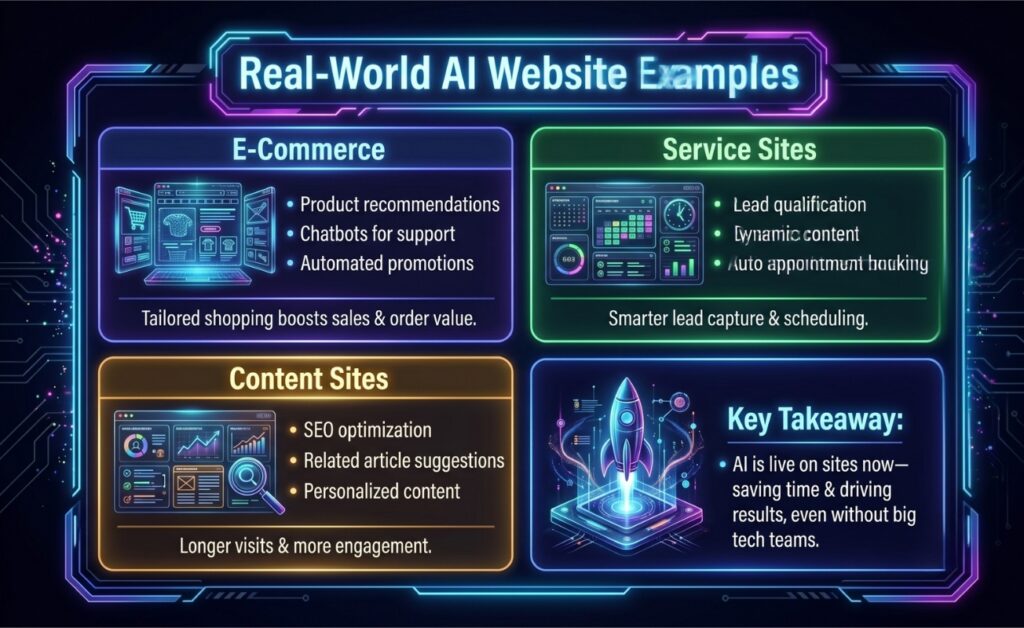
3. AI for Content Generation and Copywriting
- Get first drafts, product descriptions, and meta tags done faster.
- Use AI to break writer’s block, then polish with your own voice.
- Experiment with different headlines and messaging without extra effort.
Content creation is where AI has made the biggest immediate impact for most of our clients. I’m not talking about generating entire blog posts and calling it done; I’m talking about using AI strategically throughout your content workflow to produce better copy faster while maintaining your authentic brand voice.
The most practical application I’ve seen is automated product descriptions. If you’re running an e-commerce site with hundreds or thousands of products, writing unique, SEO-optimized descriptions for each one is genuinely impossible without AI. Tools like Jasper, Copy.ai, and even ChatGPT can generate compelling product copy that highlights features, benefits, and use cases while incorporating relevant keywords.
Meta titles and descriptions are another huge win. AI can analyze your page content and generate multiple SEO-optimized meta tag options that balance keyword inclusion with click-worthiness. It’s particularly good at staying within character limits and creating variations for A/B testing. Instead of agonizing over the perfect meta description for 30 minutes, you get ten options in 30 seconds and pick the best one.
The collaboration approach is where this really shines. We train AI on our clients’ brand voice by feeding it existing content, brand guidelines, and tone examples. Then we use it as a first-draft generator and rapid-iteration tool. A writer creates an outline, AI generates the first draft, the writer refines and adds expertise, AI helps optimize for SEO, the writer adds personality and specific examples. The result is content that’s produced 3-5x faster without sacrificing quality or authenticity.
Finally, AI is invaluable for A/B testing. Generate twenty headline variations in seconds, test the top five, and let the data tell you what works.
Real-world use case: A wellness brand uses AI to create email subject line variations and landing page headline options continuously—they’re running more tests than ever before and their conversion rates keep climbing because they’re learning faster than their competitors.
4. AI-Assisted Design and Prototyping
- Explore visual ideas and layouts without starting from a blank canvas.
- Generate images and design concepts in minutes instead of days.
- Use AI to support designers, not replace them.
AI has fundamentally changed my relationship with design work. I’m not a trained designer, but AI tools have made me dangerous enough to create compelling visuals, generate design concepts, and communicate ideas visually in ways that used to require hiring specialists for every project.
AI image generation through tools like Midjourney, DALL-E, and Nano Banana can become your new go-to for hero images, custom graphics, and visual concepts. Need a specific scene that doesn’t exist in stock photos? Generate it. Want product mockups before the product exists? Create them. Looking for unique icons that match your brand aesthetic? Done in minutes.
Layout and wireframing assistance is where AI gets really interesting for designers. Figma’s AI features and tools like Relume can generate wireframe layouts based on your content requirements. Describe your page sections, and AI suggests layouts that follow UX best practices. It’s not replacing the strategic thinking that good designers bring, but it’s accelerating the exploration phase dramatically. We can test ten layout concepts before lunch and iterate based on what resonates.
AI-powered design systems are emerging too. Tools can analyze your brand colors, typography, and existing designs to generate cohesive component libraries and suggest color palettes that complement your primary brand colors. This is particularly valuable for maintaining consistency across large sites or when multiple people are creating marketing materials.
The reality check: AI design tools are outstanding for speed and generating options, but they lack the strategic brand thinking and nuanced understanding of psychology that experienced designers bring. AI might generate a beautiful hero section, but it won’t understand why your specific audience responds better to aspirational imagery versus data-driven graphics.
AI design is best used for rapid iteration and exploration, before you bring in human judgment for final decisions and strategic direction. The best results I’ve seen come from designers who use AI to multiply their output while applying their expertise to guide and refine what the AI produces.
Real-world use case: A fintech startup uses AI to generate hero images and wireframe layouts, producing three complete homepage concepts in a single day—cutting a process that normally takes a week down to hours.
5. AI for Code Generation and Development
- Speed up development by letting AI handle repetitive code.
- Debug issues faster with an extra set of “eyes.”
- Free developers to focus on bigger-picture decisions.
For coders, this is where AI can completely transform your daily workflow. Through vibe coding, you can write code 3-4x faster (at minimum) than you ever could, and the quality is often better because AI helps you follow best practices and catch errors you might have missed. Tools like Claude Code, GitHub Copilot, Cursor, and Gemini CLI are revolutionizing development.
Here’s what this actually looks like in practice. I’m building a contact form with validation, email integration, and database storage. Instead of writing every line from scratch, I describe what I need and Copilot or Cursor suggests complete, functional code blocks. It understands context from my existing codebase, follows the patterns I’m already using, and generates code in the framework I’m working with. What used to take an hour now takes fifteen minutes.
Debugging has become collaborative instead of agonizing. When something breaks, you can paste the error message into Claude or Cursor and get not just a solution, but an explanation of why the error occurred and how to prevent it in the future. A backend issue that would have cost you three hours of Stack Overflow searching can be resolved in ten minutes.
Code review and optimization is another massive win. AI can review your code for security vulnerabilities, performance bottlenecks, and adherence to best practices. It catches things like inefficient database queries, memory leaks, and accessibility issues that might slip through manual review. It’s easy to run AI code reviews on every project as an additional quality check before deployment.
The design-to-code conversion capability is mind-blowing. Tools like v0 can look at a Figma design and generate the actual React or Vue components to build it. It’s not perfect—you’ll still need developer expertise to refine the output and handle edge cases—but it eliminates the tedious manual translation work and gets you 70% of the way there immediately.
Best practices I’ve learned: use AI as an extremely knowledgeable pair programmer, not as a complete replacement for your own thinking. Review every line of code AI generates before implementing it. Use AI to handle boilerplate and repetitive patterns while you focus on business logic and architecture. Train yourself to write clear prompts that specify requirements, constraints, and preferred approaches. The developers who are thriving right now aren’t the ones resisting AI—they’re the ones who’ve learned to direct it effectively and move from writing code to orchestrating solutions.
Real-world use case: A SaaS team uses AI code assistants to generate form validation and database code, debugging errors in real time. Tasks that once took hours were completed in under 30 minutes.
6. AI-Powered Personalization and User Experience
- Show visitors content that feels more relevant to them.
- Recommend products or pages based on real behavior.
- Improve engagement without building complex systems from scratch.
Personalization used to be the domain of enterprise platforms with six-figure budgets. Now AI makes sophisticated personalization accessible to businesses of any size. Simply put, personalization strategies increase conversion rates by showing different visitors exactly what they’re most likely to care about.
Dynamic content based on user behavior is the foundation. AI analyzes how visitors interact with your site—which pages they visit, how long they stay, what they click—and automatically adjusts what they see next. A visitor who’s browsing budget options gets messaging about value and affordability. Someone exploring premium features sees content emphasizing quality and exclusivity. This happens in real-time without manual segmentation rules.
Product recommendation engines have become incredibly sophisticated. Beyond basic “customers who bought this also bought that” logic, modern AI analyzes browsing patterns, purchase history, demographic data, and even session behavior to predict what specific users want.
Personalized user journeys take this further. AI can predict where a user is in their buying journey and adjust the experience accordingly. First-time visitors get educational content and trust signals. Returning visitors who’ve visited the pricing page three times get targeted offers or sales outreach. Users who abandoned carts receive different messaging than those who completed purchases. Each visitor essentially gets a custom-tailored website experience.
The tools for this have become remarkably accessible. Platforms like Dynamic Yield, Optimizely, and even built-in features in Shopify and WordPress plugins now offer AI-powered personalization without requiring data science teams. The key is starting with clear goals—what actions do you want to increase—and letting AI discover the patterns that predict those behaviors. Within a few weeks of collecting data, you’ll start seeing personalization suggestions that make intuitive sense and deliver measurable results.
Real-world use case: An online home goods retailer uses AI to personalize homepage content based on browsing behavior, increasing engagement and click-throughs. Returning visitors see product recommendations tailored to their past interests, boosting conversions by double digits.
7. AI for SEO and Content Optimization
- Find keyword opportunities you might otherwise miss.
- Improve existing content instead of constantly creating new pages.
- Prepare your site for how AI-driven search is evolving.
Search engine optimization used to require hours of manual research and educated guessing. AI has transformed it into a data-driven science where we can predict what will rank before we publish and optimize with precision that wasn’t possible before.
Keyword research has become exponentially more sophisticated. AI tools like Clearscope, Surfer SEO, and Semrush’s AI features analyze thousands of top-ranking pages to identify not just primary keywords but semantic relationships, related terms, and content depth expectations. They tell you exactly which concepts to cover, which questions to answer, and even the optimal word count for specific queries.
Content gap analysis is where this gets really powerful. AI can compare your content to competitors and identify topics you’re missing, questions you haven’t answered, and keywords where competitors are winning. It’s like having a competitive intelligence analyst working 24/7 to find opportunities. Your blog could be missing entire category of high-intent search queries your competitors dominate—and AI can identify the gap in twenty minutes.
Technical SEO audits have been automated and improved by AI. Tools now crawl your site, identify issues like broken links, slow load times, duplicate content, and indexing problems, then prioritize fixes based on actual impact on rankings. Instead of fixing hundreds of minor issues randomly, you focus on the twenty things that will actually move the needle.
Schema markup generation used to be tedious manual work that most businesses skipped. AI tools now analyze your content and automatically generate appropriate structured data to help search engines understand your pages better. Better schema means better rich snippets, which means higher click-through rates from search results.
Here’s what most businesses are missing: Generative Engine Optimization (GEO). As AI-powered search through ChatGPT, Perplexity, and Google’s AI overviews becomes more prevalent, traditional SEO isn’t enough. GEO focuses on making your content AI-readable and citation-worthy so it gets included in AI-generated responses. This means clear, authoritative content with proper attribution, structured data, and content that answers questions comprehensively.
We’re already optimizing client content for both traditional search and AI search engines, and the businesses that get ahead of this shift will dominate their niches.
Real-world use-case: An e-commerce site uses AI to identify keyword gaps, generate meta descriptions, and optimize content. In a month, the team increases search visibility tenfold while focusing on creative, high-value content.
8. AI Analytics and Heatmap Tools
- See how people actually use your site, not just where they land.
- Spot friction points before they turn into lost conversions.
- Turn raw data into clear, actionable insights.
Data without interpretation is just noise. AI analytics tools have transformed how we understand user behavior by finding patterns humans would miss and surfacing insights that lead to concrete improvements.
Behavioral prediction is the killer feature. AI analyzes thousands of user sessions to predict which visitors are likely to convert, likely to bounce, or likely to need support.
Conversion optimization suggestions come directly from AI analyzing your data. Instead of guessing which page elements to A/B test, AI tells you which specific changes are most likely to increase conversions based on patterns it’s identified. It might notice that visitors who engage with your testimonials section convert at 3x the rate of others and suggest making testimonials more prominent. These aren’t generic best practices—they’re insights specific to your actual users.
User flow analysis powered by AI reveals drop-off points and friction you’d never spot manually. AI can process millions of user journeys to identify the specific sequence of actions that predicts success or failure. For example, AI tools can tell you that visitors who navigate to your “About Team” page before your services page convert at dramatically higher rates—and then restructure navigation to encourage that flow.
Anomaly detection is invaluable for catching problems and opportunities. AI monitors your analytics continuously and alerts you when something unusual happens, like sudden traffic drops, conversion rate changes, or unexpected user behavior patterns. This early warning system can save you from issues like broken payment processors and even help you capitalize on viral content opportunities before they fade.
Real-world use case: An SaaS business uses AI that identifies visitors showing “high purchase intent” behaviors and automatically triggers personalized outreach from their sales team. Their demo request rate increases by 47% because they’re catching people at exactly the right moment.
9. AI for Accessibility Improvements
- Catch accessibility issues without manual audits.
- Make your site easier to use for more people.
- Improve compliance while improving overall UX.
Accessibility shouldn’t be an afterthought, and AI is making it easier to build sites that work for everyone. I’ve seen AI accessibility tools catch issues that would have taken days of manual testing and help companies avoid costly lawsuits while serving users better.
Automated alt text generation has been revolutionary for content-heavy sites. AI can analyze images and generate descriptive alt text that helps screen readers understand visual content. While human review is still important for context and accuracy, AI provides an excellent starting point and ensures nothing gets missed. Today, you can use AI to easily generate alt text for 10,000+ images in your archive—a project that would be impossible manually.
Color contrast analysis powered by AI doesn’t just check if your colors meet WCAG standards—it suggests alternative color combinations that maintain your brand aesthetic while improving readability. Tools can analyze entire sites, identify contrast issues, and provide specific hex codes that would work better. This removes the guesswork from accessible color selection.
Screen reader optimization goes beyond basic compliance. AI tools can test how screen readers actually experience your site and identify issues like confusing navigation order, unclear link text, or missing ARIA labels. Some tools even generate fixes automatically or provide code snippets to implement improvements.
With AI, accessibility compliance checking has become continuous instead of periodic. AI monitoring can scan your site regularly for accessibility issues introduced by new content or design changes. This catches problems before they impact users instead of discovering them during an annual audit. The cost of prevention is dramatically lower than remediation, and AI makes prevention automatic and affordable for any size business.
Real-world use case: An educational platform uses AI to generate alt text, adjust color contrast, and identify navigation issues, improving accessibility across hundreds of pages in just a few weeks.
10. AI-Powered Testing and Quality Assurance
- Test updates automatically instead of manually clicking through pages.
- Catch bugs before users do.
- Keep your site stable as it grows and changes.
Testing has always been the bottleneck in web development. You build something great, then spend days testing it across browsers, devices, and user scenarios. AI has compressed this timeline from days to hours and caught bugs that human testers routinely miss.
Automated cross-browser testing powered by AI doesn’t just check if your site loads in different browsers—it understands user intent and tests whether features actually work correctly. AI can navigate your site like a real user, fill out forms, complete purchases, and verify that every interaction produces expected results across Chrome, Firefox, Safari, and Edge. Marketers who use these AI tools can do things like catch a Safari-specific bug in a checkout flow that would have cost you thousands in lost sales per day.
Bug detection and reporting has become predictive. AI analyzes your code as you write it and warns about potential issues before they become bugs. It identifies patterns that commonly lead to problems—memory leaks, security vulnerabilities, performance bottlenecks—and suggests corrections immediately. It’s like having a senior developer reviewing every commit in real-time.
Performance monitoring with AI goes beyond simple load time tracking. AI establishes baseline performance metrics and alerts you when anything degrades. It identifies which specific code changes caused performance problems and suggests optimizations.
User flow testing verifies that critical paths through your site work correctly. AI can simulate hundreds of different user journeys simultaneously, testing everything from account creation to checkout to support ticket submission. This catches edge cases and interaction bugs that manual testing misses. The AI learns which flows are most critical to your business and prioritizes testing those paths with every update.
Real-world use case: A small business’s website is gradually slowing down as they add features—AI identifies that their image loading strategy is the culprit and suggests a lazy loading implementation that restores fast load times.
Popular AI Tools by Use Case (Starting Points, Not Endorsements)
Don’t let the number of options stress you out: you don’t need all of these to get started. Most businesses begin with one AI use case that solves their biggest bottleneck, then expand as they learn what works for their site.
| Use Case | Example Tools | What They’re Used For | Who It’s For | Who Might Explore This |
| AI Chatbots | Tidio, Intercom, Chatbot.com | Customer support, lead capture, basic personalization | Most websites | Businesses new to AI on websites |
| AI Website Builders | Bolt, Lovable, Replit, v0 | Rapid site creation, MVPs, landing pages | Early-stage teams, marketers | Founders, marketers, early-stage teams |
| AI Content Writing | ChatGPT, Jasper, Copy.ai | Drafting site copy, product descriptions, meta tags | Content and e-commerce teams | Content teams, e-commerce sites |
| AI Image Generation | Midjourney, DALL-E, Stable Diffusion | Hero images, graphics, visual concepts | Marketing and design teams | Marketing and design teams |
| AI Code Assistance | Cursor, GitHub Copilot, Claude Code | Faster development, debugging, code suggestions | Developers | Developers, technical teams |
| AI SEO Tools | Surfer SEO, Clearscope, SEMrush | Content optimization and keyword research | Marketing teams | Marketing teams learning AI-driven SEO |
| AI Design & Prototyping | Figma AI, Relume | Wireframes, layout ideas, early concepts | Designers, UX teams | Designers, UX teams |
| AI Analytics & Heatmaps | GA4, Hotjar AI | User behavior insights and optimization ideas | Growth-focused teams | Teams exploring data-informed decisions |
| AI Accessibility Tools | accessiBe, AudioEye | Identifying and improving accessibility issues | All businesses | Businesses improving site inclusivity |
| AI Testing & QA | Testim, Mabl | Automated testing and quality checks | Technical teams | Development and QA teams |
What AI Can’t Do (Yet)
Despite all the impressive capabilities I’ve just shown you, AI has real limitations. Understanding these boundaries is just as important as knowing what AI can do, because it helps you invest your time and money wisely and keeps your expectations grounded in reality.
AI can’t understand your unique market position and competitive advantage. It can analyze competitor websites and suggest improvements, but it can’t grasp the nuanced strategic decisions about how to position your brand differently in a crowded market. That requires deep industry knowledge, understanding of your customers’ unspoken needs, and the kind of strategic intuition that comes from experience.
AI can’t build authentic emotional connections or understand relationship nuances. While AI chatbots can handle customer service inquiries efficiently, they can’t read between the lines when a frustrated customer needs empathy more than a solution, or recognize when a casual inquiry is actually a high-value sales opportunity that needs a personal touch.
AI can’t make judgment calls about brand reputation and ethical considerations. It doesn’t understand when a technically correct response might damage your brand, when a viral trend is worth jumping on versus staying silent, or how to navigate the complex ethical considerations that come with business decisions. AI might suggest content that’s perfectly optimized for SEO but tone-deaf to current events or your company values. Human oversight isn’t optional here.
AI can’t truly understand your company culture or the unwritten rules that make your business work. It can’t know that your CEO hates industry jargon, that your customers respond better to humor than corporate speak, or that your team has a specific way of handling difficult conversations with clients. These cultural nuances make the difference between content and communication that feels authentic versus robotic. Every time we onboard a new client, we spend significant time training AI tools on their specific voice and values, but even then, human editors catch things AI misses.
AI can’t predict black swan events or think truly creatively outside established patterns. AI is exceptional at recognizing and extrapolating from patterns in existing data, but it can’t imagine something genuinely novel or anticipate paradigm shifts. It would never have predicted that a global pandemic would transform e-commerce overnight, or that a particular social media platform would suddenly become essential for B2B marketing. Strategic foresight and creative innovation still require human imagination.
AI also cannot always detect manipulative or malicious tactics. So-called “black-hat GEO strategies” can intentionally poison search results or manipulate AI-generated recommendations. Even when AI is trained on vast amounts of data, it can miss these sophisticated attempts to game algorithms, potentially amplifying misinformation or low-quality content instead of flagging it. For a deeper look at these risks and how black-hat tactics are emerging in AI-driven search, see our detailed post on AI Poisoning & Black-Hat GEO.
The businesses that are winning with AI understand balance. They use AI to handle the repetitive, pattern-based work that bogs down their teams, then redirect that saved time and energy toward the high-value human work that AI can’t touch: building relationships, making strategic decisions, creating breakthrough ideas, and navigating the complex human elements of business.
The Human + AI Future
After thoughtfully implementing AI tools across so many of our clients’ projects, I’m more convinced than ever that AI is an amplifier, not a replacement. The websites that perform best aren’t the ones that are “most AI-powered”—they’re the ones where human creativity, strategy, and judgment direct AI capabilities toward clear business goals.
AI is extraordinarily good at execution, pattern recognition, and handling repetitive tasks at scale. It’s not good at understanding your unique market position, connecting emotionally with your specific audience, or making strategic decisions about where your business should go. Every tool I’ve covered in this article produces better results when a knowledgeable human guides it with clear intent and evaluates its output with critical thinking.
The most successful teams I’m seeing use AI to eliminate the tedious parts of web development—writing boilerplate code, generating meta descriptions, testing across browsers—so humans can focus on the high-value work of strategy, creative direction, and relationship building.
My recommendation is to start experimenting now. Pick one application from this list that addresses your biggest pain point—maybe it’s the AI chatbot if customer service is overwhelming, or AI content generation if you’re drowning in writing tasks, or AI code tools if development is your bottleneck. Implement it, learn from it, and expand from there.
Ready to implement AI on your website but not sure where to start? Contact us to schedule a free 30-minute AI strategy session where we’ll identify your biggest opportunities and create a custom roadmap.
Frequently Asked Questions About AI for Websites
Is AI for websites expensive? Not anymore. Most businesses can start with free or low-cost tools ($0-150/month) and see measurable results within 60 days, with many AI tools offering free tiers for basic functionality.
Can I use AI on my website without coding? Yes, absolutely. Most modern AI tools like chatbots, content generators, and website builders offer visual interfaces and no-code setup that anyone can use, regardless of technical skill.
What’s the easiest AI tool to start with for my website? AI chatbots are the easiest and deliver immediate value. Platforms like Tidio, Chatbot.com, and Drift offer free tiers and can be installed on your site in under 15 minutes with visible results from day one.
Will AI replace web developers? No, AI is a tool that makes developers more efficient, not a replacement. The best results come from combining AI’s speed and pattern recognition with human creativity, strategic thinking, and problem-solving skills.
How long does it take to implement AI on a website? Simple implementations like chatbots take 15-30 minutes, while comprehensive AI integration across multiple areas typically takes 2-4 weeks. Most businesses see their first measurable results within the first week.
What’s the ROI of AI tools for websites? It really depends, but a 3-5x ROI within the first 90 days is definitely achievable through time savings, increased conversions, and reduced operational costs. You might save about 15-20 hours per week with initial AI implementation.
Do I need a big website to benefit from AI? No, AI tools scale to any size business. Even single-page websites can benefit from AI chatbots for lead capture, AI-generated content for SEO, or AI analytics to understand visitor behavior.
What’s the difference between AI website builders and traditional development? AI builders generate functional sites in minutes from text prompts and work best for simple sites, MVPs, and landing pages. Traditional development offers more customization, unique functionality, and sophisticated features that AI can’t yet handle.
How do I know which AI tools are right for my business? Start by identifying your biggest pain point—overwhelmed customer service suggests chatbots, slow content creation suggests AI writing tools, poor SEO suggests AI optimization tools. Choose the tool that addresses your most urgent need first.
Is AI-generated content bad for SEO? No, when used properly. Google doesn’t penalize AI content—it penalizes low-quality content regardless of how it’s created. AI-generated content that’s edited, fact-checked, and optimized for user value performs just as well as human-written content.
If you want to combine AI tools with professional design and development, our website design and development services help you build a high-performing site that maximizes both user experience and business results.
![10 SEO Tips for eCommerce Sites in 2026 [With GEO]](https://bgoodmedia.com/wp-content/uploads/2026/06/ecommerce-website-tips-seo-geo.jpg)